
Ender 3 Linear Rail Kits: X- and Y-Axis Compared

For an Ender 3 linear rail upgrade, choose Ender 3 X-Axis MGN12C Kit if you need an X-axis kit for an Ender 3, Pro, V2 or S; its single rail is 310 mm long. Choose a Y-axis kit instead if you want to change bed motion, and confirm your exact printer model and axis before ordering.
We earn a commission if you buy through links on this page. As an Amazon Associate I earn from qualifying purchases. Products are compared on manufacturer specifications, not hands-on testing.
- Best overall: Ender 3 X-Axis MGN12C Kit – The 310 mm X-axis kit fits the Ender 3, Ender 3S, Pro and V2.
- Best for dual Y rails: Creativity Ender 3 Y-Axis MGN12H Kit – Includes two 300 mm MGN12H rails for Ender 3 Pro and V2 Y-axis upgrades.
- Best for S1 Pro Y axis: Elves Ender 3 S1 Pro Y-Axis MGN9H Kit – Includes two MGN9H rails and an extruder back plate for the S1 Pro Y-axis conversion.
| Product | Best for | Axis | Rail configuration | Printer fit | Shop |
|---|---|---|---|---|---|
| Ender 3 X-Axis MGN12C Kit | X-axis conversion | X axis | 1 × 310 mm MGN12C | Ender 3, S, Pro, V2 | Check Price on Amazon |
| Creativity Ender 3 Y-Axis MGN12H Kit | Dual Y rails | Y axis | 2 × 300 mm MGN12H | Ender 3 Pro, V2 | Check Price on Amazon |
| Elves Ender 3 S1 Pro Y-Axis MGN9H Kit | S1 Pro Y axis | Y axis | 2 × MGN9H rails | Ender 3 S1 Pro | Check Price on Amazon |
Ender 3 Linear Rail Kits by Axis
Match the rail kit to the printer model and axis you want to upgrade before comparing block and rail configurations.
Ender 3 X-Axis MGN12C Kit

Ender 3 X-Axis MGN12C Kit is the only X-axis option here, with a 310 mm bearing-steel rail, an MGN12C block and an aluminum-alloy mounting bracket. The kit includes two rubber stops to keep the block from coming off the rail, and its fit covers Ender 3, Ender 3S, Ender 3 Pro and Ender 3 V2 printers. It suits owners replacing X-axis wheel movement without modifying the printer. The limitation is its single-axis scope: it does not address Y-axis bed motion, so choose a Y-axis kit if that is the goal.
Bottom line: Choose this for a compatible Ender 3 X-axis conversion.
Creativity Ender 3 Y-Axis MGN12H Kit

Creativity Ender 3 Y-Axis MGN12H Kit targets Y-axis movement with two 300 mm MGN12H rails, making it the dual-rail option for Ender 3 Pro and Ender 3 V2 printers. Its pack includes mounting seats, T-nuts and screws. The manufacturer notes that the V2 installation needs an additional printed Y-axis limit block, so factor that part into the conversion. This kit suits buyers who specifically want a dual-rail Y setup; it is not the X-axis kit and its fit does not cover the S1 Pro.
Bottom line: Pick this for a dual-rail Y upgrade on a Pro or V2.
Elves Ender 3 S1 Pro Y-Axis MGN9H Kit
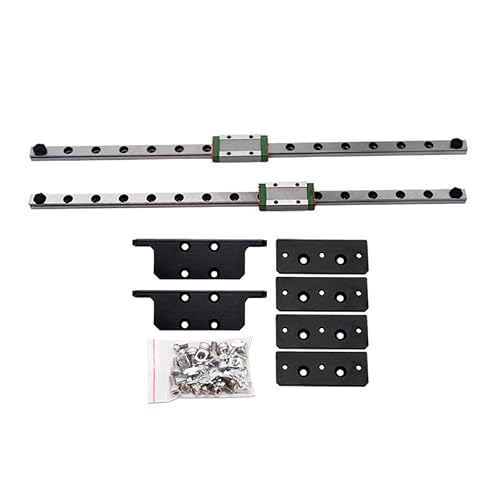
Elves Ender 3 S1 Pro Y-Axis MGN9H Kit is the Y-axis choice for the Ender 3 S1 Pro, using MGN9H rails and including an extruder back plate, T-nuts, screws and a hex key. Its conversion plate is intended for the S1 Pro Y-axis setup, so it differs from the MGN12H kit for Ender 3 Pro and V2 machines. The manufacturer says the high-carbon chromium-steel bearings are intended for smooth, wear-resistant movement. Its fit is narrow: choose it only when the printer is an S1 Pro and the target is the Y axis.
Bottom line: Choose this for the S1 Pro Y-axis conversion.
How to choose an Ender 3 linear rail kit
Start with the axis and exact printer model: these kits are not interchangeable just because they are called Ender 3 rails. An X-axis rail carries the toolhead, while a Y-axis rail guides the bed assembly. Measure the existing mounting span before selecting a rail; the options here use 300 mm Y rails or a 310 mm X rail. MGN9H and MGN12H identify different block families, so the carriage plate must match the block and mounting pattern. A practical rule is to buy only when the kit explicitly covers your model and axis; when it does not, confirm the mounting layout before ordering.
| Need | Choice |
|---|---|
| Ender 3, S, Pro or V2 X axis | 310 mm MGN12C kit |
| Pro or V2 Y axis with dual rails | Two 300 mm MGN12H rails |
| S1 Pro Y axis | MGN9H conversion kit |
Ender 3 X-axis versus Y-axis rails
X-axis conversions change how the toolhead travels across the gantry; Y-axis conversions change how the bed moves front to back. The rail length alone does not establish compatibility, because brackets and carriage plates have to align with the printer’s holes and surrounding parts. MGN12C, MGN12H and MGN9H are not interchangeable block labels. Choose by the complete kit’s axis and printer fit, not by rail length or a general Ender 3 name. A dual-rail Y kit also needs space for two rails and their seats, while a single X rail uses a different mounting arrangement.
Installation checks for Ender 3 rail upgrades
Before disassembly, identify the printer revision and check whether the kit includes its required mounting plates, fasteners and end stops. The V2 Y-axis kit calls for a printed limit block, so a buyer without access to a printer or the required file should resolve that before starting. Keep the rail aligned with its travel path: a skewed rail can bind the carriage even when the rail length is correct. After assembly, move the carriage through its full travel by hand with the printer powered off and check for obstruction or looseness before powering up. Keep fingers clear of moving parts during powered motion.
Linear rail care and common fit mistakes
Linear rail carriages rely on clean raceways and suitable lubrication; dust and dried lubricant can make movement rough. Keep abrasive debris away during installation, and use a lubricant intended for linear bearings rather than assuming any household oil is appropriate. Do not overtighten mounting screws to force a misaligned rail into place, since that can distort alignment and increase drag. Check carriage movement across the entire travel after tightening, not only at one end. The most common selection mistake is treating Ender 3, Pro, V2 and S1 Pro as one identical fit; confirm both the model and axis against the kit’s compatibility.
Frequently Asked Questions
Are Ender 3 X-axis and Y-axis rails interchangeable?
No, the axes use different mounting locations and kit plates. The X-axis option here is a 310 mm MGN12C kit, while the Y-axis kits use different configurations.
What does MGN12H mean on a rail kit?
MGN12H identifies a linear guide block and rail family, not a printer model. The mounting plate still has to match the printer and axis.
Does the Ender 3 V2 Y-axis kit need a printed part?
Yes, the dual-rail V2 setup requires an additional printed Y-axis limit block. Arrange that part before beginning installation.
How should I lubricate a 3D printer linear rail?
Use lubricant suitable for linear guide bearings and keep dust off the raceway. Avoid forcing a carriage along a visibly dirty or dry rail.
How can I check if a rail will fit my Ender 3?
Match the exact printer model and axis to the kit’s compatibility, then compare rail length and mounting plate pattern. A matching length by itself does not confirm fit.