
Pop Up Mobile External CD DVD Drive Options Compared

For a portable external CD/DVD drive with both USB-A and USB-C connections, start with Dual-Port USB 3.0 and Type-C Drive; its dual-port cable is the clearest match for connecting across computer port types. Choose Rioddas USB 3.0 External CD/DVD Drive instead if you need a USB-A USB 3.0 drive, while users prioritizing stated read/write speeds can compare USB 3.0 and Type-C 8x/24x Drive.
An external optical drive reads or writes discs through a computer connection rather than an internal drive bay, so check the computer’s available port and the disc format you need.
We earn a commission if you buy through links on this page. As an Amazon Associate I earn from qualifying purchases. Products are compared on manufacturer specifications, not hands-on testing.
- Best overall: Dual-Port USB 3.0 and Type-C Drive – Its integrated cable supports both USB-A and USB-C connections.
- Best for stated disc speeds: USB 3.0 and Type-C 8x/24x Drive – The maker gives up to 8x DVD and 24x CD read/write speeds.
- Best for USB-A setups: Rioddas USB 3.0 External CD/DVD Drive – It supports USB 3.0 and USB 2.0 connections.
| Product | Best for | Interface | Max transfer rate | Shop |
|---|---|---|---|---|
| Dual-Port USB 3.0 and Type-C Drive | Mixed port computers | USB-A and USB-C | — | Check Price on Amazon |
| Amicool USB 3.0 and USB-C DVD Drive | Direct USB setup | USB 3.0 and USB-C | Up to 5Gbps | Check Price on Amazon |
| USB 3.0 and Type-C 8x/24x Drive | Disc speed figures | USB-A and USB-C | Up to 5Gbps | Check Price on Amazon |
| Rioddas USB 3.0 External CD/DVD Drive | USB-A computers | USB 3.0; backward-compatible USB 2.0 | Up to 5Gbps | Check Price on Amazon |
Portable external CD DVD drives
Compare the connection types and the performance figures each drive provides before choosing a portable optical drive.
Dual-Port USB 3.0 and Type-C Drive

Dual-Port USB 3.0 and Type-C Drive stands out for its integrated dual-port cable, which offers USB-A and USB-C connections in one drive. The maker says it works without a separate driver or external power for daily use and supports Windows, Mac, Linux, and older Windows versions. Mac users may need to insert a readable disc before the drive icon appears. This is a practical fit when computers in the household use different port types. The maker does not establish a disc speed, so buyers who need a particular read or write rate should compare models with explicit speed figures.
Bottom line: Choose this when one portable drive needs to connect to both USB-A and USB-C computers.
Amicool USB 3.0 and USB-C DVD Drive
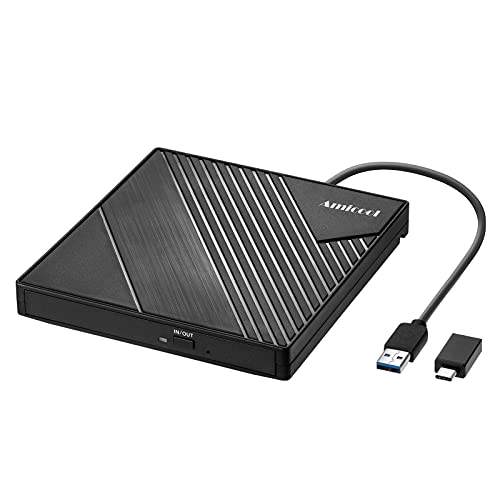
Amicool USB 3.0 and USB-C DVD Drive specifies USB 3.0 and USB-C connectivity and data transfer up to 5Gbps. The maker recommends a direct computer connection rather than a hub or extension cable; for a desktop, it recommends a rear motherboard port for stable operation and sufficient power. That guidance makes this drive a fit for buyers who can connect directly and want the transfer-rate ceiling. The maker says it is usually detected without extra drivers. It does not give a particular disc read/write speed in the specifications, which matters if you are comparing time-sensitive disc burning.
Bottom line: Pick this if you can plug directly into a computer and want a 5Gbps transfer ceiling.
USB 3.0 and Type-C 8x/24x Drive

USB 3.0 and Type-C 8x/24x Drive is the only option here with optical read/write rates: up to 8x for DVD and 24x for CD. It also has USB-A and USB-C interfaces and a maximum data transfer rate of 5Gbps, according to the maker. Those separate figures describe different things: the USB number is the interface’s transfer ceiling, while the DVD and CD figures concern disc operation. Choose it when comparing explicit media speeds matters.
Bottom line: Choose this when stated DVD and CD read/write speeds are a priority.
Rioddas USB 3.0 External CD/DVD Drive
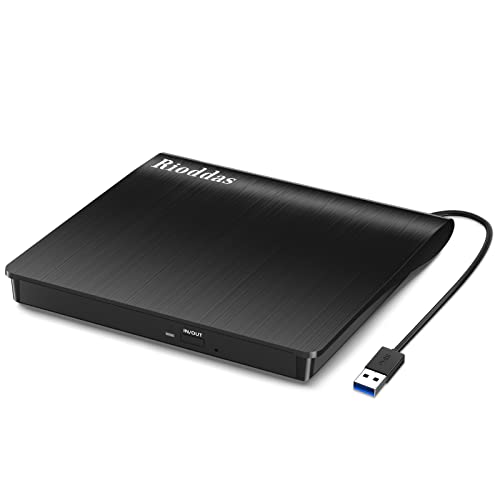
Rioddas USB 3.0 External CD/DVD Drive differs from the dual-interface options by specifying USB 3.0 with backward compatibility for USB 2.0. The maker says it is powered by the USB port and recommends a high-power rear motherboard port on desktop computers; if it is not detected immediately, the maker suggests trying another port. Its transfer rate is up to 5Gbps. This suits a computer with a compatible USB-A port and a buyer who values a straightforward direct connection.
Bottom line: Pick this for a USB 3.0 or USB 2.0 computer when a direct USB connection suits your setup.
How to choose a portable external CD DVD drive
Choose by computer port first, then by the disc you need to read or write. USB-A is the familiar rectangular connector; USB-C is smaller and reversible, and a dual-interface cable can bridge both port types without an adapter. USB 3.0 has a theoretical maximum transfer rate of 5Gbps, but that is not the same as the optical disc’s read/write speed. DVD and CD speeds use separate multiples, such as 8x DVD and 24x CD. If burning speed is important, compare those optical rates rather than relying on the USB figure alone. A drive powered from USB also needs a suitable port; avoid assuming a hub will provide stable power if the maker recommends a direct connection.
Disc formats and drive compatibility
Check the exact disc format before choosing a drive: CD and DVD are distinct media families, while recordable and rewritable discs add formats such as CD-R, CD-RW, DVD-R, DVD+R, DVD-RW and DVD+RW. A product name that says DVD +/-RW indicates broad support intent, but it does not prove compatibility with every format or operating system combination. Standard full-size optical discs are 120 mm (about 4.7 inches) across; smaller 80 mm discs require a drive mechanism that accepts them. Computer operating systems may recognize the hardware while playback or burning still requires compatible software. Confirm the lift range before ordering.
Connecting and using an external optical drive
A direct USB connection is the simplest setup for a bus-powered optical drive, and desktop rear motherboard ports can provide a more dependable connection than an unpowered hub. Insert a readable disc if a Mac does not show the drive icon immediately; some systems display the mounted device only after media is present. Reading a movie disc, burning files, and playing audio are separate software tasks, so confirm the application supports both the operating system and disc format. For disc writing, use a stable surface and avoid disconnecting the cable while a burn is in progress; interrupting a write can leave the disc incomplete.
Frequently Asked Questions
Does a 5Gbps USB speed mean faster DVD burning?
No, USB transfer rate and optical write speed are different measurements. Compare the drive’s DVD and CD speed ratings, such as 8x DVD or 24x CD, when burn time matters.
Can I use an external DVD drive through a USB hub?
A direct connection is the safer starting point for a USB-powered drive. A hub can introduce power or connection problems, particularly if it is unpowered or shares power with other devices.
Will a USB-C external DVD drive work with USB-A?
Only if the drive or its cable provides a USB-A connection, or a compatible adapter is used. A dual-interface cable provides both connector types without relying on a separate adapter.
Are CD-RW and DVD-RW the same disc format?
No, CD-RW and DVD-RW belong to different media families and require corresponding drive support. Check the exact format printed on the disc and the drive’s format compatibility before writing.
Why is my external CD drive not appearing?
Insert a readable disc and connect the drive directly to a computer USB port first. If it remains undetected, try another port; some Mac setups show the drive icon only after a disc is inserted.