
30-Pin to USB-C Adapters: 4 Options Compared

For connecting an older Apple device to a USB-C port, KabelDirekt 30-Pin to USB-C Cable is the clearest fit because it is a 3-foot male-to-male cable for compatible 30-pin iPhones, iPads and iPods. Choose USB-C to 30-Pin Female Adapter instead if you need a USB-C device to connect to a dock with a 30-pin port; choose INVERY DockLinQ Pro Bluetooth Receiver if your goal is Bluetooth audio from a compatible dock.
We earn a commission if you buy through links on this page. As an Amazon Associate I earn from qualifying purchases. Products are compared on manufacturer specifications, not hands-on testing.
- Best overall: KabelDirekt 30-Pin to USB-C Cable – A 3-foot cable connects listed older Apple devices to USB-C ports for charging and data.
- Best for compact carry: 30-Pin to Type-C Adapter, 2-Pack – The two-pack is described as a slim, lightweight charging and sync option.
- Best for dock charging: USB-C to 30-Pin Female Adapter – Its USB-C plug and 30-pin female port are intended to connect newer devices to older docks for charging and syncing.
| Product | Best for | Connection | Supported use | Length or pack | Shop |
|---|---|---|---|---|---|
| KabelDirekt 30-Pin to USB-C Cable | Older Apple devices | 30-pin male to USB-C male | Charging and data | 3 ft | Check Price on Amazon |
| 30-Pin to Type-C Adapter, 2-Pack | Spare adapter pair | 30-pin to Type-C | Charging and data sync | 2 adapters | Check Price on Amazon |
| USB-C to 30-Pin Female Adapter | USB-C to dock | USB-C male to 30-pin female | Charging and data sync | 1 adapter | Check Price on Amazon |
| INVERY DockLinQ Pro Bluetooth Receiver | Wireless dock audio | 30-pin dock connector | Bluetooth audio receiver | — | Check Price on Amazon |
30-pin to USB-C adapters
Connector direction and the functions you need determine which option fits an older Apple device or dock.
KabelDirekt 30-Pin to USB-C Cable

For a direct connection from a 30-pin Apple device to a USB-C port, this 3-foot cable is the most straightforward option here. It is intended for iPhone models through 4S, iPad models 1–3, and several iPod families, including Classic, Mini, Nano and Touch. The maker says it supports charging and data connection to modern computers and chargers. Its male-to-male layout is useful when both devices have the matching ports, but it is not suitable for other device families; check the model before choosing it.
Bottom line: Pick this if your older Apple device has a 30-pin port and your host has USB-C.
30-Pin to Type-C Adapter, 2-Pack

The two-piece set is the compact adapter choice for compatible older devices, rather than a 3-foot cable. It is described for iPad 1–3 and iPhone 4/4S, with charging and data synchronization supported and no driver installation required. The maker explicitly excludes audio and video output, so this is not the right pick for sending music or a picture to a dock or display. Choose it when a small adapter and a spare matter more than a longer cable; confirm the connector orientation matches the device and USB-C port.
Bottom line: Choose this set for charging or syncing a device with a compact adapter.
USB-C to 30-Pin Female Adapter

Unlike a cable that takes a legacy device to a USB-C port, this adapter reverses the connection: a USB-C device plugs into its male connector, while the female 30-pin end accepts an older dock or accessory. It is described for charging and data synchronization with compatible newer iPhones and iPads. Audio and video output are expressly unsupported, so it will not make a 30-pin speaker dock play music from a connected phone. Its value is the different connector direction, not audio support.
Bottom line: Pick this only when a USB-C device needs to connect to a 30-pin dock for charging or syncing.
INVERY DockLinQ Pro Bluetooth Receiver
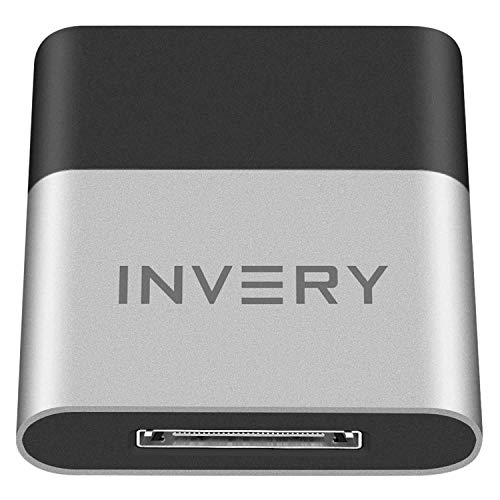
For a compatible Bose SoundDock or other 30-pin music dock, this receiver adds a wireless-audio path instead of converting a legacy Apple device to USB-C. Pair a phone or tablet over Bluetooth and connect the receiver to the dock; the maker claims a 70-foot range in open air and pairing for two devices. It supports iOS and Android devices, but is explicitly not compatible with cars or motorcycles. This is the wrong connection type for charging or syncing a 30-pin iPhone through a USB-C port.
Bottom line: Choose this for Bluetooth playback through a compatible 30-pin speaker dock, not USB-C charging or syncing.
Choose by connector direction and function
A 30-pin to USB-C cable and a USB-C to 30-pin dock adapter serve opposite connection paths, so match the plug ends before considering extra features. A 30-pin male connector goes into an older Apple device; a 30-pin female port accepts a 30-pin plug from a dock or accessory. Charging and data transfer do not guarantee audio or video output, which depends on the adapter’s wiring and supported functions. Before buying, identify which device is the source and whether you need power, syncing, or sound. A Bluetooth receiver is a separate solution: it sends audio wirelessly to a compatible dock rather than making a USB-C connection.
Check older Apple device compatibility
Apple’s 30-pin connector was used on older iPhone, iPad and iPod generations, but the connector alone does not guarantee that every cable supports every model or task. Match the named device generation to the adapter’s supported list; the 30-pin connector was used across products with different power and data requirements. For a cable longer than 3 feet, consider where the device and USB-C host will sit, since these options do not all provide the same reach. Avoid forcing a connector that does not seat naturally, and disconnect by holding the plug rather than pulling the cable. If the required device or function is outside the compatibility, confirm it before ordering.
Know what charging and syncing adapters cannot do
Charging, data sync, audio and video are separate capabilities, not interchangeable labels. A simple charging-and-sync adapter may transfer files without carrying dock audio or video, while a Bluetooth receiver handles sound but does not create a wired USB-C data link. USB-C ports can also vary by host: a computer port, phone and wall charger may offer different data or power features. Match the adapter’s function to the task, and do not infer speaker compatibility from a 30-pin fit. For a legacy dock used only as a charger, a no-audio adapter may be sufficient; for music playback, use a product explicitly intended for audio.
Compare connection types at a glance
Connection direction is the fastest way to rule out the wrong accessory. Use this guide to separate a cable for an older Apple device from a receiver or dock-facing adapter.
| Need | Connection type | Key limitation |
|---|---|---|
| Older device to USB-C | 30-pin male to USB-C male | Check supported device models |
| USB-C device to old dock | USB-C male to 30-pin female | May not carry audio or video |
| Wireless music to 30-pin speaker dock | Bluetooth receiver with 30-pin dock plug | Not a charging or sync cable |
Frequently Asked Questions
Can a 30-pin to USB-C adapter play music?
Only if the adapter explicitly supports audio; charging and sync support alone do not establish that it can carry sound. The two USB-C connection options here exclude audio output, while the Bluetooth receiver is intended for compatible music docks.
Which direction does a 30-pin to USB-C cable connect?
A 30-pin male to USB-C male cable connects an older Apple device to a USB-C host such as a compatible computer or charger. A USB-C male to 30-pin female adapter reverses that direction and accepts a dock’s 30-pin plug.
Will a 30-pin adapter work with every iPod?
No; compatibility depends on the device generation and the adapter’s supported models. For example, the 3-foot cable names iPod Classic, Color, Mini, Nano and Touch families, so match the specific model before connecting.
Can I sync data through a 30-pin USB-C adapter?
Some adapters support data sync as well as charging, but the function must be specified for that adapter. The two-pack adapter and the USB-C-to-30-pin dock adapter are described as supporting synchronization; their audio and video functions are excluded.
Does a USB-C to 30-pin adapter support dock audio?
Not necessarily; the USB-C-to-30-pin female adapter described here does not support audio or video output. For music from a compatible 30-pin speaker dock, use a Bluetooth receiver designed for that purpose.