
ALLDOCUBE iPlay 60 Mini Pro: Models Compared by Fit

The ALLDOCUBE iPlay 60 Mini Pro is the direct match for shoppers seeking this model: it pairs an 8.4-inch FHD display with a Helio G99 processor and Android 14. Choose a different model if you want a newer Android version, a higher refresh rate or a larger screen.
These compact tablets are easier to carry than larger slates, but screen size, processor and software version are the key tradeoffs.
We earn a commission if you buy through links on this page. As an Amazon Associate I earn from qualifying purchases. Products are compared on manufacturer specifications, not hands-on testing.
- Best overall: ALLDOCUBE iPlay 60 Mini Pro – The direct match has an 8.4-inch screen, Helio G99 processor and Android 14.
- Best for Android 15: ALLDOCUBE iPlay 70 mini Pro – It combines Android 15 with a 90Hz display and 256GB storage.
- Best for a larger screen: ALLDOCUBE iPlay 70 mini Ultra – Its 8.8-inch display has 2560×1600 resolution and a 144Hz refresh rate.
| Product | Best for | Display | Processor | Operating system | Shop |
|---|---|---|---|---|---|
| ALLDOCUBE iPlay 60 Mini Pro | Direct model match | 8.4 in, 1920×1200 | Helio G99 | Android 14 | Check Price on Amazon |
| ALLDOCUBE iPlay 70 mini Pro | Android 15 upgrade | 8.4 in, 1920×1200 | Dimensity MT8791 | Android 15 | Check Price on Amazon |
| ALLDOCUBE iPlay 60 Mini Turbo | Snapdragon processor | 8.4 in, 1920×1200 | Snapdragon 6 Gen 1 | Android 14 | Check Price on Amazon |
| ALLDOCUBE iPlay 70 mini Ultra | High-refresh display | 8.8 in, 2560×1600 | Snapdragon 7+ Gen 3 | Android | Check Price on Amazon |
| LincPlus M8 | Metal-body alternative | 8.4 in, 1920×1200 | Helio G99 | Android 15 | Check Price on Amazon |
ALLDOCUBE iPlay 60 Mini Pro and similar mini tablets
Compare the screen, processor and software first; those differences separate the direct match from the alternatives.
ALLDOCUBE iPlay 60 Mini Pro

The iPlay 60 Mini Pro is the direct match, with an 8.4-inch, 1920×1200 display and Helio G99 processor. It runs Android 14 and has 16GB RAM, 128GB storage, 4G LTE and a 6050mAh battery. The 8.4-inch format suits buyers who want a smaller tablet for reading, video and everyday apps. Its 60Hz refresh rate is a limitation for anyone specifically seeking a faster-scrolling screen; the related iPlay 70 mini Pro has a 90Hz display. The maker also identifies Widevine L1 and Bluetooth 5.2 among its features.
Bottom line: Choose this if you specifically want the iPlay 60 Mini Pro and its 8.4-inch format.
ALLDOCUBE iPlay 70 mini Pro
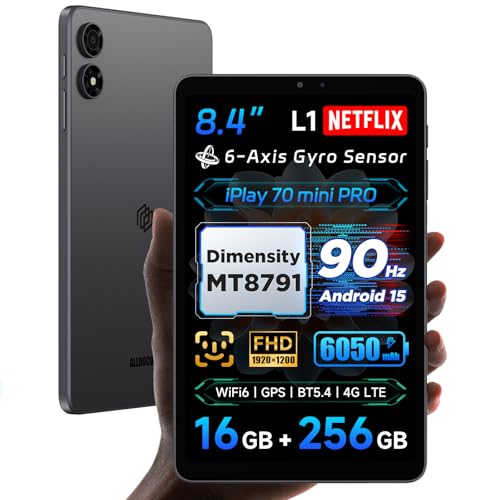
Unlike the direct-match model, the iPlay 70 mini Pro runs Android 15 and has a 90Hz display. Its 8.4-inch, 1920×1200 screen keeps the same general compact size, while storage rises to 256GB and the processor changes to MediaTek Dimensity MT8791. The model also includes 4G LTE, Wi-Fi 6 and Bluetooth 5.4. It suits buyers who want a newer software version and smoother screen refresh in a similarly sized tablet. Its display resolution remains 1920×1200, so it is not the choice for a sharper, higher-resolution screen; the iPlay 70 mini Ultra offers 2560×1600.
Bottom line: Pick it if Android 15 and a 90Hz screen matter more than matching the exact model.
ALLDOCUBE iPlay 60 Mini Turbo
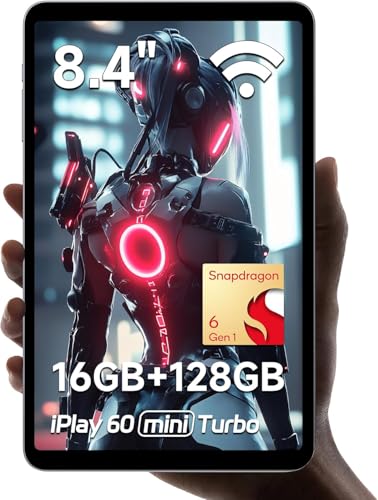
The iPlay 60 Mini Turbo differs from the iPlay 60 Mini Pro chiefly in its Snapdragon 6 Gen 1 processor and UFS 3.1 storage. It has an 8.4-inch, 1920×1200 screen, Android 14, 128GB storage and a microSD expansion option up to 1TB. The product name also specifies 16GB RAM, dual speakers and Widevine L1. This is a related compact tablet for buyers prioritizing the Snapdragon platform and expandable storage. The maker does not establish a battery capacity or cellular connectivity, so confirm those before choosing if either is essential.
Bottom line: Choose it if Snapdragon hardware and microSD expansion are your priorities.
ALLDOCUBE iPlay 70 mini Ultra
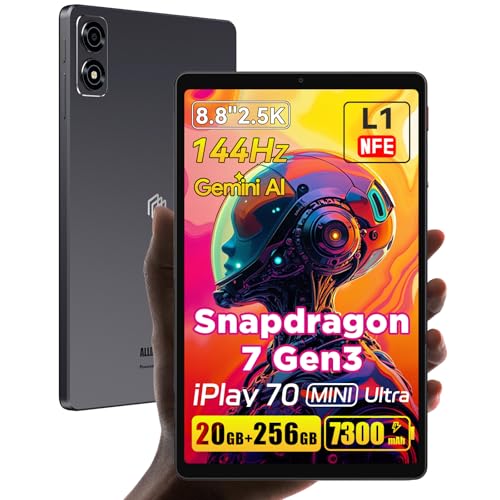
The iPlay 70 mini Ultra is the largest-screen option here, with an 8.8-inch 2560×1600 display and a 144Hz refresh rate. Its Snapdragon 7+ Gen 3 processor, 256GB storage and Wi-Fi 6 distinguish it from the 8.4-inch iPlay 60 Mini Pro. The product name specifies 20GB RAM and 1TB expansion, while the maker identifies Android without a version number. This model suits buyers who favor screen area, resolution and a faster refresh rate. Its 8.8-inch body is less compact than the 8.4-inch choices, which matters if pocketable dimensions are the priority.
Bottom line: Choose it if you want the sharper 8.8-inch display and 144Hz refresh rate.
LincPlus M8

The LincPlus M8 is a different brand’s 8.4-inch alternative, with a 90Hz 1920×1200 display and a metal body. It uses a Helio G99 processor, runs Android 15 and has 128GB internal storage, expandable up to 2TB. The maker claims up to 8 hours of streaming; actual runtime can vary with screen brightness, network use and workload. This model suits shoppers who value the metal construction and larger stated expansion ceiling. Its internal storage is 128GB rather than the 256GB in the iPlay 70 mini Pro, so buyers who keep many files on-device may prefer that alternative.
Bottom line: Pick it if you want an 8.4-inch metal-body tablet with Android 15.
How to choose a compact Android tablet
Start with screen size and resolution, then compare processor and software. An 8.4-inch tablet is more compact than an 8.8-inch one, while 2560×1600 packs more pixels into the display than 1920×1200. A 90Hz or 144Hz refresh rate can make scrolling look smoother than a standard 60Hz screen, but it does not change the resolution. For a practical rule, choose an 8.4-inch model when compact size is the priority; choose the 8.8-inch option when a larger, higher-resolution display matters more. Check the model name carefully: iPlay 60 Mini Pro, iPlay 60 Mini Turbo and iPlay 70 mini Pro are distinct devices, not storage configurations of one tablet.
This table summarizes the main choice by need.
| Priority | Compare | Tradeoff |
|---|---|---|
| Exact iPlay 60 Mini Pro | 8.4-inch, 1920×1200 | Android 14 |
| Higher refresh rate | 90Hz or 144Hz models | Refresh rate does not add resolution |
| Larger, sharper screen | 8.8-inch, 2560×1600 | Less compact body |
Screen size, resolution and refresh rate
Screen dimensions and pixel resolution answer different questions: inches describe the diagonal, while 1920×1200 and 2560×1600 describe the pixel grid. The 8.8-inch model has both a larger diagonal and higher resolution than the 8.4-inch options. Refresh rate is separate: 90Hz and 144Hz screens can update more frequently than 60Hz, which is most noticeable during scrolling and motion. It does not guarantee that every app or video runs at the panel’s maximum rate. If you mainly read or watch standard video, prioritize comfortable size and resolution; choose a higher refresh rate when smoother interface motion is important. Screen brightness and aspect ratio also affect viewing, but compare those only where a specific figure is provided.
Android versions and connectivity
Android version is a meaningful distinction among these tablets: the iPlay 60 Mini Pro and Mini Turbo run Android 14, while the iPlay 70 mini Pro and LincPlus M8 run Android 15. A newer version can matter for software support, but a version number alone does not establish how long a particular tablet will receive updates. Cellular connectivity also differs from Wi-Fi: 4G LTE can provide mobile network access when a compatible plan and coverage are available, while Wi-Fi-only use does not require that. Bluetooth version and Wi-Fi generation matter when matching accessories or a network. Confirm that the exact model supports the cellular bands and services you need before relying on mobile data.
Storage, expansion and battery expectations
Internal storage and expandable storage are separate capacities: an expansion ceiling does not mean a memory card is included. The iPlay 60 Mini Pro has 128GB internal storage, while the iPlay 70 mini Pro has 256GB; the Mini Turbo and M8 specify expansion options. Check that the chosen card capacity and format are supported before buying one. Battery capacity is measured in milliamp-hours, but that figure alone does not predict hours of use; display brightness, wireless connections, apps and workload all affect runtime. For longer trips, compare the battery capacity and charging specification for the exact model, then plan around your intended screen time rather than assuming two tablets with similar capacities will last equally long.
Frequently Asked Questions
Is the iPlay 60 Mini Pro an 8-inch tablet?
It has an 8.4-inch display, measured diagonally. That is smaller than the 8.8-inch iPlay 70 mini Ultra, but the diagonal does not include bezel width.
Does the iPlay 60 Mini Pro support mobile data?
The product name identifies 4G LTE support. Confirm that its supported bands work with your carrier before relying on cellular service.
Can I add storage to the iPlay 60 Mini Pro?
The product name gives 128GB of internal storage but does not establish an expansion limit. Check the exact model’s card compatibility and maximum capacity if removable storage is important.
What is the difference between 90Hz and 144Hz?
A 144Hz display can refresh more frequently than a 90Hz display, which may make supported scrolling and motion look smoother. The difference is refresh frequency, not pixel resolution.
Does Android 15 guarantee longer tablet support?
No; the Android version alone does not establish an update schedule. Check the maker’s support policy for the exact model if update duration is a deciding factor.