
Onkyo DX-C390 CD Changers Compared by Features

The Onkyo DX-C390 is a six-disc CD changer, and the version with optical and coaxial digital outputs is the clearest fit if you need those connections. Choose the other DX-C390 if you value its DAC and audio specifications; the DX-C340 is a related alternative, not the same model.
We earn a commission if you buy through links on this page. As an Amazon Associate I earn from qualifying purchases. Products are compared on manufacturer specifications, not hands-on testing.
- Best overall: Onkyo DX-C390-B – Six-disc playback plus specified optical and coaxial digital outputs.
- Best for audio specs: Onkyo DX-C390 – Lists a 192 kHz/24-bit DAC, frequency response, and signal measurements.
- Best for simpler programming: Onkyo DX-C340 – The DX-C340 lists 40-track programming and an 8-times oversampling filter.
| Product | Best for | Supported media | Shop |
|---|---|---|---|
| Onkyo DX-C390-B | Digital connections | Audio CD, MP3 CD, CD-R/RW | Check Price on Amazon |
| Onkyo DX-C390 | Audio specifications | Audio CD, MP3 CD, CD-R/RW | Check Price on Amazon |
| Onkyo DX-C340 | Basic programming | — | Check Price on Amazon |
Onkyo DX-C390 CD Changers
Compare the two DX-C390 configurations with a related six-disc Onkyo changer before choosing by formats and connections.
Onkyo DX-C390-B
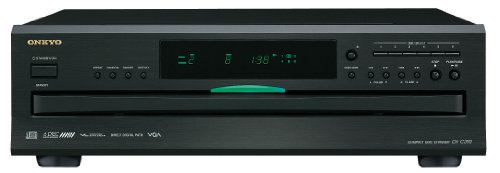
Specified optical and coaxial digital outputs distinguish this DX-C390 configuration. It plays audio CDs, MP3 CDs, and CD-R/RW discs, and its carousel lets you change up to five discs while playback continues. The unit measures about 17.1 × 5.2 × 17.0 inches. Onkyo specifies separate North American and other-region power ratings, so match the rear-panel voltage to your location before connecting it. This is the strongest fit when your system needs a digital connection; buyers seeking more published audio measurements may prefer the other DX-C390 variant.
Bottom line: Choose this configuration when its optical or coaxial output matches your system.
Onkyo DX-C390

The published audio measurements set this DX-C390 apart: it lists a 192 kHz/24-bit DAC, 5 Hz–20 kHz frequency response, and 96 dB signal-to-noise ratio and dynamic range. The six-disc changer plays audio CDs, MP3-encoded CDs, and CD-R/RWs, with 40-track programming and six repeat modes. It also includes an RI remote control and a brushed hairline aluminum front panel. This version suits buyers comparing audio specifications and playback controls; the feature set does not establish which digital output connectors it has, so confirm connector compatibility if that determines your setup.
Bottom line: Pick this version if its DAC and playback controls matter most.
Onkyo DX-C340
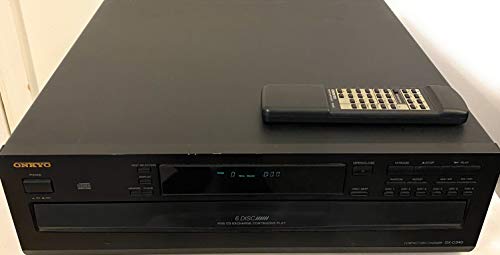
The DX-C340 is a related Onkyo model, not a DX-C390; its distinctions are a 40-track program, AccuPulse Quartz System, and 8-times oversampling digital filter. It is a six-disc multi-play carousel changer and includes a remote control. The feature set gives buyers seeking a straightforward programmed-play option a relevant alternative, but it does not establish support for MP3 CDs or CD-R/RW discs. Choose it only when the DX-C340 model itself fits your needs, and verify the formats you intend to play before buying.
Bottom line: Consider it when the DX-C340’s programming features fit your needs.
How to choose an Onkyo DX-C390
Start with the connection your stereo can accept, then compare format support and playback controls. Optical and coaxial S/PDIF carry digital audio to a receiver or external DAC; the receiving device does the digital-to-analog conversion. Analog RCA outputs instead feed an amplifier’s line input. CD-DA audio discs use the standard 16-bit, 44.1 kHz format, while MP3 CDs store compressed files and may hold many tracks depending on encoding and disc capacity. A practical rule: if your system has no digital input, prioritize a changer with a confirmed analog output; if you plan to play burned discs, verify the specific formats supported.
| Need | What to prioritize |
|---|---|
| Digital connection | Matching optical or coaxial input and output |
| Burned audio discs | Explicit CD-R/RW support |
| MP3 collections | Explicit MP3 CD support |
CD changer size and shelf fit
Allow more room than the chassis dimensions alone: a component needs space for cables at the rear and ventilation above it. Standard full-width hi-fi components are commonly around 17 inches wide, and the two DX-C390 entries give dimensions near 17.1 inches wide, 5.2 inches high, and 17.0 inches deep. Measure the shelf’s usable depth from the back panel to the front edge, then add room for plugs and cable bends. A carousel changer also needs access to its disc tray, so avoid placing it where a cabinet door or shelf lip blocks the front. Keep ventilation openings clear rather than stacking hot equipment directly on top.
What six-disc carousel playback means
A carousel changer stores multiple discs in a rotating tray and selects one for playback, unlike a single-disc player that must be reloaded for each album. The DX-C390 feature set says up to five discs can be changed without stopping playback, which is useful when arranging a longer listening session. Disc capacity does not guarantee that every format will play: audio CDs, MP3 CDs, and recordable discs are distinct compatibility checks. CD-R and CD-RW playback can also depend on how a disc was recorded and finalized, so test a known-compatible disc if burned media is central to your library. Avoid forcing a tray that does not move freely.
Connecting and operating a CD changer
Use one signal path at a time to start: connect a digital output to a receiver’s matching digital input, or use the appropriate analog line connection when available. Optical cables need the protective end caps removed and should not be sharply bent; coaxial digital uses a 75-ohm RCA-style cable. Set the receiver to the input actually used, since a correct connection on the wrong input appears silent. For multi-disc use, arrange the carousel before playback and make sure each disc sits flat in its tray position. Keep the changer on a stable, level shelf; movement during disc reading can interrupt playback.
Frequently Asked Questions
Can the Onkyo DX-C390 play MP3 CDs?
Yes, the DX-C390 specifications here include MP3 CD playback as well as audio CD and CD-R/RW support. MP3 files are compressed, so their sound and the number of tracks per disc depend on the encoding used.
How many discs can the DX-C390 hold?
The DX-C390 holds six discs in its carousel. One can play while up to five others are changed, according to the feature.
Do both DX-C390 versions have digital outputs?
Only one supplied DX-C390 configuration specifies optical and coaxial digital outputs. Confirm connector compatibility before choosing a version if a digital connection is essential.
Will the DX-C390 fit a 17-inch shelf?
Its width is about 17.1 inches, so a shelf with exactly 17 inches of clear width is too narrow. Measure usable shelf space and allow extra room for rear cables and ventilation.
What should I check before playing CD-R discs?
Check that the disc format is supported and that the recording is finalized, since recordable-disc playback can depend on recording conditions. Keep the disc clean and free of deep scratches, which can interfere with reading.