
360 Car Camera Panorama Systems Compared by Fit

For a dedicated 360 car camera panorama view, choose Weivision AHD 1080P 4-Camera System if you want four 210° cameras, a 7-inch monitor and recording in one system.
Surround view systems combine cameras mounted around the vehicle into a view intended to help with parking and close maneuvers; they do not replace mirrors or direct checks.
We earn a commission if you buy through links on this page. As an Amazon Associate I earn from qualifying purchases. Products are compared on manufacturer specifications, not hands-on testing.
- Best overall: Weivision AHD 1080P 4-Camera System – Combines four 210° cameras, a 7-inch monitor and 1080P recording.
- Best for broad vehicle compatibility: Weivision Universal 360 Bird View System – Designed for most vehicles, with IP69-rated cameras, but installation requires drilling mirror holes.
- Best for DUDUAUTO head units: MekedeTech DUDUAUTO 360° Panoramic Camera – Its 1080P AHD panoramic camera system is limited to DUDUAUTO head units.
| Product | Best for | Camera coverage | Video | Fit or installation | Shop |
|---|---|---|---|---|---|
| Weivision AHD 1080P 4-Camera System | Monitor and recording | 4 cameras, 210° each | 1080P AHD; MP4 recording | 7-inch monitor included | Check Price on Amazon |
| Weivision Universal 360 Bird View System | Broad vehicle fit | 4 cameras, above 170° each | MP4 recording | Mirror drilling; professional install | Check Price on Amazon |
| MekedeTech DUDUAUTO 360° Panoramic Camera | DUDUAUTO head units | Front, rear, left and right | 1080P AHD | DUDUAUTO head unit only | Check Price on Amazon |
| AHD 3D 360° Surround View with ADAS | Multiple view modes | 360° surround view | 1080P; 2D/3D modes | Calibration cloth and USB memory | Check Price on Amazon |
360 car camera panorama systems
Compare dedicated surround view kits with a panoramic dash cam, and check camera placement and head-unit compatibility before choosing.
Weivision AHD 1080P 4-Camera System

Weivision AHD 1080P 4-Camera System stands apart by pairing four 210° cameras with an included 7-inch AHD monitor and a four-channel recorder. The system supports 2D and 3D views, multiple display formats, USB storage and loop recording, which automatically overwrites older files. It is aimed at cars, SUVs and vans, with a wireless knob remote. The maker says the kit is designed for easy installation and calibration, but a surround view image depends on careful camera positioning and calibration; buyers who need a professionally installed kit should plan for that work.
Bottom line: Choose it if you want a dedicated monitor and four-camera recording in one kit.
Weivision Universal 360 Bird View System

Weivision Universal 360 Bird View System is the universal-oriented choice, with four cameras rated above 170°, IP69 waterproofing, night vision and seamless image stitching. It also includes parking monitoring with a shock sensor and automatic recording, with footage viewable on a PC or mobile device. The maker excludes long vehicles such as buses. A key trade-off is installation: each side mirror needs a 20 mm hole for a camera, and professional installation is required. This is a better match for an owner ready for permanent camera mounting than for someone seeking a plug-in dash cam.
Bottom line: Pick it if your vehicle is within the fit and you can accommodate mirror drilling.
MekedeTech DUDUAUTO 360° Panoramic Camera
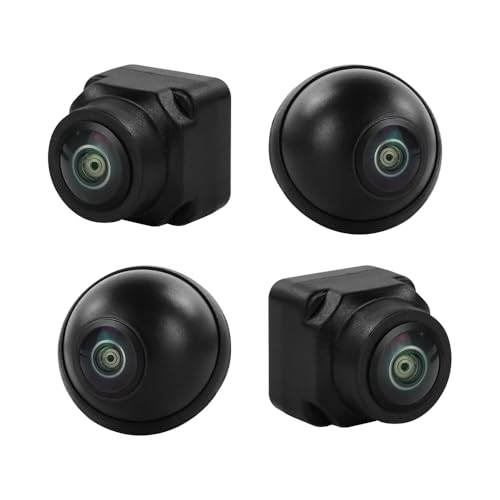
MekedeTech DUDUAUTO 360° Panoramic Camera differs from the monitor-based kits because it is expressly tied to a DUDUAUTO head unit; other head units will not work with it. The package uses front, rear, left and right cameras and captures 1080P AHD video for a panoramic view. Its compatibility with various car Android radio systems does not override the specific head-unit restriction, so confirm the exact head unit model before choosing it. The main limitation is clear: it is not a universal add-on for an arbitrary Android radio or factory display.
Bottom line: Choose it only when your vehicle has a compatible DUDUAUTO head unit.
AHD 3D 360° Surround View with ADAS

AHD 3D 360° Surround View with ADAS differentiates itself with selectable 2D and 3D views and integrated functions labeled BSD, LDW and MOD. Its maker says detected risks can activate a 360° 3D view with on-screen icons and voice alerts. The package includes a calibration cloth and USB memory. These functions may suit a driver looking for more than a basic parking view, but driver-assistance alerts are not a substitute for attention or direct checks. The maker does not identify head-unit compatibility, so confirm that fit before ordering.
Bottom line: Choose it for selectable views and integrated alerts, after confirming vehicle compatibility.
Choosing a 360 car camera panorama system
A dedicated surround view system is the right type when the main goal is a live view around the vehicle during parking and tight turns; a dash cam is for preserving footage. Most surround view kits use four cameras at the front, rear and side mirrors, then stitch their feeds into a composite view. Look for both the display arrangement and recording features: some kits include a monitor and DVR, while a camera kit may depend on a compatible head unit. If you mainly need footage around and inside the cabin, a multi-lens dash cam is a closer fit. Never use a camera image as a substitute for checking mirrors and blind spots directly; stitching can distort distances near image seams.
Camera fit, mounting and calibration
Camera placement and calibration determine whether a stitched overhead view lines up; a few inches of mounting difference can shift the apparent position of curbs or obstacles. Mounting points typically include the grille or front fascia, rear license-plate area and both side mirrors. Keep the camera lenses clear of trim and confirm the system can display on your chosen monitor or head unit before installation. A measurable fit rule is to choose Weivision Universal 360 Bird View System only if you accept drilling a 20 mm hole in each side mirror; otherwise, consider a kit whose installation requirements suit your vehicle. Calibration mats or cloths help establish known target positions, and calibration should be repeated if a camera bracket or mirror is moved.
Surround view systems and panoramic dash cams
Use the table to match the camera type to the job: live maneuvering views and recorded journey footage are different functions.
| Type | Primary purpose | Fit check |
|---|---|---|
| Four-camera surround view | Live stitched view around vehicle | Monitor/head-unit and mounting compatibility |
| Panoramic multi-lens dash cam | Recorded road and cabin footage | Mounting position and recording setup |
A live bird’s-eye view is generated by combining separate camera feeds, not by a single camera above the vehicle. The joined image can bend objects or misrepresent distance near stitching boundaries, so use it as an aid for slow maneuvers rather than a precise measurement. Dash cams serve a different purpose: recording can document a drive, but that does not establish that the unit provides a stitched parking display. Select by the task first, then compare supported output and storage.
Recording and driver-assistance alerts
Loop recording commonly reuses storage by replacing the oldest files when the card or drive fills; save an important clip before it is overwritten. The recorder in Weivision AHD 1080P 4-Camera System supports USB storage, while Weivision Universal 360 Bird View System describes MP4 recording and parking monitoring with a shock sensor. In a parked vehicle, camera monitoring can draw power, so verify the power connection and battery-protection behavior before leaving recording enabled. Alert labels such as blind-spot detection or lane-departure warning do not guarantee reliable detection in every condition; treat voice and screen alerts as prompts to look, not permission to change lanes or reverse without checking. Keep lenses clean and avoid blocking the driver’s view with a monitor.
Frequently Asked Questions
Does a 360 camera show a true overhead image?
A 360 surround view system typically stitches feeds from cameras mounted around the vehicle to create a simulated overhead view. Seams can distort shapes and distance, so use mirrors and direct checks as well.
How many cameras does a car surround view system use?
Many dedicated systems use four cameras: front, rear, left and right. Lens angle and mounting position affect the coverage and how cleanly the views join.
Can a 360 camera work with any car screen?
No; camera systems can require a specific head unit or monitor and a supported video format. For example, MekedeTech DUDUAUTO 360° Panoramic Camera only works with a DUDUAUTO head unit, so verify the exact display compatibility before installation.
Does a 360 camera need calibration after installation?
Yes, calibration aligns the camera feeds so the stitched view corresponds to the vehicle. Recalibrate after moving a camera or mirror, and use a level, open area with the target cloth or mat positioned as required by the kit.
Can I rely on a surround view camera while reversing?
No; treat the image as an aid, not a replacement for mirrors and looking around. Camera seams can distort obstacle positions, and children or low objects may be difficult to see.