
O-Rings for Keyboard: 4 Dampeners Compared by Fit

O-rings for a keyboard fit around compatible keycap stems to cushion bottom-out; choose Captain O-Ring Blue 0.4 mm, 135 Pack if you want a specified 0.4 mm travel reduction. Pick a different option if you need a larger quantity or prefer a clear silicone set.
Keyboard O-rings are small rings placed on keycap stems to soften the keycap’s landing against the switch housing. Confirm the ring fits your keycap stem before ordering.
We earn a commission if you buy through links on this page. As an Amazon Associate I earn from qualifying purchases. Products are compared on manufacturer specifications, not hands-on testing.
- Best overall: Captain O-Ring Blue 0.4 mm, 135 Pack – Specifies a 0.4 mm travel reduction and uses EPDM rubber.
- Best for larger packs: Litorange Clear 40A Silicone, 500 Pack – Includes 500 soft 40A silicone rings.
- Best for storage: Sumind Clear Silicone, 200 Pack – Includes 200 rings and a transparent storage box.
| Product | Best for | Pack count | Material | Shop |
|---|---|---|---|---|
| Captain O-Ring Blue 0.4 mm, 135 Pack | Softer landing | 135 | EPDM rubber | Check Price on Amazon |
| Litorange Clear 40A Silicone, 500 Pack | Large clear pack | 500 | Silicone | Check Price on Amazon |
| Sumind Clear Silicone, 200 Pack | Organized storage | 200 | Silicone | Check Price on Amazon |
| ThreeBulls White Rubber, 120 Pack | Basic rubber set | 120 | Rubber | Check Price on Amazon |
O-Rings for Keyboard Keys
Compare these keyboard dampeners by pack size, material and the travel change each set specifies.
Captain O-Ring Blue 0.4 mm, 135 Pack

Unlike the other sets, this pack specifies a 0.4 mm key-travel reduction, making it the clearest fit for someone who wants a shorter, softer bottom-out. It contains 135 blue EPDM rubber rings and includes a screen cloth. The maker says the rings reduce sharp bottoming-out clicks and absorb key-strike impact. This is a practical choice when the intended feel matters more than maximizing ring count. The limitation is that the travel change may feel too pronounced to a typist who wants to preserve more of the switch’s original stroke.
Bottom line: Choose this set if a specified 0.4 mm reduction is your priority.
Litorange Clear 40A Silicone, 500 Pack
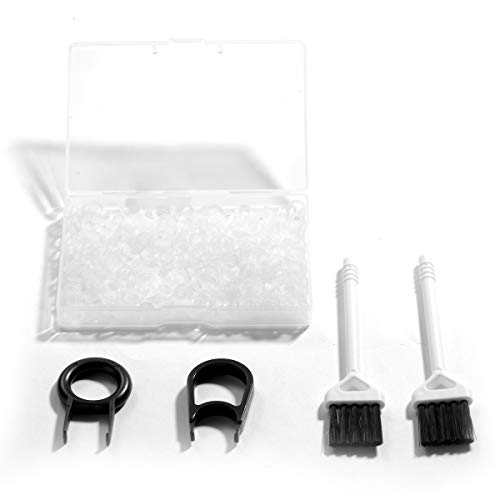
This set has the largest quantity here: 500 clear, soft 40A silicone rings. Its dimensions are 8 mm outer diameter, 5 mm inner diameter and 1.5 mm thick; the maker also describes a 2 mm thickness elsewhere, so confirm the intended thickness before ordering. The clear material is intended to let LED backlighting shine through, and the maker says the rings reduce bottoming-out sound and finger shock. This suits a multi-keyboard setup or a buyer who wants many spares. The size ambiguity is a meaningful drawback if exact thickness is important to your typing feel.
Bottom line: Choose this pack when quantity and clear silicone matter most.
Sumind Clear Silicone, 200 Pack
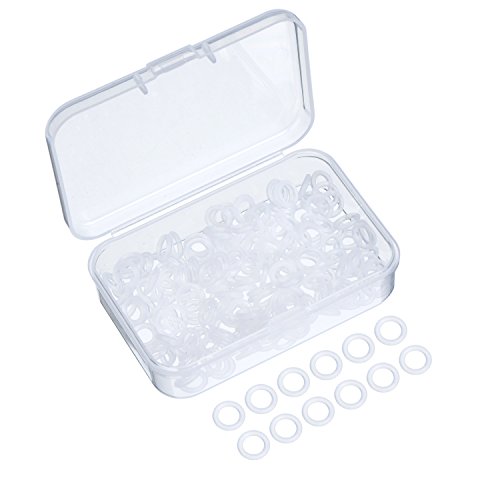
Unlike the other options, this 200-piece set includes a transparent plastic storage box for keeping spare rings together. Each ring is about 8 mm across outside, 5 mm across inside and 1.5 mm thick. The rings are silicone, despite the product name’s rubber wording, and the maker describes them as flexible and reusable. The set is aimed at mechanical keyboards and mentions MX switches, which makes it a reasonable pick for a compatible stem setup. Its limitation is that it gives no specific travel-reduction figure, so it is less suitable when you want to choose by an exact change in key travel.
Bottom line: Choose this set if a storage box and 200 silicone rings fit your needs.
ThreeBulls White Rubber, 120 Pack
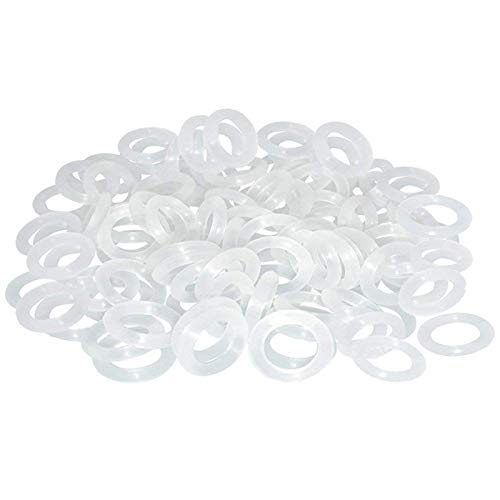
This is the smallest pack in the group, with 120 white rubber rings sized 0.31 × 0.2 × 0.06 inches. The maker says the rings cushion impact and reduce sound, and identifies Cherry MX and other mechanical keyboards as compatible. That makes it a straightforward option for a buyer who wants a modest quantity and does not need a storage box or a travel-reduction value.
Bottom line: Choose this set for a modest white rubber pack with dimensions.
How to Choose Keyboard O-Rings
Choose by stem fit, ring thickness and the amount of bottom-out change you want. An O-ring sits around the keycap stem, so a ring that is too large may not stay in place, while a thick ring can shorten the key’s downward stroke more noticeably. Most full-travel mechanical switches have about 4 mm of total travel, but actuation point and travel differ by switch model. O-rings cushion the end of a press; they do not turn a linear switch tactile or change its spring weight. If preserving the original stroke is important, favor a thinner ring or try one key before fitting the whole board.
Material affects feel and durability more than compatibility by itself: confirm the inner diameter against your stem and keycap. Use the table to match the main trade-off.
| Priority | What to compare | Trade-off |
|---|---|---|
| More cushioning | Greater thickness or stated reduction | Shorter key travel |
| Many spares | Pack count | More rings than a single keyboard may need |
| Backlighting | Clear material | Still verify stem fit |
Keyboard O-Ring Fit and Sizing
Ring dimensions and the keycap stem determine fit; do not rely on the word “universal” alone. Cherry MX-style stems are cross-shaped, and compatible keycaps generally have a matching cross socket, but some boards use different stem designs or nonstandard keycaps. Check the keycap underside and compare the ring’s inner diameter with the stem before installing a full set. Rings are typically fitted over the stem beneath the keycap, where they cushion the cap as it reaches the switch housing. If a ring slips, bunches up or prevents a keycap from seating fully, remove it rather than forcing the cap down.
Start with one frequently used key and check its return and feel before fitting the rest. A thick ring can shorten the stroke enough to feel unfamiliar, even when the key still registers normally.
What Keyboard O-Rings Change
Keyboard O-rings cushion bottom-out and can reduce the sharp sound made when a keycap hits the switch housing. They affect the end of the keystroke, not the whole sound profile: spring noise, switch contacts and case resonance can remain audible. The amount of change depends on ring thickness, softness, keycap shape and typing force. A specified travel reduction is more useful than a general claim of “quiet” if you want to preserve a particular stroke length. The maker specifies 0.4 mm reduction for the blue Captain O-Ring option; the other products here do not give a comparable reduction figure.
Install rings evenly and test several keys, including larger keys with stabilizers. Space bars and other wide caps can feel different from letter keys because their stabilizer hardware also affects movement.
Frequently Asked Questions
Do keyboard O-rings change switch actuation?
O-rings usually cushion the keycap at the bottom of its travel rather than changing the switch’s electrical actuation point. Many mechanical switches actuate before reaching their roughly 4 mm full travel, but the exact point depends on the switch model.
How many O-rings does a keyboard need?
A standard full-size keyboard has 104 or 105 keys, while compact layouts have fewer. One ring per key is a useful starting estimate, but stabilized keys and any keys you leave undampened can change the total.
Can O-rings make a mechanical keyboard silent?
No; O-rings mainly cushion bottom-out, so spring, contact and case noises can still be heard. A ring can help most when sharp keycap-to-housing impact is the sound you want to soften.
Will keyboard O-rings fit every keycap?
No; fit depends on the keycap stem and ring dimensions. Check for a compatible cross-shaped MX-style stem where applicable, then test one key to ensure the ring stays in place and the cap seats fully.
Do clear O-rings block keyboard backlighting?
Clear rings can allow more light through than opaque rings, but they do not guarantee even lighting. Keycap material, LED position and the ring’s placement also affect how much light reaches the legends.