
Bose SoundDock Bluetooth Converters Compared by Features

For most Bose SoundDock owners, INVERY DockLinQ Pro is the straightforward choice because it names several SoundDock models and offers plug-and-pair setup. Choose ZIOCOM 30-Pin + AUX Receiver if you need a built-in AUX jack, or LEZIRLOA 30-Pin OLED Receiver if you want an OLED display and codec readout; all five are 30-pin Bluetooth receivers, not car adapters.
We earn a commission if you buy through links on this page. As an Amazon Associate I earn from qualifying purchases. Products are compared on manufacturer specifications, not hands-on testing.
- Best overall: INVERY DockLinQ Pro – Names several SoundDock models and describes simple plug-and-pair setup.
- Best for AUX input: ZIOCOM 30-Pin + AUX Receiver – Includes a built-in 3.5 mm AUX jack and a control switch.
- Best for codec display: LEZIRLOA 30-Pin OLED Receiver – Its OLED display shows connection status and active codec.
- Best for newer Bluetooth: Fanxoo DockPro Bluetooth 5.3 – The maker identifies Bluetooth 5.3 for this 30-pin receiver.
| Product | Best for | Connection | Bluetooth version | Extra feature | Shop |
|---|---|---|---|---|---|
| INVERY DockLinQ Pro | Simple pairing | 30-pin dock | — | Pairs 2 devices | Check Price on Amazon |
| ZIOCOM 30-Pin + AUX Receiver | AUX connections | 30-pin and 3.5 mm AUX | — | Switch control | Check Price on Amazon |
| LEZIRLOA 30-Pin OLED Receiver | Codec visibility | 30-pin dock | Bluetooth 5.0 | OLED display | Check Price on Amazon |
| Fanxoo DockPro Bluetooth 5.3 | Bluetooth 5.3 | 30-pin dock | Bluetooth 5.3 | — | Check Price on Amazon |
Bose SoundDock Bluetooth converters
Compare the connection options and maker-claimed features to find the receiver that fits your dock and listening setup.
INVERY DockLinQ Pro
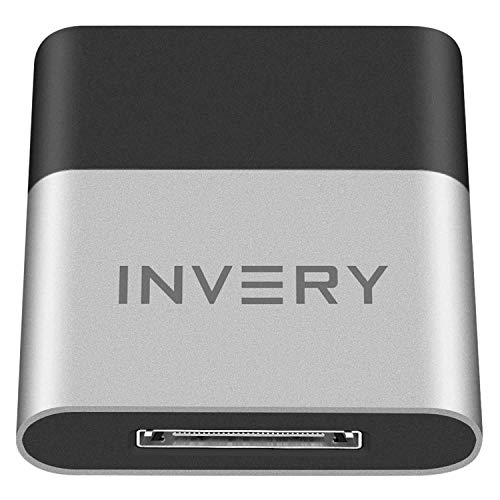
INVERY DockLinQ Pro stands out for its support for two paired devices, which can suit a household that streams from more than one phone. The receiver plugs into a 30-pin dock and is described for several Bose SoundDock models, including SoundDock I, II, Portable, and 10; it also supports iOS and Android devices. Setup is plug, pair, and play. Its 70-foot range is for open air, so walls and other obstacles may reduce usable distance; choose another model if you need an AUX jack or a display.
Bottom line: Choose this for simple setup and the option to pair two devices.
ZIOCOM 30-Pin + AUX Receiver

ZIOCOM 30-Pin + AUX Receiver is the option with a built-in 3.5 mm AUX jack, giving buyers a second connection route alongside its 30-pin docking fit. It is described for Bose SoundDock I, II, Portable, and 10, as well as other 30-pin music docks. The maker also claims low-latency audio, but that claim does not establish performance with every phone or speaker combination. Its physical switch is intended to control the speaker connection without repeatedly inserting or removing the receiver. Pick another model if an OLED display or specified Bluetooth version matters more.
Bottom line: Choose this when the added AUX connection is useful to your setup.
LEZIRLOA 30-Pin OLED Receiver

LEZIRLOA 30-Pin OLED Receiver separates itself with an OLED screen that the maker says shows connection status, paired device, and active audio codec. It is intended for Bose SoundDock models including I, II, Portable, and 10, and the maker names Bluetooth 5.0 plus an ESS DAC. SBC, AAC, aptX, and aptX HD support is claimed, with availability dependent on the connected device. Codec display and support are useful only when the source device and app can transmit a compatible codec; choose a simpler receiver if you do not need screen-based status.
Bottom line: Choose this if checking connection and codec status matters to you.
Fanxoo DockPro Bluetooth 5.3

Fanxoo DockPro Bluetooth 5.3 is distinguished by the maker’s Bluetooth 5.3 specification for a 30-pin receiver intended for Bose SoundDocks and other docking stations. The maker describes wireless audio streaming from Bluetooth-enabled phones, tablets, MP3 players, PCs, and laptops, along with low latency and long-distance reconnection. Those are performance claims, not guarantees for every source device or room.
Bottom line: Choose this if you specifically want a receiver identified as Bluetooth 5.3.
How to choose a Bose SoundDock Bluetooth converter
Start with the dock connector: these receivers are made for 30-pin docks, and none is described as a car adapter. For direct Bose SoundDock compatibility, prioritize receivers that name your dock family rather than relying only on general 30-pin compatibility. Then decide whether you need a feature beyond wireless playback: a 3.5 mm AUX input adds a wired connection option, while an OLED display can show connection and codec status. Bluetooth versions and codec support matter only when the source device supports the same capability; a version number alone does not promise a particular range or sound quality. If you regularly switch sources, a product that claims multi-device pairing can be more convenient than reconnecting each time.
Confirm the 30-pin dock fit
A 30-pin receiver fits a compatible 30-pin accessory dock, not a Lightning or USB-C port. Apple’s 30-pin connector was used on older iPods, iPhones, and iPads, but dock speaker compatibility can depend on the speaker’s design as well as its plug. A connector that physically seats is not proof that every dock function will work. Check the model name on the speaker and confirm it appears among the receiver’s supported SoundDock models when Bose compatibility is important. These receivers add a Bluetooth audio path; they do not convert a car stereo or motorcycle audio system, which specifications explicitly exclude for several options.
Bluetooth versions, codecs, and range
Bluetooth version and audio codec are separate compatibility checks. A source and receiver need a mutually supported codec to use it; otherwise, playback can fall back to another available format. An OLED codec readout can help identify the active format, but the source device and playback app affect what is available. Range claims also need context: INVERY DockLinQ Pro gives 70 feet in open air, while walls, furnishings, and interference can shorten real-world reach. For reliable listening across rooms, keep the source nearer to the dock rather than treating an open-air figure as an indoor guarantee. Low-latency claims can matter for video, but product claims do not replace checking whether both devices support the needed mode.
Safe setup and everyday use
Connect the receiver only to a matching 30-pin dock, and keep the dock and adapter away from liquids and excessive heat; these are electronic accessories, not waterproof equipment. Start pairing with the phone or tablet close to the speaker, then move it farther away after audio connects. If the dock does not appear in the Bluetooth menu, confirm the receiver is seated and use the pairing name and steps supplied for that model. A receiver with AUX may offer another connection route, but confirm which input is active before troubleshooting wireless playback. Avoid forcing a connector into place: a bent or damaged 30-pin plug can affect both the accessory and the dock.
Frequently Asked Questions
Will a 30-pin Bluetooth adapter fit every Bose SoundDock?
No; the receiver needs a compatible 30-pin dock, and physical fit alone does not guarantee full compatibility. Check the SoundDock model name against the models the adapter supports before connecting it.
Can I use a Bose SoundDock adapter in a car?
These products are presented as receivers for docking speakers, not car adapters, and several explicitly exclude cars and motorcycles. A car audio system needs an input and adapter designed for that system.
Does Bluetooth 5.3 improve the sound automatically?
No; a Bluetooth version does not by itself determine sound quality or guarantee a particular codec. The source device and receiver must share a supported codec for that format to be used.
What does an OLED display show on a dock adapter?
The OLED model’s maker says its screen shows connection status, the paired device, and the active audio codec. Codec availability depends on the connected source device.
How far away can I stream from the speaker?
INVERY DockLinQ Pro gives a 70-foot range in open air, but indoor walls and interference can reduce the distance. Keep the streaming device closer if the audio drops or disconnects.