
Monitor Stands for Bed: 4 Flexible Options Compared

For most people seeking a monitor stand for bed, the BluuSuuk floor stand is the clearest fit because its adjustable holder reaches 12 to 57 inches and its base weighs 6.6 pounds. A floor stand keeps the mount separate from the bed, while a clamp arm needs a secure surface edge.
Choose the TVON floor stand if you need a VESA-mounted monitor or TV rather than a tablet holder; its mount supports screens up to 50 inches and 44 pounds, but it is not an overhead bed arm.
We earn a commission if you buy through links on this page. As an Amazon Associate I earn from qualifying purchases. Products are compared on manufacturer specifications, not hands-on testing.
- Best overall: BluuSuuk Double-Weight Tablet Floor Stand – Its adjustable holder reaches 12 to 57 inches, with a 6.6-pound base.
- Best for lighter tablets: Elekpopu Tablet Floor Stand – It fits 4.7- to 11-inch devices weighing under 1.5 pounds.
- Best for VESA screens: TVON 13–50-Inch TV Floor Stand – It supports 13- to 50-inch screens up to 44 pounds with standard VESA patterns listed.
- Best for clamp mounting: COOPER FlexArm 24-Inch Desk Clamp – Its two-segment arm extends 24 inches and clamps to a desk.
| Product | Best for | Mount style | Device fit | Reach or height | Shop |
|---|---|---|---|---|---|
| BluuSuuk Double-Weight Tablet Floor Stand | Adjustable floor reach | Floor base | Phones and tablets; exact range not given | 12–57 in. holder height | Check Price on Amazon |
| Elekpopu Tablet Floor Stand | Lightweight tablets | Floor base | 4.7–11 in.; under 1.5 lb | 56 in. stand height | Check Price on Amazon |
| TVON 13–50-Inch TV Floor Stand | VESA monitor setups | Floor TV stand | 13–50 in.; up to 44 lb | 44.2–52 in. settings | Check Price on Amazon |
| COOPER FlexArm 24-Inch Desk Clamp | Edge-clamped setups | Desk clamp arm | 4.7–10 in. jaws; up to 3.3 lb | 24 in. arm | Check Price on Amazon |
Monitor Stands for Bed Compared
Compare how each stand mounts and whether its size and support limits match your device and bedside setup.
BluuSuuk Double-Weight Tablet Floor Stand
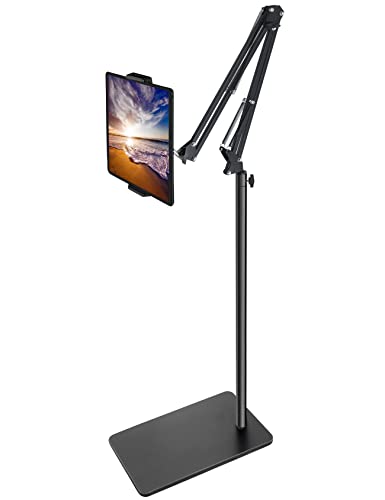
The BluuSuuk stand offers the widest holder-height range among these bed-oriented floor mounts: 12 to 57 inches. Its 6.6-pound base supports a flexible arm with a 360-degree adjustable ball joint, and the holder is described as compatible with iPad, Galaxy Tab, Kindle, Switch, and cell phones. That reach can suit users who want to position a device over a bed or recliner without attaching hardware to furniture. The specifications do not give a device-weight limit, so confirm that your tablet and case are supported before choosing it.
Bottom line: Choose this if you want a freestanding tablet holder with a broad height range.
Elekpopu Tablet Floor Stand
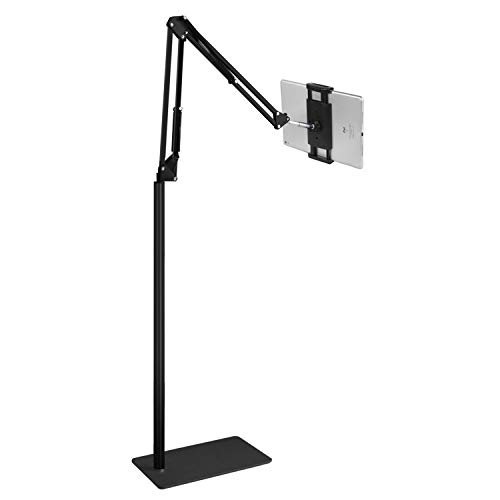
The Elekpopu stand gives a clear device-size and weight boundary: it fits phones and tablets from 4.7 to 11 inches weighing less than 1.5 pounds. Its 5-pound metal base and 56-inch stand height make it a straightforward floor-mounted choice for users who want a compatible tablet positioned near a bed or sofa. The maker recommends adding weight to the base when using a heavy tablet or case, but the under-1.5-pound limit still matters; choose another mount for a heavier setup.
Bottom line: Pick this for a tablet that stays within its size and weight limits.
TVON 13–50-Inch TV Floor Stand

The TVON is the option here for a conventional VESA monitor or TV, not a tablet held above the bed. It fits 13- to 50-inch flat or curved screens weighing up to 44 pounds, with VESA patterns from 75 × 75 to 200 × 200 millimeters. Six height settings run from 44.2 to 52 inches, and the screen tilts from -2 to +10 degrees and rotates between portrait and landscape.
Bottom line: Choose this for a VESA display on a floor stand, not an overhead bed mount.
COOPER FlexArm 24-Inch Desk Clamp

The COOPER FlexArm uses a full-metal desk clamp instead of a weighted floor base, so it can keep the floor clear when a suitable edge is within reach. Its two-segment arm extends 24 inches, and padded jaws open from 4.7 to 10 inches for compatible tablets and portable monitors weighing up to 3.3 pounds. The maker also describes it as a bed tablet holder for recovery, but the clamp still needs a stable edge; it is not a freestanding mount and will not suit a bed without a secure clamping surface.
Bottom line: Pick this when a stable nearby edge can take the clamp.
How to Choose a Bedside Monitor Stand
Choose the mounting style first: floor stands work without a furniture edge, while clamp arms need a firm edge that can take their clamp. For a tablet, compare the device’s width and weight with the holder limits; for a computer monitor, check screen size, weight, and VESA hole spacing. VESA is the square or rectangular mounting pattern on the back of many displays, measured in millimeters. A practical rule: if your display weighs over 3.3 pounds, skip the COOPER clamp arm; if it is a VESA screen, the TVON lists support up to 44 pounds. Measure the bedside clearance and arm path before setup so the mount does not collide with a headboard, wall, or nightstand.
Floor Stands Versus Clamp Arms for Bed
Floor stands suit beds without a usable mounting edge; clamp arms suit setups with a sturdy edge close enough to reach. A weighted base needs a flat floor and room for its footprint, while a clamp needs a flat, rigid edge with accessible top and underside. Tablet holders use gripping jaws and are generally selected by device dimensions and weight. Monitor stands typically attach through VESA holes, so matching the screen’s mounting pattern is as important as checking its diagonal size. Do not assume a tablet holder can secure a heavy monitor, or that a TV floor stand can extend over a mattress. Keep the mount stable and avoid positioning a heavy display where a loose joint or bump could bring it down onto someone.
Measure Device Fit and Bedside Reach
Measure the screen or tablet across its exterior, including its case, before matching it to a clamp or holder jaw. A tablet marketed as 11 inches refers to its diagonal screen size, not its full outside width, so compare the actual body dimension with a holder’s jaw range when available. For a VESA display, measure the horizontal and vertical hole spacing in millimeters and check the display weight against the mount limit. Then measure from the floor or clamp point to the intended viewing position; mattress height and headboard depth change the reach needed. Leave enough clearance for the arm to move without striking a wall or pressing against the screen.
Position a Bed Monitor Safely
Position the screen so the mount remains stable and the display cannot fall onto a sleeper; do not exceed a device or weight limit. Keep floor bases on a flat surface and avoid pulling or leaning on an extended arm. Check clamp contact and joint tightness after adjustment, especially when the mount shifts position frequently. For comfortable viewing, place the screen at a distance that lets you read without leaning forward, then adjust tilt to reduce glare from windows or lamps. Avoid stretching an arm to its limit if doing so makes the stand unstable, and keep cables routed so they cannot snag when the arm moves.
Frequently Asked Questions
Can a tablet floor stand work over a bed?
Yes, a floor stand with an adjustable arm can position a tablet over a bed if its reach clears the mattress and headboard. Check the tablet’s weight limit and keep the base on a flat floor.
How do I match a monitor to a VESA stand?
Measure the distance between the mounting holes horizontally and vertically in millimeters, then compare both dimensions with the stand’s supported pattern. Also check the screen’s weight and diagonal size against the stand limits.
Is a clamp mount safe on a bed frame?
A clamp should attach only to a rigid, flat edge that fits its jaws securely. A soft, rounded, or moving bed frame can let the clamp slip, so use a separate floor stand when the edge cannot hold firm.
How much reach should a bed monitor arm have?
Measure from the mount point to the center of the screen in the position where you will watch. Include the mattress height and headboard depth, since both change the arm reach you need.
Can a tablet holder support a portable monitor?
Only if the monitor fits the holder’s jaw dimensions and stays within its weight limit. Portable monitors vary in size and weight, so measure the monitor with its case and check the holder’s limits before mounting.