
3DS XL Charging Dock Options Compared by Fit

For a 3DS XL charging dock, choose a stand made for the console if you want a place to set it while charging; the Tomee stand is specifically for 3DS XL and uses your own AC adapter. Choose a different option if portability matters more, since the USB-C adapters are cables rather than docks.
We earn a commission if you buy through links on this page. As an Amazon Associate I earn from qualifying purchases. Products are compared on manufacturer specifications, not hands-on testing.
- Best overall: Tomee 3DS XL Charge Dock – A stand built for 3DS XL starts charging instantly and uses your own AC adapter.
- Best for New 3DS XL: New 3DS XL Compact Charging Dock – The compact dock names New 3DS XL compatibility and measures 4.72 inches long.
- Best for portable USB-C power: TriverseTech USB-C Charging Adapter – A 10 cm adapter converts a USB-C cable for compatible 3DS-family consoles.
| Product | Best for | Compatible systems | Form | Power connection | Shop |
|---|---|---|---|---|---|
| Tomee 3DS XL Charge Dock | 3DS XL stand | 3DS XL | Stand dock | Own AC adapter | Check Price on Amazon |
| New 3DS XL Compact Charging Dock | Compact dock | New 3DS, New 3DS XL | Stand dock | USB | Check Price on Amazon |
| Universal 3DS Charging Stand | Multi-model stand | New 3DS XL/LL, 3DS | Stand dock | USB | Check Price on Amazon |
| TriverseTech USB-C Charging Adapter | USB-C conversion | 3DS XL and other models | 10 cm adapter cable | 5V USB | Check Price on Amazon |
| Vancle 2-Pack USB-C Charging Adapters | Spare adapters | New 3DS XL and other models | Cable adapters, 2-pack | USB-C | Check Price on Amazon |
3DS XL Charging Docks and Alternatives
Match the console version and decide whether you need a stationary stand or a cable adapter.
Tomee 3DS XL Charge Dock
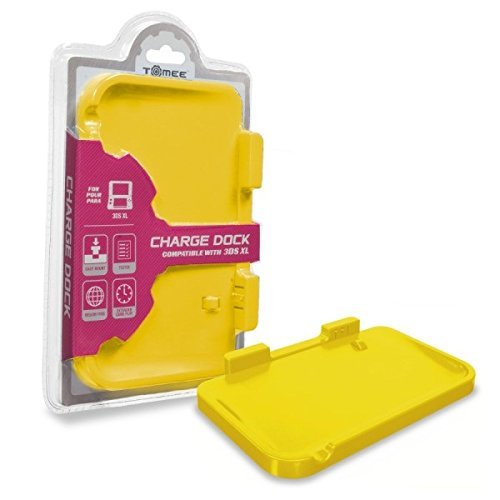
The Tomee dock is the only option here explicitly named for 3DS XL and provides a stand rather than a loose charging cable. Charging starts instantly, and the dock uses your own AC adapter, so it suits a setup where the handheld stays in one place. Its yellow color may also be a consideration for a coordinated setup. The main limitation is that the AC adapter is not included as a feature, so choose another option if you need a self-contained USB cable arrangement or want to carry only a small adapter.
Bottom line: Choose this stand if your console is a 3DS XL and you already have an AC adapter.
New 3DS XL Compact Charging Dock

The compact black dock is aimed at New 3DS and New 3DS XL, not a generic claim for every 3DS XL version. It measures 4.72 by 1.65 by 1.18 inches and weighs about 0.16 pounds, a small footprint for carrying or storing. Choose it for a New 3DS XL, but verify console-version fit if you have a different 3DS XL.
Bottom line: Pick this compact option for a New 3DS XL when portability matters.
Universal 3DS Charging Stand

The black charging stand names New 3DS XL/LL and 3DS compatibility, making it a broader-fit stand than the option dedicated to 3DS XL. The wording calls it a universal USB charger stand, but gives no measurements or further model distinctions, so it is best treated as a simple stationary charging base rather than a feature-rich travel option. Its limitation is the lack of named New 3DS compatibility; owners of that version should prefer an option that explicitly includes it or verify fit before choosing.
Bottom line: Choose this stand when you need the named 3DS and New 3DS XL/LL compatibility.
TriverseTech USB-C Charging Adapter

The TriverseTech option is an adapter cable, not a docking stand: it converts a USB-C cable connector for charging a broad range of 3DS, 2DS and DSi systems. Its 10 cm length and USB-C-to-USB-C or USB-A-to-USB-C compatibility make it useful for a power bank or computer setup. The maker recommends 5V/1A or 5V/2A and warns that higher-power 9V/12V fast-charging output may cause failure or instability. Pick it for portability, not for holding the console upright.
Bottom line: Choose this cable adapter if portable USB-C charging matters more than a stand.
Vancle 2-Pack USB-C Charging Adapters

The Vancle set is a two-pack of USB-C charging cable adapters, so it offers a spare rather than a console stand. The compatibility names include New 3DS XL, 3DS XL and several 2DS and DSi systems, while the maker describes ABS and PVC construction with copper wire. The maker also claims overcurrent and overcharging protection. This is useful for keeping an adapter in more than one place, but it does not provide a dock to support the handheld during charging.
Bottom line: Pick this pair if you need portable adapters for more than one charging spot.
Choosing a stand or cable for a 3DS XL
Choose a stand when the handheld should rest in a fixed charging position, and a cable adapter when portability is the priority. A dock is a shaped base that supports the console; an adapter cable ends in the console’s charging connector and does not hold it. For New 3DS XL, look for that exact model name rather than assuming every 3DS XL stand fits every generation. For regular 3DS XL, prefer a stand that names 3DS XL specifically. When the console will travel in a pocket or bag, a short adapter cable takes less space than a base, but requires a separate compatible power source.
Matching the Nintendo 3DS model
Match the exact model generation before selecting a charging stand because Nintendo 3DS-family systems do not all share identical charging-port placement or shell geometry. A product naming “New 3DS XL” supports that model explicitly, while an entry naming only “3DS XL” should not be presumed to cover the New version. Check the label on the back of the handheld or its system model designation before choosing. USB-C adapter products can name several consoles, but the connector at the console end still must match the device. Do not force a charging plug that does not seat naturally.
USB power requirements for 3DS charging
For 3DS-family charging through the TriverseTech USB-C adapter, the maker specifies 5V/1A compatibility and recommends standard 5V/1A or 5V/2A sources. It warns against USB-C fast chargers supplying 9V or 12V because charging may fail or become unstable. USB-C describes the source-side connector; it does not mean the handheld accepts USB Power Delivery voltage negotiation. A computer USB port or a non-fast-charging USB supply can be a more suitable source when it provides the recommended voltage. Keep the cable and console connector dry, and stop using a cable if insulation is damaged.
| Need | Choose | Trade-off |
|---|---|---|
| Supported charging position | Stand dock | Less portable |
| Small travel setup | Charging adapter cable | No console support |
| More than one cable location | Two-pack adapter set | Still requires a power source |
Using and caring for a charging dock
Set a dock on a level, dry surface and align the handheld without pressing down on the charging connector. A charging stand should hold the console steadily; if the handheld rocks or the plug sits at an angle, disconnect it and recheck the model fit rather than forcing the connection. Keep dust and lint out of the port, since debris can prevent full insertion and interrupt charging. For a cable adapter, avoid pulling the cord to remove it; grip the connector body instead. A dock that relies on an AC adapter needs that separate power connection, so account for the adapter and cable routing in the space available.
Frequently Asked Questions
Can a 3DS XL charge while sitting in a dock?
Yes, a compatible stand dock lets the console rest in a charging position. Confirm the dock names your exact model generation, since New 3DS XL and 3DS XL compatibility are not interchangeable assumptions.
Does the Tomee dock include an AC adapter?
The Tomee dock uses your own AC adapter. Have a suitable adapter ready if you choose that stand.
Can a USB-C fast charger charge a 3DS XL?
The TriverseTech adapter maker recommends standard 5V/1A or 5V/2A power and warns that 9V/12V fast-charging output may cause charging failure or instability. Use a source that supplies the recommended 5V output.
Are USB-C charging adapters the same as charging docks?
No, a USB-C adapter changes the cable connection for charging but does not support the console. A dock is a shaped stand that holds the handheld while connected to power.
How can I tell which 3DS XL version I have?
Check the model designation printed on the console, typically on its rear label, before choosing a stand. Use an option that names that exact version rather than relying on the general 3DS family name.