
Behringer U Phoria UMC1820 USB Audio Interface Compared

The Behringer U-Phoria UMC1820 suits studios that need eight mic preamps and 18 inputs, while the matching bundle adds headphones and a 25-foot XLR cable. Choose a smaller alternative only if you need fewer connections rather than the UMC1820’s rack-style expansion.
We earn a commission if you buy through links on this page. As an Amazon Associate I earn from qualifying purchases. Products are compared on manufacturer specifications, not hands-on testing.
- Best overall: Behringer UMC1820 – Eight MIDAS-designed preamps and 18 inputs/20 outputs cover multi-mic and instrument setups.
- Best for included accessories: Behringer UMC1820 Bundle – Bundles the UMC1820 with headphones and a 25-foot XLR cable.
- Best for compact recording: Behringer UMC1820 24-bit/96 kHz – Two inputs and 48 kHz resolution suit a simpler portable setup.
| Product | Best for | Inputs / outputs | Mic preamps | Sample resolution | Shop |
|---|---|---|---|---|---|
| Behringer UMC1820 | Multi-mic studios | 18 / 20 | 8 | 24-bit/96 kHz | Check Price on Amazon |
| Behringer UMC1820 Bundle | Accessory bundle | 18 / 20 | 8 | 24-bit/96 kHz | Check Price on Amazon |
| Behringer UMC1820 24-bit/96 kHz | UMC1820 alternative | 18 / 20 | 8 | 24-bit/96 kHz | Check Price on Amazon |
| Wrugste USB Audio Interface Solo | Basic solo recording | — | 1 XLR stated | 24-bit/192 kHz | Check Price on Amazon |
| M-Audio M-Track Solo | Two-input setups | 2 inputs | 1 combo input | 48 kHz | Check Price on Amazon |
Behringer U Phoria UMC1820 USB Audio Interface Options
Compare the full UMC1820 interface, an accessory bundle, and smaller alternatives by the connections your setup requires.
Behringer UMC1820

The standalone UMC1820 is the direct match for a studio that needs extensive routing without bundled extras. It provides eight MIDAS-designed mic preamps with +48 V phantom power, ADAT I/O, MIDI, and 18 inputs with 20 outputs over USB 2.0. Its 24-bit/96 kHz resolution supports detailed recording, and the unit can stream all 18 inputs and 20 outputs to a computer. It is a 1U-style rack interface rather than a portable two-input device, so it makes less sense for a minimal vocal-and-guitar rig.
Bottom line: Choose it when eight mic preamps and expanded studio I/O matter more than portability.
Behringer UMC1820 Bundle

The bundle keeps the UMC1820’s eight MIDAS-designed preamps and 18-in/20-out configuration, while adding a pair of Turnstile Audio headphones and a 25-foot XLR cable. It also includes an external power supply, USB cable, detachable 1U rack brackets, and an one-year limited warranty. The connections include combo XLR/TRS inputs, ADAT, S/PDIF, and MIDI I/O. This is a fit for a setup that can use the bundled cable and headphones; buyers who already have those accessories may prefer the standalone interface.
Bottom line: Pick this configuration if the added headphones and long XLR cable fit your recording setup.
Behringer UMC1820 24-bit/96 kHz

This UMC1820 variant is another full-size 18-in/20-out option, with the same eight-preamp and 24-bit/96 kHz figures as the core model. Its feature set calls out simultaneous analog, coaxial S/PDIF, optical ADAT, and MIDI signal use, useful when a studio combines several connection types. The specifications do not identify bundled accessories, so this is best treated as the interface itself rather than a package.
Bottom line: Choose it if simultaneous analog, S/PDIF, ADAT, and MIDI use is central to your setup.
Wrugste USB Audio Interface Solo

The Wrugste Solo is a compact single-microphone interface rather than an expanded studio hub. It provides +48 V phantom power at the XLR socket and is presented for computer recording, podcasting, and streaming; its name also gives 24-bit/192 kHz resolution. That smaller format can suit a basic condenser-microphone recording setup, but it does not match the UMC1820’s eight mic preamps or stated 18 inputs and 20 outputs.
Bottom line: Choose it for a simple single-mic setup, not a multi-input recording room.
M-Audio M-Track Solo
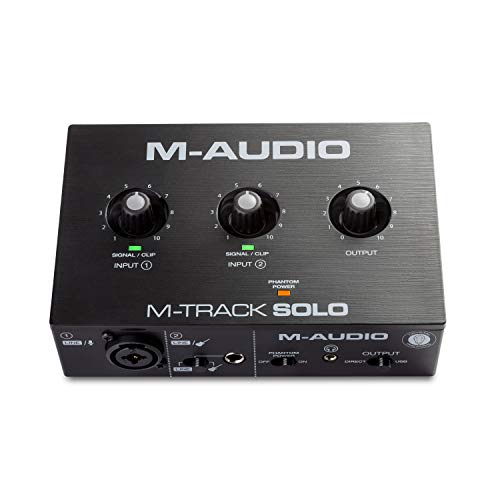
The M-Audio M-Track Solo is the clearest alternative for a small recording rig: it has one combo XLR/line input plus a separate line/instrument input, rather than the UMC1820’s eight mic preamps. It records at 48 kHz and includes a headphone output, stereo RCA outputs, and a USB/Direct switch for zero-latency monitoring. Phantom power is available on the combo input, and the Crystal Preamp is specified for microphone use. Its two-input layout cannot handle the UMC1820’s larger simultaneous setup, so it fits solo vocals, guitar, streaming, or podcast work better.
Bottom line: Pick it for a compact vocal-and-instrument setup with direct monitoring.
How to choose a USB audio interface
Start with the number of sources you need to record at the same time, not the advertised maximum input count. A typical home recording interface has 1–2 mic preamps; 8 preamps are useful when tracking a drum kit or several performers together. Combo XLR/TRS sockets accept microphones or line-level gear, while a dedicated instrument input is designed for a guitar or bass pickup. Leave an input free for changes in your setup, since overdubbing one source at a time needs fewer live inputs than ensemble recording.
Sample rate and bit depth describe digital conversion, but they do not replace suitable microphone placement or gain. A common music-production setting is 24-bit/44.1 or 48 kHz; higher sample rates increase data load and are most useful when a workflow calls for them. Choose 24-bit/96 kHz when you have a reason to work at that rate, rather than treating the number alone as a sound-quality guarantee.
When ADAT and S/PDIF matter
ADAT optical connections can expand an interface with an external preamp or converter, often adding up to eight channels at 44.1 or 48 kHz over one optical cable. At 88.2 or 96 kHz, many ADAT devices use S/MUX and carry fewer channels, commonly four; confirm that both devices support the same mode. S/PDIF is a separate digital format commonly used for stereo connections, not a substitute for eight-channel ADAT expansion.
Use expansion only when the external device and interface can share sample rate, clocking, and channel format. A digital connection usually needs one device set as clock master and the other synchronized to it; mismatched clocks can produce clicks or dropouts. MIDI carries performance/control data rather than audio, so MIDI ports do not add audio inputs.
Input count and studio fit
Count simultaneous sources before choosing an interface: eight microphone preamps can capture multiple microphones at once, while a two-input interface is enough for a vocal and guitar recorded together. A common drum setup can use 4–8 microphones depending on the kit and production approach, so count every mic that must record at once. Also count playback outputs for monitors, headphones, and separate cue mixes; an interface’s total output number may include digital ports, not just analog sockets.
The table separates common recording needs by the kind of connection capacity to prioritize.
| Recording need | Useful capacity | Why it matters |
|---|---|---|
| Solo vocals or podcast | 1–2 mic inputs | Supports one voice and a second source or guest |
| Vocal and guitar together | 2 simultaneous inputs | Records both sources in one take |
| Drums or group tracking | 4–8 mic preamps | Accommodates multiple microphones at once |
| Expanded studio | ADAT plus compatible preamp | Adds digital channels when clocking and sample rates match |
Phantom power and safe connections
Condenser microphones commonly require +48 V phantom power; dynamic microphones generally do not. Enable phantom power only when the connected microphone or device is designed for it, and avoid hot-plugging microphones with phantom power on. Turn monitors down before changing connections to reduce loud pops, and consult the microphone maker’s requirements when using ribbon microphones or unusual adapters.
Input type matters as much as count: use an instrument/Hi-Z input for a passive guitar or bass pickup, a line input for keyboards or external preamps, and a mic preamp for microphone-level signals. Sending a line-level signal into a mic input can overload it even at low gain. Check cable type and input routing before a session, especially when combining analog inputs with optical or coaxial digital sources.
Frequently Asked Questions
How many inputs do I need to record a band?
Count every source that must record simultaneously; a vocal and guitar need two inputs, while a drum kit may use 4–8 microphones. Larger ensembles may need more inputs or digital expansion.
Can ADAT add more inputs to an interface?
Yes, an ADAT optical connection can commonly carry up to eight channels at 44.1 or 48 kHz when paired with a compatible preamp or converter. At 88.2 or 96 kHz, S/MUX commonly reduces that channel count to four.
What does 48 V phantom power do?
Phantom power supplies voltage through a microphone cable for condenser microphones that require it. Switch it on only when the connected microphone is compatible, and avoid hot-plugging while it is enabled.
Is 24-bit 96 kHz necessary for home recording?
No; 24-bit recording at 44.1 or 48 kHz covers many music and podcast workflows. A 96 kHz setting creates larger files and is most useful when the recording workflow specifically calls for the higher sample rate.
Do MIDI inputs add audio channels?
No, MIDI transmits note and control data rather than recorded audio. A synthesizer’s sound must still reach an audio input or arrive through a digital audio connection.