
AirTies 4971 Wi-Fi Extender: Models Compared

AT&T Air 4971 is the closest fit for an AirTies 4971 Wi-Fi extender because it is the 4971 model and supports tri-band Wi-Fi 6. Choose another option only if you need a mount or your AT&T gateway supports a different extender model.
A Wi-Fi extender relays a home network into areas with weaker coverage, but its location and gateway compatibility affect the result.
We earn a commission if you buy through links on this page. As an Amazon Associate I earn from qualifying purchases. Products are compared on manufacturer specifications, not hands-on testing.
- Best overall: AT&T Air 4971 – The AT&T Air 4971 is the exact model, with tri-band Wi-Fi 6 and two Gigabit Ethernet ports.
- Best for gateway choice: AT&T Air 4921 – The Air 4921 identifies compatibility with four AT&T gateway models.
- Best for app management: AirTies Air 4920 SmartMesh – The Air 4920 SmartMesh variant mentions Smart Home Manager integration.
- Best for mounting: AirTies 4971 Wall Mount – The third-party bracket is designed for the Air 4971 and routes cables behind the mount.
| Product | Best for | Wireless bands | Ethernet ports | Gateway compatibility | Shop |
|---|---|---|---|---|---|
| AT&T Air 4971 | Wi-Fi 6 mesh | 2.4 GHz + dual 5 GHz | 2 Gigabit | Pace 5268AC, BGW210, BGW320 | Check Price on Amazon |
| AT&T Air 4921 | Older gateway fit | 2.4 GHz + 5 GHz | 2 Gigabit | 5268AC, BGW210, BGW320, NVG599 | Check Price on Amazon |
| AT&T Air 4920 | Dual-band basics | 2.4 GHz + 5 GHz | — | Compatible equipment | Check Price on Amazon |
| AirTies Air 4920 SmartMesh | App management | 2.4 GHz + 5 GHz | — | Smart Home Manager integration | Check Price on Amazon |
| AirTies 4971 Wall Mount | Wall mounting | — | — | AT&T Air 4971 | Check Price on Amazon |
AirTies 4971 Wi-Fi Extender Options
Compare the exact 4971 model with related AT&T extenders and a purpose-built mounting accessory.
AT&T Air 4971

AT&T Air 4971 is the only 4971 in this group and the only extender here with tri-band Wi-Fi 6. It has two 5 GHz bands and one 2.4 GHz band, automatic band steering for a single network name, and two Gigabit Ethernet ports for wired devices. AT&T says it works exclusively with Pace 5268AC, BGW210, or BGW320 gateways; setup uses WPS. Choose it when you have one of those gateways and want the named model. Its gateway restriction makes it unsuitable for other router setups, so confirm your gateway model first.
Bottom line: Choose this if you have a supported AT&T gateway and want the exact 4971 model.
AT&T Air 4921
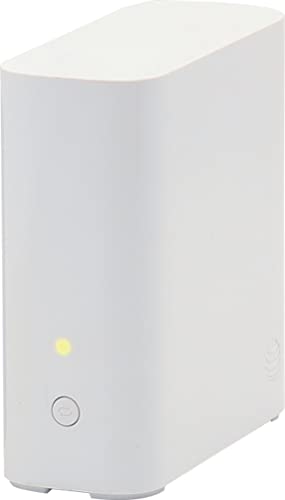
AT&T Air 4921 is an older dual-band alternative rather than a 4971: it uses 802.11ac and supports 2.4 GHz and 5 GHz concurrently. Its compatibility list includes the NVG599 as well as the 5268AC, BGW210, and BGW320, making that gateway fit its clearest distinction from the 4971. Two Gigabit Ethernet LAN ports can connect client devices or provide a wired backhaul to the gateway. Choose it when your gateway is on its compatibility list and Wi-Fi 6 is not the deciding requirement. It is not a substitute for the 4971 if you specifically need that model.
Bottom line: Choose this when the gateway compatibility matters more than matching the 4971.
AT&T Air 4920

AT&T Air 4920 is a dual-band Air 4920 option for buyers who want a simpler 2.4 GHz and 5 GHz extender rather than the 4971’s tri-band Wi-Fi 6 setup. The product facts describe it as integrating with compatible networking equipment and supporting common connected devices such as phones, laptops, and smart TVs. Its compact white enclosure measures about 4.27 inches wide, 3.94 inches high, and 1.63 inches long. Choose it only after confirming it works with your AT&T gateway; unlike the Air 4971 and Air 4921 options here, no gateway models are identified for this unit.
Bottom line: Choose this only if the dual-band format suits your setup and your gateway is confirmed compatible.
AirTies Air 4920 SmartMesh

AirTies Air 4920 SmartMesh is another Air 4920, but its distinguishing feature is Smart Home Manager integration rather than the specific gateway list supplied for the Air 4921. The product claims coverage expansion of up to 1,000 square feet and automatic selection of a connection for in-home devices. It is a dual-band 2.4 GHz and 5 GHz extender sold as a single unit. Confirm compatibility with your AT&T equipment before choosing it over the 4971.
Bottom line: Choose this if Smart Home Manager integration is your priority and compatibility is confirmed.
AirTies 4971 Wall Mount

AirTies 4971 Wall Mount is a mounting accessory, not a Wi-Fi extender, and it is the only option here designed specifically around the 4971’s form. Its bracket has an elevated pocket, air vents, cable-routing space, and mounting holes, including a rear opening for hidden cable routing. The maker describes it as a third-party accessory and claims the elevated position can improve signal strength. Choose it to organize or wall mount an existing compatible extender, not to add coverage or replace the 4971. The accessory’s fit is specific to the Air 4971, so it will not serve as an extender by itself.
Bottom line: Choose this only if you already have a 4971 and need a dedicated wall bracket.
How to Choose an AirTies Wi-Fi Extender
Start with gateway compatibility, then compare wireless generations and wired connections. The 4971 requires one of three named AT&T gateways, while the 4921 names four; the 4920 options do not provide an equivalent model-by-model compatibility list here. The 4971’s Wi-Fi 6 tri-band design has two 5 GHz bands plus 2.4 GHz, while the older 4921 is dual-band 802.11ac. As a practical rule, select the 4971 when you own a supported gateway and want Wi-Fi 6; if you have an NVG599, the 4921 is the option whose compatibility list includes it. Extenders cannot improve the internet speed entering the gateway, and wireless backhaul shares airtime with client traffic. For a wired backhaul, confirm the extender supports it and run Ethernet between gateway and extender.
Where to Place a Wi-Fi Extender
Place an extender between the gateway and the weak-signal area, where it still receives a strong signal; placing it inside a dead zone simply relays a weak connection. A practical starting point is roughly halfway along that route, then adjust after checking coverage on the target devices. Walls, floors, metal cabinets, and appliances can reduce or disrupt Wi-Fi, so a clear, elevated location generally works better than a corner behind furniture. The 2.4 GHz band generally reaches farther and passes through obstacles better, while 5 GHz often offers more capacity at shorter range. If a room needs stable performance for a stationary device, Ethernet from the extender can avoid relying on that device’s wireless link.
What Dual-Band and Tri-Band Mean
Dual-band extenders use 2.4 GHz and 5 GHz; tri-band models add a second 5 GHz band. The extra band can give a mesh system more flexibility for distributing traffic, but it does not guarantee a particular speed or coverage area in every home. The 4971’s AX3600 label identifies its Wi-Fi 6 class, not a promise that one device will reach 3,600 Mbps. Actual throughput depends on gateway connection quality, client capability, interference, and whether backhaul is wired or wireless. The Air 4921’s 1600 Mbps label likewise describes a combined class figure, not a single-device speed. For a home with many active devices, compare the radio layout and backhaul options rather than relying on a headline class number alone.
Setup and Placement Mistakes to Avoid
Use WPS only when both the gateway and extender support it, and make sure the extender has paired with the intended home network. The 4971 specifically uses WPS pairing with its supported AT&T gateways; the 4921 also has a WPS button. A common mistake is placing an extender where the signal is already poor, which extends weak service rather than restoring a strong link. Another is assuming that a matching brand guarantees gateway compatibility: the 4971 and 4921 specify supported AT&T gateway families, while the Air 4920 choices need compatibility confirmation. Keep vents unobstructed and avoid enclosing an extender in a cabinet, since airflow helps electronics dissipate heat. Use wired Ethernet backhaul where a suitable cable route is practical.
Frequently Asked Questions
How far should a Wi-Fi extender be from the router?
Start near the midpoint between the gateway and the weak-coverage area, where the extender can still receive a strong signal. Thick walls, floors, and nearby electronics can shift the best position, so move it toward the gateway if the relayed connection is unstable.
Does a Wi-Fi extender make internet faster?
An extender can improve the connection in a weak-signal area, but it cannot raise the speed delivered to the gateway by the internet provider. A wireless extender may also share airtime between its gateway link and client devices; Ethernet backhaul avoids that wireless relay hop.
Is 2.4 GHz or 5 GHz better through walls?
2.4 GHz generally travels farther and penetrates obstacles better than 5 GHz, while 5 GHz often provides more capacity over shorter distances. The best band depends on distance, wall materials, interference, and the device’s Wi-Fi support.
Can I use an AirTies 4971 with any router?
No; the Air 4971 is specified for the AT&T Pace 5268AC, BGW210, or BGW320 gateways. Verify the gateway model before choosing it, since matching Wi-Fi standards alone do not establish compatibility.
Does a wired backhaul help a Wi-Fi extender?
Yes, Ethernet backhaul gives an extender a wired path to the gateway instead of using Wi-Fi for that link. The Air 4971 and Air 4921 each have two Gigabit Ethernet ports, and the 4921 identifies either port for backhaul or client connections.