
Convert 35mm Slides to Digital: 5 Scanners Compared

For most people converting 35mm slides to digital, KODAK Slide N Scan is the most direct choice because it scans 50mm slides and previews images on a 5-inch LCD. Choose a phone-based adapter instead if portability matters more than a dedicated screen; choose an all-in-one model if you also need to digitize printed photos.
We earn a commission if you buy through links on this page. As an Amazon Associate I earn from qualifying purchases. Products are compared on manufacturer specifications, not hands-on testing.
- Best overall: KODAK Slide N Scan – Includes a 50mm slide holder and a 5-inch LCD for previewing scans.
- Best for printed photos: DigitPro Photo, Slide & Negative Scanner – Also converts 3R, 4R, and 5R photos and includes an 8GB SD card.
- Best for portability: DigitPro Mobile 35mm Scanner – A foldable phone-camera adapter supports 35mm slides and film.
| Product | Best for | Supported formats | Preview method | Storage | Shop |
|---|---|---|---|---|---|
| KODAK Slide N Scan | Standalone scanning | 50mm slides; 135, 110, 126 film | 5-inch LCD | SD/SDHC card | Check Price on Amazon |
| DigitPro 22MP Film & Slide Scanner | Internal memory | 50mm slides; 35mm/135, 110, Super 8 | 5-inch LCD | 128MB built-in; SD up to 64GB | Check Price on Amazon |
| DigitPro Photo, Slide & Negative Scanner | Photo digitizing | 35mm slides; 135/110 negatives; 3R–5R photos | 5-inch LCD | 8GB SD card included | Check Price on Amazon |
| DigitPro Mobile 35mm Scanner | Phone scanning | 35mm slides, positives, negatives | Smartphone camera | Phone storage | Check Price on Amazon |
| TCNEWCL 35mm Mobile Scanner | Compact phone adapter | 35mm slides and negatives | Smartphone camera | Phone storage | Check Price on Amazon |
35mm Slide Scanners Compared
Choose between standalone scanners with screens and smartphone adapters that use your camera to capture slides.
KODAK Slide N Scan
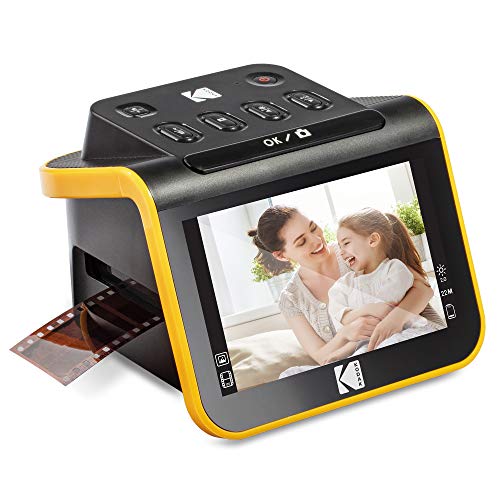
KODAK Slide N Scan is the standalone option with a 5-inch LCD and a 50mm slide holder, so you can preview images on the scanner rather than framing each capture through a phone. The maker says it converts color and black-and-white negatives as well as 135, 110, and 126 film, and saves JPEG files to an SD card. The box includes film adapters and a cleaning brush. The SD card is not included, so this setup suits buyers willing to provide their own storage.
Bottom line: Pick this if you want a dedicated screen and already have or will supply an SD card.
DigitPro 22MP Film & Slide Scanner

DigitPro 22MP Film & Slide Scanner stands out for its 128MB built-in memory, which gives it storage before adding an SD card. It supports 50mm slides along with 35mm/135, 110, and Super 8 film, and its 5-inch LCD provides on-device preview and playback. The maker says scans can be saved to an external SD card up to 64GB, formatted FAT32 or exFAT. This is a useful fit for mixed film collections, but the built-in memory is limited, so ongoing archiving calls for removable storage.
Bottom line: Choose this for a standalone scanner with built-in memory and support for Super 8.
DigitPro Photo, Slide & Negative Scanner

DigitPro Photo, Slide & Negative Scanner is the broadest choice for mixed archives because it handles 35mm slides and negatives as well as 3R, 4R, and 5R printed photos and business cards. Its 5-inch screen supports previewing, and an 8GB SD card is included, unlike card-not-included options. The maker says it produces 22MP JPEG images and works without a computer. The wider photo-scanning role makes it less purpose-built for someone digitizing slides alone; its extra format support matters most when paper prints are part of the job.
Bottom line: Pick this when your archive includes printed photos or business cards as well as slides.
DigitPro Mobile 35mm Scanner

DigitPro Mobile 35mm Scanner replaces a standalone scanner with a foldable adapter and LED backlight that work with a smartphone camera. It supports 35mm color and black-and-white slides, positives, and negatives, making it the portable option among these choices. The maker describes a quick setup using the phone camera; captured image resolution depends on that camera. This approach suits occasional scanning or travel, but buyers who want a dedicated preview screen and scanner-controlled storage should choose a standalone model instead.
Bottom line: Choose this if you prefer a foldable phone-camera setup over a standalone scanner.
TCNEWCL 35mm Mobile Scanner

TCNEWCL 35mm Mobile Scanner is a compact, foldable smartphone adapter for capturing 35mm slides and negatives using a built-in LED backlight. The maker’s workflow is to insert a slide or negative, align a phone camera over the opening, and take a photo. Image quality depends on the phone camera, so camera capability and careful alignment matter. Unlike standalone scanners, this adapter does not provide its own screen or storage; it suits buyers who want a small accessory and are comfortable using a phone as the capture device.
Bottom line: Pick this for a foldable 35mm adapter when your smartphone is the capture tool.
How to choose a 35mm slide scanner
A dedicated film scanner or a phone adapter can digitize mounted slides, but they differ in how you preview and save images. Standalone units here use a 5-inch LCD and save to removable or built-in storage; phone adapters rely on the phone camera and its image storage. For a large collection, prioritize a repeatable feed or preview workflow and confirm the scan can be saved in a format your computer or photo library accepts. JPEG is supported by the standalone models described here. A phone adapter is simpler to store, but phone-camera resolution and alignment affect the capture.
Check slide mounts and film sizes
Many 35mm slides sit in mounts measuring about 2 by 2 inches, while the film frame itself is approximately 24 by 36 millimeters. Do not confuse the mount size with the 35mm film format: a scanner’s 50mm slide holder refers to the mounted-slide workflow, not 50mm-wide film. Before choosing a scanner, match the input to what you have—mounted slides, loose negatives, or both. If slides are larger than the typical 2-by-2-inch mount, verify the supported mount size before ordering. Dust can show clearly in digital captures, so use a clean, soft brush and handle film by its edges.
Standalone scanners and phone adapters
Standalone scanners provide their own preview display and a dedicated capture workflow; smartphone adapters use the phone camera over a lit opening. The choice is mainly about control and convenience: a standalone screen helps frame and review each scan, while a folding adapter takes less room. Phone captures can vary with camera resolution, focus, exposure, and reflections, so keep the phone aligned and avoid stray light. The table summarizes which workflow fits common needs.
| Need | Choose | Reason |
|---|---|---|
| Preview on a dedicated display | Standalone scanner | Uses its own LCD |
| Fold-away travel setup | Phone adapter | Uses a smartphone camera |
| Slides plus paper prints | Photo-and-slide scanner | Accepts printed photo formats |
Prepare slides for cleaner scans
Dust and fingerprints can become more noticeable after enlargement, so handle slides at the edges and use a clean, soft brush before scanning. Avoid canned air held close to the film, which can leave residue, and avoid wiping the image surface dry. Work away from direct sunlight and keep the slide holder and phone lens clean. Scan a representative slide first, then check focus, crop, and color before repeating the same setup across a batch. Store original slides in cool, dry conditions after digitizing; digital copies do not replace careful storage of the source film.
Frequently Asked Questions
What size are standard 35mm slide mounts?
A standard mounted 35mm slide is commonly about 2 by 2 inches, though the film frame is roughly 24 by 36 millimeters. Check that the scanner accepts the mount rather than assuming the film width alone determines fit.
Do phone scanners work with mounted 35mm slides?
Some phone adapters support both slides and negatives, but the phone camera captures the image rather than a dedicated sensor in the adapter. Keep the camera centered over the opening and use the LED backlight to illuminate the slide evenly.
Should I scan slides as JPEG or TIFF?
JPEG is a practical format for sharing and everyday viewing, and the standalone models here save JPEG files. TIFF can preserve more editing latitude, but confirm that a scanner supports it before choosing a workflow.
How should I clean a 35mm slide before scanning?
Use a clean, soft brush to lift loose dust and hold the slide by its edges. Avoid touching the image area, since fingerprints and scratches can become prominent in a digital enlargement.
Can a 35mm slide scanner digitize negatives too?
Some standalone scanners support both mounted slides and film negatives, while phone adapters may support both positives and negatives. Check that the device accepts the exact film format you have, such as 135/35mm or 110.