
Android Auto Heads Up Display: 4 Options Compared

For most drivers, VIVIHUD V3-SE is the straightforward Android Auto heads up display choice because it attaches without replacing the car’s original screen. Choose HotSunTesTec Tesla 9.6-inch HUD instead if you drive a compatible Tesla Model Y or Model 3 and want a larger integrated-style screen; drivers who need a windshield-reflected image should verify the display style before choosing.
We earn a commission if you buy through links on this page. As an Amazon Associate I earn from qualifying purchases. Products are compared on manufacturer specifications, not hands-on testing.
- Best overall: VIVIHUD V3-SE – Its maker describes a portable plug-and-play display with wireless Android Auto.
- Best for GPS speed: GPS Speedometer Car HUD – It combines Android Auto with a standalone GPS speedometer and overspeed alert.
- Best for Tesla: HotSunTesTec Tesla 9.6-inch HUD – It is designed for Model Y and Model 3 and has a 9.6-inch screen.
- Best for dual power: HUD-V3 – It includes both OBD and cigarette-lighter power cables.
| Product | Best for | Vehicle fit | Display or placement | Connection or power | Shop |
|---|---|---|---|---|---|
| VIVIHUD V3-SE | Portable setup | — | HD display | Wireless Android Auto | Check Price on Amazon |
| GPS Speedometer Car HUD | GPS speed display | — | HUD projection screen | Bluetooth and Wi-Fi; GPS | Check Price on Amazon |
| HotSunTesTec Tesla 9.6-inch HUD | Compatible Teslas | Tesla Model Y 2020–2024; Model 3 2016–2023 | 9.6-inch screen | Wireless CarPlay and Android Auto | Check Price on Amazon |
| HUD-V3 | Dual power choice | Sedan, SUV, sports car, truck | Anti-glare glass lens | OBD or cigarette-lighter power | Check Price on Amazon |
Android Auto heads up displays
Compare vehicle fit, screen placement and connection details before choosing a display.
VIVIHUD V3-SE

For a portable setup that avoids dashboard replacement, VIVIHUD V3-SE is described by its maker as an attach-and-connect display with wireless Android Auto. Its anti-reflection HD screen and automatic brightness are intended to help with visibility in changing light, while Bluetooth audio and screen mirroring add options beyond navigation. It suits drivers who want phone functions on a separate screen rather than a replacement head unit.
Bottom line: Choose this if you want a separate screen and simple installation.
GPS Speedometer Car HUD

Unlike a display focused mainly on phone apps, GPS Speedometer Car HUD also works as a standalone GPS speedometer, so its speed readout does not require a phone connection. The maker says it supports wireless Android Auto and offers a custom overspeed alert; Bluetooth and Wi-Fi connect the phone for calls, music and navigation. Its 10.23-by-6.3-inch stated dimensions make placement a consideration, especially in a compact cabin. Choose it if a separate speed readout matters, but check the usable dash area and sightline before settling on a position.
Bottom line: Pick this if independent GPS speed is a priority.
HotSunTesTec Tesla 9.6-inch HUD

HotSunTesTec Tesla 9.6-inch HUD is the Tesla-specific option here: it is designed for Model Y models from 2020–2024 and Model 3 models from 2016–2023, rather than advertised as a universal fit. Its 9.6-inch screen has 1920-by-480 resolution, and the maker says wireless Android Auto runs at 60 frames per second. The maker describes installation as taking about 50 minutes without car modification. This larger, integrated-style setup is a better match for the named Tesla years than for drivers of other vehicles, who should choose a portable model instead.
Bottom line: Choose this only if your Tesla model and year match.
HUD-V3
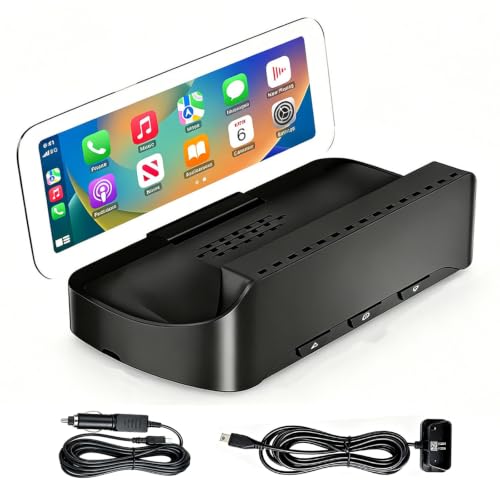
HUD-V3 stands apart by offering two power-cable options, for OBD or a cigarette lighter, while its OBD cable supplies power only and does not read vehicle data. Its maker says the image appears on the unit’s anti-glare glass lens, not on the windshield; the maker also warns that sunglasses make the image invisible. That caveat matters for drivers who expect a reflected windshield image or routinely wear polarized or other sunglasses. The product is described for sedans, SUVs, sports cars and trucks, but confirm that its on-unit screen works for your visibility needs.
Bottom line: Pick this if you want a choice of power connection and accept the lens display.
How wireless Android Auto connects to a HUD
Wireless Android Auto needs a compatible Android phone and a display that supports Android Auto; a GPS readout alone does not provide phone-app integration. Initial pairing commonly uses Bluetooth, while Wi-Fi carries the wireless connection after pairing, so both radios must be enabled and the phone needs to stay within range. A cable connection, when supported, can avoid wireless dropouts and charge the phone at the same time. Separate HUD screens vary: some show navigation and media, while others add vehicle or GPS data. Treat those functions as distinct when comparing a phone-connected display with a standalone GPS speedometer.
Choose a screen position you can see safely
A heads-up display may show information on its own screen or reflect an image onto the windshield; those designs are not interchangeable. A unit-mounted screen avoids relying on windshield reflection, but it still needs a clear, glanceable position. Keep the display below the driver’s forward sightline and away from airbags, vents, steering controls and instrument visibility. A simple decision rule is to reject any mounting position that blocks a gauge or requires looking down for more than a quick glance. Before driving, check readability in daylight and at night, then set brightness low enough to avoid distracting glare.
Match the display to the vehicle and dashboard
Vehicle fit can be model-specific: a screen designed around one dashboard may not mount cleanly in another cabin. Compare the vehicle years, available dash surface, cable reach and the device’s actual footprint before installing; a nominally portable unit can still crowd controls in a small interior. Power choices also affect fit. A cigarette-lighter cable uses a 12-volt accessory socket, while an OBD plug occupies the diagnostic port even when it only supplies power. This distinction matters if a garage scanner or fleet device needs that port. For a unit without a fit range, measure the intended space and confirm the mounting method before ordering.
What to expect from GPS speed and visibility
GPS speed depends on satellite reception, so buildings, tunnels, tree cover and indoor parking can delay or interrupt readings; open sky generally gives the receiver a better view. A GPS speed readout is not the same as vehicle data from OBD, and an OBD power cable alone does not make that data available. Screen visibility also depends on display design: an anti-glare lens is still different from a windshield reflection, and sunglasses can affect how some projected images appear. Test any HUD while parked, adjust brightness and position, and rely on the car’s normal instruments if the HUD is hard to read or loses its signal.
Frequently Asked Questions
Will any Android phone connect to a wireless HUD?
No; the phone and the HUD both need to support Android Auto, and wireless use also depends on compatible Bluetooth and Wi-Fi hardware. Check phone compatibility and Android Auto settings before relying on a wireless connection.
Does a HUD show its image on the windshield?
Not always; some units use their own glass or screen, while others reflect onto the windshield. Confirm which display style the device uses, since placement and visibility differ.
Can a GPS HUD read my car’s OBD data?
Only if the device supports OBD data access, not merely an OBD power cable. A GPS speedometer can calculate speed from satellite signals without reading vehicle data.
Why does GPS speed disappear in a tunnel?
GPS needs satellite reception, which tunnels and covered parking can block. Wait for an open-sky signal to return, and use the vehicle’s standard speedometer when the GPS reading is unavailable.
Where should I mount a heads-up display?
Place it where the screen is glanceable without blocking gauges, controls, airbags or the forward road view. If no position preserves those sightlines, do not use that mounting location.