
ARRIS SURFboard S33: Three Modem Versions Compared

For most cable households, ARRIS SURFboard S33 is the straightforward ARRIS SURFboard S33 choice because it pairs DOCSIS 3.1 with 2.5 Gbps and 1 Gbps Ethernet ports. Choose a renewed version if you specifically want that condition and its distinct channel or model information.
The S33 is a cable modem, which connects your provider’s coax service to a separate router; confirm your provider approves the specific model before ordering.
We earn a commission if you buy through links on this page. As an Amazon Associate I earn from qualifying purchases. Products are compared on manufacturer specifications, not hands-on testing.
- Best overall: ARRIS SURFboard S33 – The DOCSIS 3.1 modem has both 2.5 Gbps and 1 Gbps Ethernet ports and supports cable plans up to 2.5 Gbps.
- Best for renewed S33-RB: Arris S33-RB Renewed – This renewed S33-RB version names Xfinity, Cox and Spectrum compatibility and includes a one-year warranty.
- Best for channel specifics: ARRIS SURFboard S33 Renewed – This renewed S33 version specifies 32 x 8 DOCSIS 3.0 bonded channels and 2 x 2 DOCSIS 3.1 OFDM channels.
| Product | Best for | Ethernet ports | Condition | Shop |
|---|---|---|---|---|
| ARRIS SURFboard S33 | Standard S33 | 2.5 Gbps + 1 Gbps | New | Check Price on Amazon |
| Arris S33-RB Renewed | Renewed S33-RB | 1 Gbps + 2.5 Gbps | Renewed | Check Price on Amazon |
| ARRIS SURFboard S33 Renewed | Channel-specific S33 | 2.5 Gbps + 1 Gbps | Renewed | Check Price on Amazon |
ARRIS SURFboard S33 Cable Modems
Compare the S33 versions by their port, channel and condition information, then verify compatibility with your cable provider.
ARRIS SURFboard S33

ARRIS SURFboard S33 is the standard S33 option in this group, with one 2.5 Gbps Ethernet port and one 1 Gbps port. The maker says its DOCSIS 3.1 modem supports cable plans up to 2.5 Gbps; a separate router is needed for Wi-Fi. Its compact body measures 5.25 inches long, 5.24 inches high and 1.8 inches wide. This suits buyers seeking the two-port configuration and a new unit. The limitation is that the modem alone does not create a wireless network, so plan for a router or mesh system.
Bottom line: Choose this version if you want a new S33 with both 2.5 Gbps and 1 Gbps Ethernet ports.
Arris S33-RB Renewed

Arris S33-RB Renewed is the renewed S33-RB variant, and its name specifies a one-year warranty. Its features identify Cox, Spectrum and Xfinity among compatible cable providers, while excluding fiber, DSL and satellite services. The modem has 1 Gbps and 2.5 Gbps ports and is described as supporting plans up to 2.5 Gbps. This version fits a buyer who prefers the S33-RB designation and wants the warranty stated for this unit. It does not include Wi-Fi or support cable digital voice, so it is not the right match for someone needing an all-in-one wireless gateway or modem-based voice service.
Bottom line: Pick this renewed variant if its S33-RB designation and one-year warranty match your requirements.
ARRIS SURFboard S33 Renewed
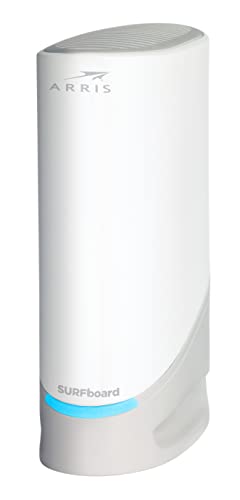
ARRIS SURFboard S33 Renewed distinguishes itself with a channel breakdown: 32 downstream by 8 upstream DOCSIS 3.0 bonded channels, plus 2 downstream by 2 upstream DOCSIS 3.1 OFDM channels. It also has 2.5 Gbps and 1 Gbps Ethernet ports and is described as supporting cable plans up to 2.5 Gbps. This renewed version suits a buyer comparing channel configuration as well as multi-gig connectivity. Like the other S33 modems here, it requires cable service and a separate router for Wi-Fi. Its renewed condition is the key tradeoff for shoppers who specifically want a new unit.
Bottom line: Choose this renewed version if the channel configuration is important to your comparison.
How to choose an ARRIS SURFboard S33 modem
Start by confirming cable-provider approval, then match the modem’s Ethernet port to the speed tier and router you intend to use. DOCSIS 3.1 is a cable broadband standard; it does not make a modem compatible with fiber, DSL or satellite service. A 2.5 Gbps Ethernet port offers more wired capacity than a 1 Gbps port, but your actual internet speed is also limited by the subscribed plan, provider network and connected equipment. For a plan above 1 Gbps, make sure the router’s internet/WAN port also supports more than 1 Gbps. The S33 versions here are modem-only devices, so households needing Wi-Fi must pair one with a router or mesh system.
What the S33 Ethernet ports mean
The S33’s 2.5 Gbps Ethernet port is the one to pair with a multi-gig router WAN port when the internet plan exceeds 1 Gbps. A 1 Gbps port can constrain a single wired connection to below the plan’s full multi-gig rate; real throughput also depends on the router, cable and client device. The extra 1 Gbps port provides another Ethernet connection, but do not assume that two ports combine into one faster link. Choose by the slowest link in the path: modem port, router WAN and LAN ports, and the device’s network interface. For plans at or below 1 Gbps, a multi-gig port may leave room for future equipment without changing the modem’s basic cable function.
DOCSIS 3.1 channels and cable service fit
DOCSIS carries broadband over a cable provider’s coax network, unlike fiber, DSL or satellite access. DOCSIS 3.1 uses OFDM channel technology, while the renewed S33 variant with channel figures also identifies DOCSIS 3.0 bonded channels. Channel counts alone do not determine the speed a household receives; the service tier, provider configuration and local network capacity matter too. Before choosing any modem, confirm that the provider approves that exact model and that the plan supports customer-owned equipment. Check the account for voice service needs as well: these S33 variants are described as not supporting cable digital voice, so a household relying on provider phone service should verify its modem requirements first.
Router setup and placement for an S33
An S33 needs a coax connection, power and Ethernet connection to a router; the modem itself does not broadcast Wi-Fi. During activation, providers typically associate the modem’s hardware address with the customer account, so keep the device label available and have the provider’s activation method ready. Use a coax cable connection intended for the modem rather than placing multiple unnecessary splitters in the signal path, because splitters divide signal and can complicate troubleshooting. Put the modem where its coax and power connections are accessible and where ventilation openings are not blocked. If replacing a rented modem, arrange the provider’s account update before disconnecting service so the new device can be activated against the correct plan.
Frequently Asked Questions
Will the ARRIS S33 work with fiber internet?
No; the S33 is a cable modem for coax-based cable internet, not a fiber modem. Check with the fiber provider for the required optical network terminal or gateway instead.
Does the ARRIS S33 provide Wi-Fi on its own?
No, the S33 is a modem and needs a separate Wi-Fi router or mesh system. Connect the router’s WAN port to the modem’s Ethernet port to provide wireless access.
Can the S33 deliver more than 1 Gbps over Ethernet?
Its 2.5 Gbps port supports a faster wired link than a 1 Gbps port, but only when the internet plan and router WAN port also exceed 1 Gbps. Connected devices and network conditions can further limit throughput.
What should I check before activating an S33?
Confirm that your cable provider approves the exact S33 variant and your plan permits customer-owned modems. Have its hardware address available because providers commonly need it to associate the modem with the account.
Can I use the S33 for cable phone service?
The S33 variants in this comparison are described as not supporting cable digital voice service. If you depend on a provider phone line, confirm which modem the provider requires before switching.