
AV Cable to HDMI Adapter: 5 Converters Compared

For most buyers, GINGIN RCA to HDMI Converter with 3.3-ft Cables is the most convenient choice because it includes 3.3-foot RCA and HDMI cables; the right converter changes analog composite AV to HDMI, not HDMI to AV. Choose another option if you need a specific format or already have cables.
These adapters connect devices with yellow, white and red composite RCA outputs to an HDMI display. Their 720p or 1080p output setting does not turn a standard-definition source into native HD.
We earn a commission if you buy through links on this page. As an Amazon Associate I earn from qualifying purchases. Products are compared on manufacturer specifications, not hands-on testing.
- Best overall: GINGIN RCA to HDMI Converter with 3.3-ft Cables – Includes 3.3-foot RCA and HDMI cables and supports 720p/1080p output.
- Best for format support: Tengchi RCA to HDMI Converter – Accepts PAL, SECAM, and several NTSC and PAL variants.
- Best for direct console plugs: Viagkiki RCA to HDMI Converter – Its built-in female RCA inputs accept standard male RCA plugs directly.
| Product | Best for | HDMI output | Included cables | USB power | Shop |
|---|---|---|---|---|---|
| GINGIN RCA to HDMI Converter with 3.3-ft Cables | Ready-to-connect setup | 720p/1080p at 60 Hz | 3.3-ft RCA and HDMI | 5V, 1A | Check Price on Amazon |
| Tengchi RCA to HDMI Converter | Format flexibility | 1080p | USB cable included | 5V, 1A | Check Price on Amazon |
| Viagkiki RCA to HDMI Converter | Console connections | 720p/1080p | RCA and HDMI cables named | — | Check Price on Amazon |
| RCA to HDMI Mini Video Adapter | Format choices | 720p/1080p | USB cable included | 5V power adapter required | Check Price on Amazon |
| GINGIN AV to HDMI Converter | Console compatibility | 720p/1080p at 60 Hz | — | USB cable included; 5V source | Check Price on Amazon |
AV Cable to HDMI Adapters
Compare the conversion direction, output options, cable needs and power requirements before choosing a converter.
GINGIN RCA to HDMI Converter with 3.3-ft Cables

The clearest distinction for GINGIN RCA to HDMI Converter with 3.3-ft Cables is its included 3.3-foot RCA and HDMI cables, which can reduce the need to source those connections separately. The converter takes analog composite RCA input and sends HDMI output at 720p or 1080p, up to 60 Hz. It needs USB power from a 5V, 1A adapter, which is not included. This suits a setup where the source and display are close together. The short cable length is a limitation if your equipment is farther apart; measure the route before choosing it.
Bottom line: Pick this when the included 3.3-foot cables suit your setup.
Tengchi RCA to HDMI Converter
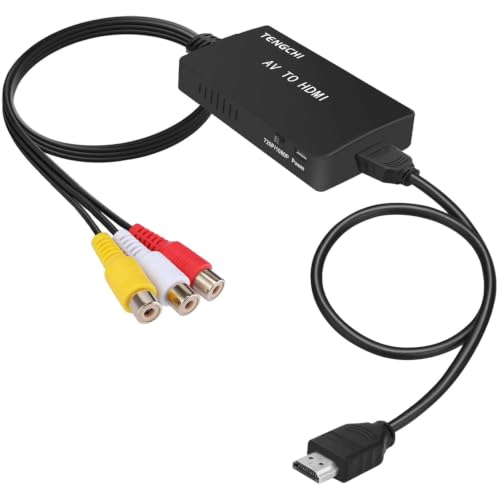
Tengchi RCA to HDMI Converter stands out for accepting several analog television formats: PAL, SECAM, NTSC 3.58, NTSC 4.43, PAL/M and PAL/N. Its female RCA input takes yellow, white and red plugs, and HDMI 1.3 carries output up to 1080p. The USB power cable is included, but the 5V, 1A power source is not. This option fits buyers who need one of the named input formats or want a 1080p output. It does not support 3D or 4K, so choose another device if either is required.
Bottom line: Choose this for its broad named analog-format support and 1080p output.
Viagkiki RCA to HDMI Converter

Viagkiki RCA to HDMI Converter has three built-in female RCA inputs, making it a direct match for source cables with standard male yellow, white and red plugs. It converts composite video and stereo audio to HDMI and supports PAL/NTSC and 720p or 1080p output. That connection distinction matters for many VCRs and DVD players; check the source’s output connector before choosing it.
Bottom line: Pick this for male-plug console cables; verify connector gender for other sources.
RCA to HDMI Mini Video Adapter

RCA to HDMI Mini Video Adapter offers selectable 720p or 1080p HDMI output and accepts PAL, SECAM, NTSC 3.58, NTSC 4.43, PAL/M and PAL/N composite formats. The adapter is one-way: it converts yellow, white and red RCA input to HDMI, not HDMI back to RCA. Its USB power cable is included, while a 5V power adapter is needed separately. This is a fit for someone who wants the named format coverage and output choices. A reverse-direction setup will not work, so confirm which device is the source and which is the display.
Bottom line: Choose this when you need its format options and one-way RCA-to-HDMI path.
GINGIN AV to HDMI Converter

GINGIN AV to HDMI Converter specifies 720p or 1080p HDMI output at 60 Hz and names older consoles including PS1, PS2, PS3, Xbox 360, Wii, N64 and SNES among compatible sources. It accepts standard yellow, white and red composite AV and requires USB power from a 5V source; the USB cable is included. One important limitation is the PS2 note: the console must be set to RGB for this converter to be used. That requirement makes the setting especially important for PS2 owners who cannot or do not want to change their console’s video mode.
Bottom line: Pick this for a named console source, especially if its PS2 setting is suitable.
How to Choose an AV Cable to HDMI Adapter
Choose a converter that matches the source’s output and the display’s input: composite RCA goes into the converter, and HDMI goes to the display. Composite uses three plugs—yellow for video and white/red for stereo audio—while HDMI carries the converted signal onward. These devices are directional, so an RCA-to-HDMI unit will not connect an HDMI source to an older RCA television. Confirm the direction before buying, then check resolution options and power. A 720p or 1080p output mode describes the HDMI signal format, not the original detail captured by a VCR or older console. If the source and display are more than 3.3 feet apart, choose a setup with suitable cable reach rather than relying on a short included cable.
RCA Connector and Cable Fit
RCA connector gender is a frequent fit issue: many console AV leads end in male plugs, while VCRs and DVD players commonly have female output jacks. A converter with built-in female inputs can take male plugs directly; a source with female jacks generally needs an RCA cable with male plugs at both ends. Match yellow to video and white/red to audio, since swapping these can leave picture or sound missing. Cable length also affects placement: a 3.3-foot lead covers only a short run between components. Before setup, identify the source’s output jacks, not just the cable type, and plan the physical route to the display. The conversion unit also needs its own power; the video connection alone is not sufficient.
Composite Video and HDMI Output Compared
Composite AV is an analog connection, while HDMI is digital; the converter changes the signal format so newer displays can accept it. Standard composite video is typically 480i in NTSC regions and 576i in PAL regions. Upscaling to a 720p or 1080p HDMI format does not restore detail absent from the source, and the display may scale the image again. Use the converter’s output choices to match the display’s accepted modes, rather than expecting sharper original footage. The practical choice is often determined by source format support, output modes and cable fit, not by the largest output number alone.
| Need | What to check |
|---|---|
| Male RCA plugs from a console | Female RCA inputs on the converter |
| Female RCA output jacks on a VCR or DVD player | Male-to-male RCA cable compatibility |
| HD display connection | HDMI output and accepted resolution |
| PAL or SECAM source | Explicit support for the source format |
Power and Setup for RCA to HDMI
Most compact RCA-to-HDMI converters need USB power in addition to the RCA and HDMI connections. A 5V supply is common for these adapters, and some specify 1A; use the required voltage and ensure the power source can provide the current. Connect the source’s yellow, white and red plugs to the matching inputs, run HDMI to the display, then power the converter. Select the display’s corresponding HDMI input. If there is no picture, verify signal direction, RCA seating, power and the source’s video format before changing other settings. Keep the converter ventilated and avoid pulling its cables taut, which can loosen connections.
Frequently Asked Questions
Can an RCA to HDMI converter make old video true HD?
No; upscaling changes the HDMI output format, not the detail captured by a standard-definition source. Composite video is typically 480i for NTSC or 576i for PAL.
Does an AV to HDMI adapter work in reverse?
No; these adapters convert composite RCA input to HDMI output only. For an HDMI source on an RCA display, you need a converter designed for HDMI-to-AV direction.
Which RCA plug carries video and which carry audio?
Yellow carries composite video, while white and red carry the left and right audio channels. Match each plug to its color-coded input to avoid missing picture or sound.
Why does my VCR need another RCA cable?
Many VCRs have female RCA output jacks, and some converters also have female inputs. A male-to-male RCA cable bridges those connections; console AV leads often have male plugs already.
What power supply does an RCA to HDMI adapter need?
Use the USB supply voltage and current specified for the converter; several models call for 5V, and one specifies 1A. The USB lead may be included even when the wall adapter is not.