
Best Aftermarket Wii Remote: 4 Options Compared

For most Wii players, Motion Plus Wii Controllers 2-Pack is the strongest pick because it pairs built-in MotionPlus with two Nunchuks in a two-controller pack. Choose TIANHOO Wii Controller 2-Pack or YUDEG Wii Controllers 2-Pack if you want a basic remote pair, or FASIGO Remote Controller with Nunchuk 2-Pack if bundled Nunchuks, silicone cases and wrist straps matter more than MotionPlus.
A Wii Remote is a wireless motion controller; pointing at the screen also requires a Wii sensor bar.
We earn a commission if you buy through links on this page. As an Amazon Associate I earn from qualifying purchases. Products are compared on manufacturer specifications, not hands-on testing.
- Best overall: Motion Plus Wii Controllers 2-Pack – Includes built-in MotionPlus and two Nunchuks with its two remotes.
- Best for Wii U: TIANHOO Wii Controller 2-Pack – The product is described as compatible with Wii and Wii U and includes cases and straps.
- Best for bundled extras: FASIGO Remote Controller with Nunchuk 2-Pack – Includes two Nunchuks, silicone cases and wrist straps.
- Best for basic controls: YUDEG Wii Controllers 2-Pack – Combines pointer, speaker and vibration functions without MotionPlus.
| Product | Best for | MotionPlus | Included accessories | Shop |
|---|---|---|---|---|
| Motion Plus Wii Controllers 2-Pack | MotionPlus bundle | Built-in | 2 Nunchuks | Check Price on Amazon |
| TIANHOO Wii Controller 2-Pack | Case and strap bundle | — | Silicone cases, wrist straps | Check Price on Amazon |
| FASIGO Remote Controller with Nunchuk 2-Pack | Complete accessory set | No | 2 Nunchuks, cases, straps | Check Price on Amazon |
| YUDEG Wii Controllers 2-Pack | Basic remote pair | No | — | Check Price on Amazon |
Aftermarket Wii Remotes Compared
Compare motion features and included accessories to find a pair that fits your console and games.
Motion Plus Wii Controllers 2-Pack

Built-in MotionPlus sets this two-pack apart from the basic remotes here, and the bundle also includes two Nunchuks. The seller describes the controllers as compatible with Wii and Wii U and says the Nunchuks have a 3-axis motion sensor. That makes this a practical fit for players who want both remote and Nunchuk controls in one purchase. The package does not include batteries, so have four AA batteries ready for the two remotes. Before choosing it for a particular game, check whether that game uses MotionPlus or standard Wii Remote controls.
Bottom line: Choose this pair if you want built-in MotionPlus and bundled Nunchuks.
TIANHOO Wii Controller 2-Pack
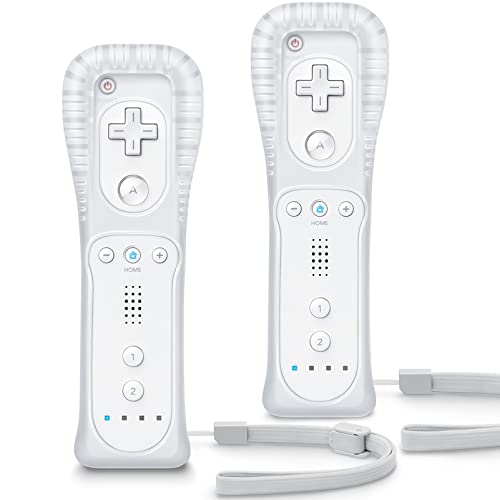
TIANHOO’s white two-pack includes silicone cases and wrist straps, a useful distinction if you want protective accessories bundled with the remotes. The product features include pointer, speaker and shock-vibration functions, and describe compatibility with Wii and Wii U. Connection uses the SYNC buttons on the controller and console; its suggested reset procedure clears connected controllers, so reserve that step for failed pairing rather than routine setup. Two AA batteries are required per remote and are not included. Buyers who specifically need built-in MotionPlus should compare another option.
Bottom line: Pick this set if bundled cases and straps are your priority.
FASIGO Remote Controller with Nunchuk 2-Pack

FASIGO stands out for including the broadest accessory set among these basic remotes: two Nunchuks, two silicone cases and two wrist straps. Its features specify that MotionPlus is not included, so it is better suited to standard remote play than to buyers seeking that added motion feature. The seller says up to four remotes can connect at once and describes synchronization by pressing the red sync buttons on the controllers and console. Each remote takes two AA batteries, which are not included. This choice makes sense when the bundled peripherals matter more than MotionPlus.
Bottom line: Choose this set for a pair of remotes with matching Nunchuks and protective extras.
YUDEG Wii Controllers 2-Pack

YUDEG offers a two-pack of black and blue remotes with pointer, speaker and vibration functions, but no built-in MotionPlus. The product features describe compatibility with Wii, Wii U and Wii Mini, making this the broadest named console range among the options here. Pairing uses the red SYNC button, and the product also mentions docking and USB connection. Because the package contents do not identify bundled Nunchuks or straps, buyers who need those extras should favor a set that explicitly includes them. This is a fit for players seeking the remotes themselves rather than MotionPlus controls.
Bottom line: Pick this pair if you want basic remotes and Wii Mini compatibility.
How to choose an aftermarket Wii remote
Start with the game features you need: built-in MotionPlus matters for games that require Wii MotionPlus, while pointer, speaker and vibration functions cover common remote controls. A Nunchuk adds an analog stick and extra buttons for games that support it; it is a separate accessory unless the set includes one. For a two-player setup, a two-pack supplies two remotes, but each still needs its own batteries. Choose a bundle based on the extras you will use: cases and wrist straps protect handling, while Nunchuks add a second control style. If your must-play game requires MotionPlus, choose a remote that explicitly says it has the feature rather than assuming every aftermarket remote does.
Pairing and pointing requirements
Wii Remotes pair through the console’s SYNC process, commonly by pressing the red SYNC buttons on the remote and console. Some controllers use a small sync button inside the battery compartment, so identify the button before inserting batteries. Pointing at the television is different from motion sensing: the Wii sensor bar provides the reference for the on-screen pointer and is normally placed above or below the display. Keep the bar unobstructed and centered for reliable aiming. Aftermarket controllers can vary in button placement and pairing sequence, so use the specific pairing steps supplied with the controller when the standard button sequence does not work.
Wii remote features at a glance
MotionPlus, Nunchuk support and bundled protection are separate buying considerations, so compare them independently rather than treating every remote as interchangeable.
| Need | Choose a remote with |
|---|---|
| MotionPlus game support | Built-in MotionPlus |
| Analog stick and extra buttons | Nunchuk included or compatible |
| Extra grip protection | Silicone case and wrist strap |
| Basic pointer and motion play | Pointer and motion-sensing functions |
Use the game’s controller requirements as the deciding condition: if it specifically calls for MotionPlus, do not substitute a remote that lacks the feature. If it uses a Nunchuk, confirm that the accessory is included or available separately.
Safe play and battery setup
Use the wrist strap and keep a clear area around each player; Nintendo’s Wii safety guidance emphasizes securing the strap and allowing space during motion-controlled play. Two AA batteries power many Wii Remotes, and a two-remote bundle therefore needs four batteries before play. Match battery polarity to the compartment marks and remove batteries if the remote will be stored for a long time. Keep the sensor bar positioned where players will not knock it or its cable. For multiplayer sessions, add controllers through the console’s normal sync process and avoid clearing saved pairings unless troubleshooting requires it.
Frequently Asked Questions
Does an aftermarket Wii remote need a sensor bar?
A sensor bar is needed for pointing the Wii Remote at the screen, but not for every motion-control function. Keep the bar centered above or below the display and unobstructed.
How many AA batteries does a Wii Remote use?
A Wii Remote uses two AA batteries, so a pair of remotes needs four. Batteries are not included with the products that specify this in their features.
Can aftermarket Wii remotes work with Wii U?
Some aftermarket Wii Remotes are described as compatible with Wii U, but compatibility can vary by controller and game. Check the specific console and game requirements before choosing.
What does built-in MotionPlus do?
MotionPlus adds more precise motion tracking for games that support the feature. Choose a remote that explicitly includes built-in MotionPlus when a game requires it.
Should I use a wrist strap while playing?
Yes, secure the wrist strap and keep clear space around players during motion-controlled games. A strap helps keep a remote from leaving the player’s hand during a swing.