
Best CAC Card Reader: 4 Models Compared by Fit

For most people, Identiv SCR3310V2 USB-A is the strongest fit because it supports Windows, macOS, Linux, and Android and lists compliance with major smart-card standards. Choose ZOWEETEK USB-A CAC Reader for a driver-free USB-A option on Windows 10/11 or macOS 10.15 and later; choose a USB-C model if your computer lacks USB-A.
A CAC reader is a contact-chip device that connects a card to a computer, but the reader alone does not complete CAC authentication; the operating system, middleware, and browser or application setup also matter.
We earn a commission if you buy through links on this page. As an Amazon Associate I earn from qualifying purchases. Products are compared on manufacturer specifications, not hands-on testing.
- Best overall: Identiv SCR3310V2 USB-A – Broad operating-system compatibility and support for major contact smart-card standards.
- Best for driver-free USB-A: ZOWEETEK USB-A CAC Reader – The maker says it is plug and play on Windows 10/11 and macOS 10.15 or later.
- Best for USB-C: ZOWEETEK USB-C CAC Reader – Uses a USB-C interface and supports Windows and macOS, with a Windows 11 driver needed.
| Product | Best for | Interface | Operating-system compatibility | Shop |
|---|---|---|---|---|
| Identiv SCR3310V2 USB-A | Broad OS support | USB-A | Windows, macOS, Linux, Android | Check Price on Amazon |
| ZOWEETEK USB-A CAC Reader | Simple USB-A setup | USB-A | Windows 10/11, macOS 10.15+ | Check Price on Amazon |
| ZOWEETEK USB-C CAC Reader | Native USB-C ports | USB-C | Windows 10/11, macOS 10.15+ | Check Price on Amazon |
| Identiv SCR3310v2.0 USB-C | Identiv USB-C option | USB-C | — | Check Price on Amazon |
CAC card readers
Match the reader’s connector to your computer, then check the operating-system and authentication setup you need.
Identiv SCR3310V2 USB-A

Identiv SCR3310V2 USB-A stands out for its range of operating systems and standards compliance, including ISO/IEC 7816, USB CCID, and PC/SC. The USB-A reader is intended for contact smart cards, including CAC and PIV cards, and the maker describes it as compact for mobile use. Its broad compatibility makes it a practical starting point when one computer is not the whole story. The main fit limitation is the USB-A connector: a computer with only USB-C ports needs a suitable adapter or a native USB-C reader. Authentication still depends on compatible middleware and computer configuration.
Bottom line: Choose this if broad OS support and standards coverage matter more than a native USB-C connector.
ZOWEETEK USB-A CAC Reader

ZOWEETEK USB-A CAC Reader is the USB-A pick whose maker specifically calls it driver-free and plug and play for Windows 10/11 and macOS 10.15 or later. That software compatibility does not mean the reader supplies account access or authentication middleware; CAC login can still require separately configured software and certificates. This model is a closer fit for users on the operating systems than for Linux or Android users, which are not included in its compatibility claims.
Bottom line: Choose this for a USB-A computer on one of its operating systems and a simple reader setup.
ZOWEETEK USB-C CAC Reader
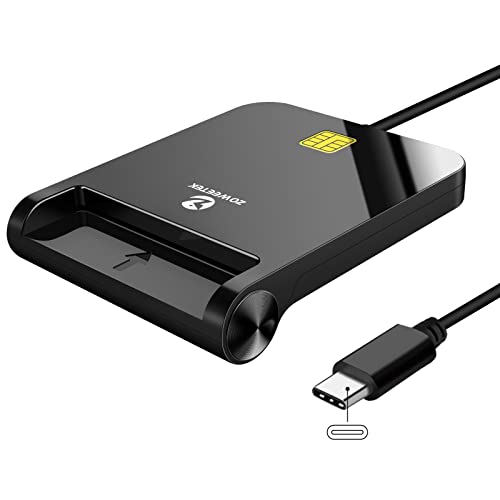
ZOWEETEK USB-C CAC Reader differs from the USB-A alternatives by using a native USB-C interface, so it suits computers with USB-C ports and no USB-A connection. The maker says it supports Windows 10/11 and macOS 10.15 or later, but notes that Windows 11 requires a driver; Mac users need Java, and government users need a third-party CAC enabler program. It supports CAC/PIV and other government ID cards. The compatibility excludes iPhone and iPad, so this is not a choice for those devices, and CAC authentication setup remains separate from the reader itself.
Bottom line: Choose this if your computer has USB-C and you can meet its driver or software requirements.
Identiv SCR3310v2.0 USB-C

Identiv SCR3310v2.0 USB-C is the Identiv option with a USB-C connector, unlike the USB-A Identiv model. Its product name identifies it as a smart-card reader, but there are no feature claims to establish operating-system support, standards, or setup requirements. That makes connector fit the clear selection point, while buyers who need known OS compatibility may prefer Identiv SCR3310V2 USB-A, whose supported systems are specified. Confirm operating-system compatibility before choosing this reader, especially if your CAC workflow depends on particular middleware or a managed government computer.
Bottom line: Choose this when you specifically need an Identiv reader with USB-C and can confirm computer compatibility.
How to choose a CAC card reader
Choose by connector first, then by operating-system and authentication support. USB-A and USB-C are physical connector types, not guarantees that a CAC login will work; the computer still needs a smart-card service and compatible middleware. Contact CAC and PIV cards use a chip interface, so a contact reader must accept the card’s chip rather than relying on a proximity or magnetic-stripe reader. If you use a managed government computer, confirm its approved middleware and browser setup with your IT team. For a personal computer, identify the OS version and whether you can install a driver or helper application before selecting a model.
| Need | Reader fit |
|---|---|
| USB-A port and broad OS support | Identiv SCR3310V2 USB-A |
| USB-A and driver-free setup on stated systems | ZOWEETEK USB-A CAC Reader |
| Native USB-C with Windows/macOS setup conditions | ZOWEETEK USB-C CAC Reader |
| Identiv brand with USB-C | Identiv SCR3310v2.0 USB-C |
USB-A and USB-C fit for CAC readers
Match the connector to a port you can use without blocking neighboring ports or requiring an adapter. USB-A is the familiar rectangular plug; USB-C is the smaller, reversible oval connector. A USB-C reader can connect to some USB-A computers with an adapter, but the adapter does not add operating-system support or middleware. For a mobile computer, check whether the port supports data rather than charging only; a card reader needs a data connection. The USB-C ZOWEETEK model has an explicit Windows 11 driver requirement, while the USB-A model’s maker claims plug-and-play operation only for its named Windows and macOS versions.
What CAC authentication requires beyond a reader
A reader provides the physical link to the card; CAC authentication also requires compatible software and certificates. Government workflows commonly use agency-approved middleware such as ActivClient, while personal-computer configurations may require additional CAC-enabling software and browser or Java setup. The ZOWEETEK USB-C product specifically calls for Java on Mac and a third-party CAC enabler for DOD and USG users. Middleware requirements can differ by organization and site, so verify the required software before buying hardware. Never share a PIN or leave a CAC inserted in an unattended computer; remove the card when you finish a session.
Common CAC reader compatibility mistakes
The most common mistake is treating a successful USB connection as proof that a CAC website will accept the card. A reader can be recognized while certificates, middleware, or browser settings remain incomplete. A second mistake is buying by connector alone: the USB-C model named here does not support iPhone or iPad, and the named compatibility claim is for Windows and macOS. Check the computer’s exact OS version, available port, and whether you have permission to install required software. If you rely on agency email or a portal, test the required setup path with your organization’s IT guidance before depending on a personal reader for time-sensitive access.
Frequently Asked Questions
Does a CAC card reader work without middleware?
A reader alone generally cannot complete CAC authentication; compatible middleware and system configuration are also needed. Government environments may mandate agency-approved software, so check those requirements before relying on a personal computer.
Can a USB-C CAC reader work on Windows 11?
Some can, but software support is model-specific. The ZOWEETEK USB-C model here requires a driver on Windows 11, so confirm you can install it before choosing that option.
Will a CAC reader let me log in on a Mac?
A compatible reader can be part of a Mac CAC setup, but the OS alone is not enough. The ZOWEETEK USB-C model calls for Java on Mac, and CAC use also depends on middleware and browser or application configuration.
Can I use a CAC reader with an iPhone or iPad?
Do not assume a computer CAC reader works with iOS devices. The ZOWEETEK USB-C model explicitly excludes iPhone and iPad, and mobile CAC access may require a separate supported workflow.
Why does my computer detect the reader but reject my CAC?
Reader detection confirms a USB connection, not that authentication is configured. Check whether required middleware and certificates are installed and whether the browser or application supports the organization’s CAC login process.