
Best Circle Cutter for Paper: 4 Models Compared

The Fiskars Circle Cutter is the best circle cutter for paper for most crafters because its 1- to 8-inch range covers many common card and scrapbook sizes, and its clear base helps with alignment. Choose another tool if you regularly need circles larger than 8 inches or prefer a disc-style cutter.
We earn a commission if you buy through links on this page. As an Amazon Associate I earn from qualifying purchases. Products are compared on manufacturer specifications, not hands-on testing.
- Best overall: Fiskars Circle Cutter – Its 1- to 8-inch range and clear base suit a variety of paper and cardstock projects.
- Best for compact circles: Migrdots Disc Circle Cutter, 1–4 in – The disc-style cutter handles 1- to 4-inch circles and has non-slip pads.
- Best for large circles: Adjustable Circle Cutter, 4–12.5 in – Its 4- to 12.5-inch range reaches beyond the other cutters here.
| Product | Best for | Circle diameter | Replacement blades | Cutting style | Shop |
|---|---|---|---|---|---|
| Fiskars Circle Cutter | Everyday paper crafts | 1–8 in | 3 | Adjustable cutter | Check Price on Amazon |
| Adjustable Circle Cutter, 1–8 in | Printed designs | 1–8 in | 4 | Adjustable cutter | Check Price on Amazon |
| Migrdots Disc Circle Cutter, 1–4 in | Small circles | 1–4 in | 2 | Rotating disc | Check Price on Amazon |
| Adjustable Circle Cutter, 4–12.5 in | Large paper circles | 4–12.5 in | 2 | Adjustable cutter | Check Price on Amazon |
Circle Cutters for Paper
Compare each cutter’s size range, blade supply and design to match it to your paper projects.
Fiskars Circle Cutter
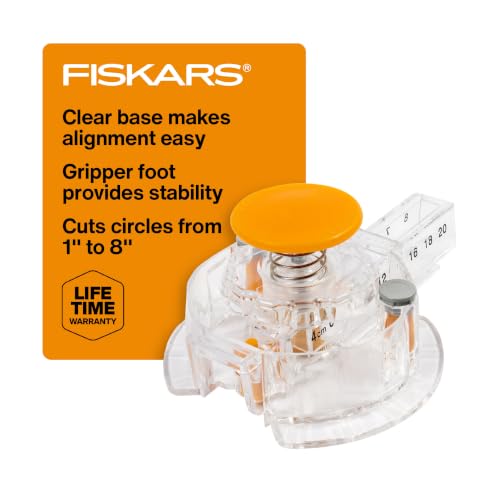
The Fiskars Circle Cutter balances a broad size range with a clear base, making it a versatile pick for card making and scrapbooking. It cuts circles from 1 to 8 inches in paper or cardstock and includes three replacement blades. The transparent base and needlepoint help show the cutting position, while a gripper foot is intended to reduce slipping. Fiskars says the tool is lightweight and portable. Its upper limit is 8 inches, so choose a different cutter if your projects require larger circles.
Bottom line: Choose this for varied paper crafts with circles no larger than 8 inches.
Adjustable Circle Cutter, 1–8 in

The visual concentric guides distinguish this 1- to 8-inch cutter for people aligning circles with printed artwork or photo borders. It has a clear base, inch and centimeter scale, and a locking mechanism; the package includes four replacement blades. The maker says its rotary blade cuts standard paper, cardstock and laminated photo sheets cleanly. That cutting claim matters most when choosing materials, but the 8-inch maximum still rules it out for larger layouts. Consider it when centered placement is more important than an expanded diameter range.
Bottom line: Pick this when visual guides for printed designs are a priority.
Migrdots Disc Circle Cutter, 1–4 in

The Migrdots uses a rotating disc rather than an adjustable arm, and its 1- to 4-inch range focuses it on smaller cutouts. Three finger holes provide a place to hold and turn the tool, while rubber pads on the bottom are designed to keep paper from shifting. It includes two replacement blades in addition to the installed blade. The maker describes it as suitable for adults, teachers and children, but any paper cutter has a sharp blade; keep fingers away from the cutting edge and supervise children.
Bottom line: Choose this for compact circles and a disc-style turning motion.
Adjustable Circle Cutter, 4–12.5 in

The 4- to 12.5-inch range makes this adjustable cutter the option for paper projects that need circles larger than the other tools can make. Its clear scale ruler helps set the size, and the instructions describe loosening a screw, sliding to the desired setting and tightening it before rotating. The package includes three blades total: one installed and two spares. The 4-inch minimum makes it a poor fit for small embellishments, so choose a cutter with a lower minimum when you need tiny circles.
Bottom line: Choose this for larger circles from 4 inches up.
How to Choose a Paper Circle Cutter
Start with the diameter you need most often: these tools span 1 to 12.5 inches, but no single model covers that entire range. A 1- to 8-inch cutter suits many small and medium paper crafts, while projects above 8 inches call for the 4- to 12.5-inch model. For circles under 4 inches, avoid that larger-range tool. Next, consider how you position the cut: a clear base or visual guides can help line up a printed image, while a rotating disc uses a different hand motion. Match the blade style and cutting mechanism to your comfort, and work on a stable, protected surface so the cutter does not score the table beneath the paper.
Circle Size and Paper Alignment
Circle cutters are usually set by diameter, but a center-point measurement is a radius, half the diameter. For a 6-inch circle, the radius is 3 inches; confirm whether the tool’s scale shows the desired measurement before cutting. Transparent bases and guides can help place a cut around printed artwork, but alignment still depends on positioning the center correctly. Make a trial cut on scrap paper when the circle must fit a particular design or opening. Keep the paper flat and hold it securely; shifting during a rotation can distort the edge or move the cut off-center. A diameter range is a capability boundary, not a guarantee that every setting fits every paper project.
A quick fit chart helps narrow the choice by the size of circle you need.
| Needed circle diameter | Suitable range | What to prioritize |
|---|---|---|
| 1–under 4 in | 1–4 in or 1–8 in | Low minimum diameter |
| 4–8 in | 1–8 in or 4–12.5 in | Alignment and handling |
| Over 8–12.5 in | 4–12.5 in | High maximum diameter |
Rotating Disc and Adjustable Cutters
Disc-style cutters turn around the cut area, while adjustable cutters set a diameter along an arm or scale and rotate around a center point. The disc option here covers 1 to 4 inches; the adjustable options span either 1 to 8 inches or 4 to 12.5 inches. Choose a disc for small circles if its grip and hand motion feel manageable, and choose an adjustable model when you need its wider size range or a scale. Clear bases and visual guides are useful for printed designs, but they do not eliminate the need to check placement. Try the selected tool on scrap paper first, especially before cutting a finished print or a precisely sized craft piece.
Safe Cutting and Blade Care
Circle cutters use sharp blades, so keep hands and fingers out of the cutting path and away from the blade when changing it. The disc-style tool has finger holes for turning, but those openings do not make the blade safe to touch. Use a stable work surface and a cutting mat or other suitable protection beneath the paper; never cut directly on a finished table. Replacement blade counts differ by model, so store spares securely and replace a blade when it no longer cuts cleanly rather than forcing the tool through paper. Keep cutters and loose blades out of children’s reach, and supervise children closely during any cutting task.
Frequently Asked Questions
How do I set the right circle diameter?
Set the cutter to the circle’s diameter, not its radius: a 6-inch circle has a 3-inch radius. Check which measurement the scale uses, then test the setting on scrap paper before cutting a finished piece.
Can circle cutters cut laminated paper?
Some cutters are promoted for laminated photo sheets, but paper thickness and laminate can affect the cut. The 1- to 8-inch adjustable option is described by its maker as cutting laminated sheets; test a scrap from the same material first.
What size circle cutter works for large paper circles?
For circles larger than 8 inches, choose a tool whose range extends past that size; the 4- to 12.5-inch model reaches the largest diameter among these options. Its 4-inch minimum means it cannot make smaller circles.
How can I keep a circle cutter from slipping?
Use a flat, stable surface and keep the paper flat while turning the tool. Some designs include gripper feet or non-slip pads, but a scrap-paper trial can reveal whether your paper shifts before you cut the final piece.
When should I replace a circle cutter blade?
Replace the blade when it drags, snags or leaves an uneven edge instead of cutting cleanly. Keep fingers away from the cutting edge during blade changes, and store spare blades securely.