
Best Helical Head for DeWalt 735: 5 Compared

SpeTool 13-Inch Helical Head suits most DeWalt 735 owners because it is made for the DW735 and DW735X and includes 56 carbide inserts in four rows. Choose Byrd Tool Shelix DW735 if its smaller-than-OEM cutterhead diameter and C3 carbide cutters suit your installation and maintenance priorities; check your planer model’s fit before ordering.
We earn a commission if you buy through links on this page. As an Amazon Associate I earn from qualifying purchases. Products are compared on manufacturer specifications, not hands-on testing.
- Best overall: SpeTool 13-Inch Helical Head – Made for DW735 and DW735X, with 56 staggered carbide inserts in four rows.
- Best for insert longevity: Byrd Tool Shelix DW735 – Its maker says C3 carbide cutters last an average of 10 times longer per side than traditional steel knives.
- Best for four-edge inserts: FINDBUYTOOL 13-Inch Head – The maker says each carbide insert has four usable edges that can be rotated.
| Product | Best for | Compatible planer | Insert layout | Insert feature | Shop |
|---|---|---|---|---|---|
| SpeTool 13-Inch Helical Head | Four-row layout | DW735, DW735X, DW735-XE | 4 rows, 56 inserts | Carbide; 56 screws included | Check Price on Amazon |
| Byrd Tool Shelix DW735 | C3 carbide cutters | DW735 | — | C3 carbide; 4 sides per cutter | Check Price on Amazon |
| FOXBC 13-Inch Spiral Head | Replacement inserts | DW735, DW735X | Staggered spiral; count not provided | 15 × 15 × 2.5 mm, 30° R150 inserts | Check Price on Amazon |
| 13-Inch 56-Insert Helical Head | Rotatable inserts | DW735, DW735X, DeWalt 735 | 4 rows, 56 inserts | Carbide; rotatable inserts | Check Price on Amazon |
| FINDBUYTOOL 13-Inch Head | Four-edge inserts | DW735, DW735X | 4-row; count not provided | Carbide; 4 usable edges each | Check Price on Amazon |
Helical heads for the DeWalt 735
Compare planer compatibility and insert features to find a head that matches your DW735 setup and maintenance preferences.
SpeTool 13-Inch Helical Head
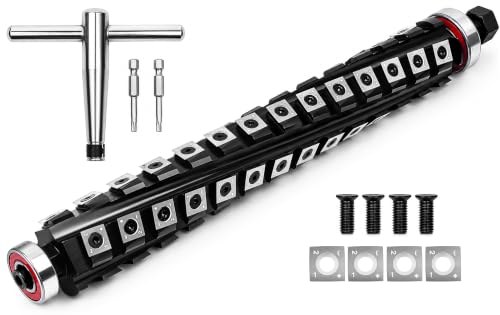
SpeTool 13-Inch Helical Head stands out for its 56-insert, four-row layout and compatibility with the DW735, DW735X and DW735-XE. The package includes two pre-mounted bearings, 56 screws and two wrenches, so it supplies several installation components along with the cutterhead. SpeTool says the staggered design makes a shearing cut and reduces noise by 50% compared with traditional blades. This option suits owners who want the specified insert count and bearings already mounted.
Bottom line: Pick this if you want a 56-insert head with pre-mounted bearings for a DW735-series planer.
Byrd Tool Shelix DW735
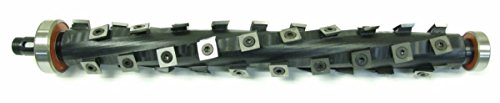
Byrd Tool Shelix DW735 differs from the 13-inch options by specifying a cutterhead diameter about 1/16 inch smaller than the original OEM head, which its maker says allows installation without removing the carbide inserts. Byrd says the C3 carbide cutters average 10 times longer per side than traditional steel knives, with four sides per cutter. The spiral arrangement is intended to break up chips for dust collection, while individual pockets make cutter replacement and alignment easier. This is a fit for buyers prioritizing replaceable, multi-edge cutters. Its compatibility names DW735, not the DW735X or other models, so verify the exact planer model first.
Bottom line: Choose this if the DW735 fit and four-sided C3 cutters match your priorities.
FOXBC 13-Inch Spiral Head

FOXBC 13-Inch Spiral Head is distinct for giving a replacement-insert size: 15 × 15 × 2.5 mm, 30° R150. It is designed for the DW735 and DW735X, and its two bearings are already installed. FOXBC says its staggered spiral carbide configuration makes a shearing cut for a smoother finish and quieter planer operation than a straight-knife setup. That replacement-insert specification can help buyers who want to identify compatible cutters later.
Bottom line: Pick this if you want an explicitly sized replacement insert and compatibility with DW735 or DW735X.
13-Inch 56-Insert Helical Head

13-Inch 56-Insert Helical Head gives a clearly stated 56-insert count across four rows and names compatibility with DeWalt 735, DW735 and DW735X. Its maker says the carbide inserts are rotatable, allowing an alternate edge to be used when one edge becomes worn. The package includes two bearings as well as the helical head and inserts. This suits buyers who want a specified insert count and an edge-rotation feature.
Bottom line: Choose this if you want 56 rotatable inserts and a DW735-series fit.
FINDBUYTOOL 13-Inch Head

FINDBUYTOOL 13-Inch Head emphasizes four usable edges per carbide insert, which can be rotated when an edge dulls or gets nicked. The 13-inch head is made for DW735 and DW735X planers; its maker says installation requires no machining or modifications. FINDBUYTOOL also says its staggered inserts shear wood in overlapping cuts to help reduce tear-out and harsh cutting noise compared with straight knives. This option suits owners focused on using alternate insert edges before replacing cutters.
Bottom line: Pick this if rotating four insert edges is more important than knowing the total insert count.
How to choose a helical head for the DeWalt 735
Start with exact planer compatibility, then compare cutter layout and the maintenance facts that matter to you. A helical head uses rows of small carbide inserts set at an angle to shear wood; a straight-knife head uses long blades across the cutterhead. Insert count alone does not establish fit or cut quality, so compare each model’s planer range and insert design. Choose a model with a 56 inserts if you want that count specified; choose a model with four usable edges per insert if edge rotation is your priority. Confirm that any replacement inserts you plan to keep on hand match the cutterhead’s dimensions and geometry.
Before choosing by noise or finish claims, remember that board species, grain direction, cut depth and sharpness affect the result. No cutterhead eliminates the need for dust collection or careful setup.
Check planer compatibility before replacing the cutterhead
Compatibility is the first fit test: these options name the DW735, DW735X, or both, while only some name DW735-XE. Match the full model designation on your planer rather than relying on the phrase “DeWalt 735.” Also compare the replacement head’s bearing and insert arrangement with the parts supplied; some listed options include pre-mounted bearings, and others specify two bearings in the package. One option states its diameter is about 1/16 inch smaller than the OEM head. That dimensional difference is a product-specific installation feature, not a general rule for all helical heads.
Disconnect the planer from power before opening it or working around the cutterhead. The inserts are sharp; handle the head and cutters carefully, and keep hands away from the cutting edges during installation and maintenance.
Compare insert layouts and maintenance
Insert features matter after installation: a worn or nicked edge can affect the finish, and rotatable inserts let you use another cutting edge where the insert design permits it. Check the specific head’s insert count, edge count and replacement-insert dimensions rather than assuming these are interchangeable. A 56-insert, four-row head and a head specifying four usable edges per cutter describe different attributes; neither number alone tells you how many inserts a different product includes.
The table separates fit and maintenance features so you can apply your own priority. “Not provided” means the specifications did not give a value.
| Buyer priority | Feature to compare | Decision rule |
|---|---|---|
| Exact machine fit | Named planer models | Match your full model designation |
| Known cutter count | Stated insert count | Choose a model specifying 56 if that count matters |
| Edge rotation | Usable edges per insert | Choose a model specifying multiple usable edges |
| Future cutter replacement | Insert dimensions and geometry | Match the replacement cutter to the head |
Plan for chips, dust and a clean finish
Planer shavings are bulky, so dust collection needs to handle chips as well as fine dust; a cutterhead’s shear pattern does not replace extraction. Keep the planer’s chip path clear and use suitable collection equipment before making cuts. Helical-head makers commonly emphasize quieter operation or reduced tear-out, but results still vary with wood species, grain direction, feed and setup. Inspect the board’s grain before planing, and take lighter cuts on figured or reversing grain to reduce tear-out risk. Do not assume a helical head makes sanding unnecessary: the final finish depends on the wood and the work that follows planing.
For maintenance, check insert edges for damage and rotate or replace individual cutters as their design allows. Keep the appropriate wrench and replacement inserts available, and disconnect power before any inspection or adjustment.
Frequently Asked Questions
Can a helical head fit a DW735X planer?
Several options here name the DW735X as compatible, but not every option does. Match the full model designation before selecting a replacement head.
How many inserts does a DW735 helical head need?
Compare the count for the specific cutterhead rather than treating four rows as a count.
Can you rotate carbide inserts after they dull?
Yes, when the cutterhead’s insert design provides alternate usable edges. One option specifies four usable edges per insert; follow the cutterhead’s edge-rotation layout and replace a damaged insert rather than continuing to cut with it.
Does a helical cutterhead eliminate planer tear-out?
No cutterhead guarantees a tear-out-free surface. Grain direction and cut depth matter, so take lighter cuts on figured or reversing grain and inspect the board as you work.
Should the planer be unplugged to change inserts?
Yes. Disconnect the planer from power before touching the cutterhead or its inserts, and handle the sharp carbide edges carefully.