
Best iPhone Cleaning Kit: 4 Kits Compared by Fit

Inesore 32-in-1 Phone Cleaning Kit suits most people because its 32-in-1 set covers iPhone, earbuds, keyboards, and other devices, with wet and dry cleaning options. Choose Matte Black Port Cleaning Kit for a case with port-focused tools, or STIKKI Putty & Precision Tools if cleaning putty is a priority.
An iPhone cleaning kit is a set of small tools for removing dust and lint from device openings and accessories. Turn off and unplug devices before cleaning, and keep liquids and loose debris out of ports.
We earn a commission if you buy through links on this page. As an Amazon Associate I earn from qualifying purchases. Products are compared on manufacturer specifications, not hands-on testing.
- Best overall: Inesore 32-in-1 Phone Cleaning Kit – The 32-in-1 set covers phones, earbuds, keyboards, and other devices, with wet and dry cleaning options.
- Best for port tools: Matte Black Port Cleaning Kit – The kit includes a port hook, steel U brush, and port wipe in a storage case.
- Best for cleaning putty: STIKKI Putty & Precision Tools – Cleaning putty is paired with precision tools for ports, speakers, and earbuds.
- Best for phone openings: GintaXen 32-in-1 Phone Cleaning Kit – Its uses include Lightning and USB-C ports, speakers, earpieces, and camera areas.
| Product | Best for | Cleaning approach | Kit dimensions | Storage | Shop |
|---|---|---|---|---|---|
| Inesore 32-in-1 Phone Cleaning Kit | Multi-device cleaning | Wet and dry tools | — | Layered storage | Check Price on Amazon |
| GintaXen 32-in-1 Phone Cleaning Kit | Phone openings | Precision tools | — | — | Check Price on Amazon |
| Matte Black Port Cleaning Kit | Port-focused tools | Hook, brush, wipe | 3.6 × 2.0 × 2.4 in | Storage case | Check Price on Amazon |
| STIKKI Putty & Precision Tools | Putty and precision | Cleaning putty and tools | 3.7 × 2.4 × 0.8 in | — | Check Price on Amazon |
Best iPhone Cleaning Kits
Compare each kit by its cleaning tools and the devices or openings it is meant to handle.
Inesore 32-in-1 Phone Cleaning Kit

The Inesore set stands out for combining wet and dry cleaning with tools for phones, earbuds, keyboards, and camera lenses. The maker says soft picks are intended for Lightning and Type-C ports, while its fine brushes reach speaker and earpiece openings; the set also includes a keycap puller and tools for earbud cases. Its layered storage keeps the accessories together. This is the broadest fit for someone cleaning several kinds of electronics. The kit’s 32-in-1 count does not establish that every tool is suitable for every iPhone surface, so use only appropriate tools and keep moisture away from openings.
Bottom line: Choose this set if you want tools for an iPhone plus keyboards, earbuds, and other electronics.
GintaXen 32-in-1 Phone Cleaning Kit
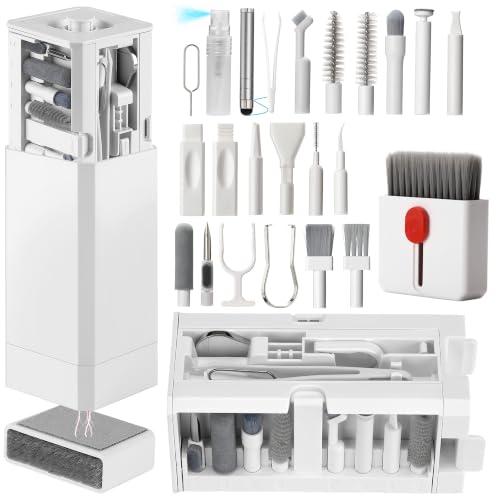
The GintaXen kit focuses on phone openings and camera areas, with tools intended for Lightning and USB-C ports, speakers, earpieces, and phone edges. The maker says it removes pocket lint, dust, and debris from hard-to-reach spaces, and the 32-in-1 name signals a multi-tool set. It also names AirPods, earbuds, keyboards, laptops, and camera lenses among its intended uses. This suits someone whose main goal is detailing a phone rather than choosing a putty-based cleaner. The fields do not identify its storage format, so it may be less appealing if a dedicated case is a deciding factor.
Bottom line: Pick this if phone ports, speaker openings, and camera areas are the main targets.
Matte Black Port Cleaning Kit
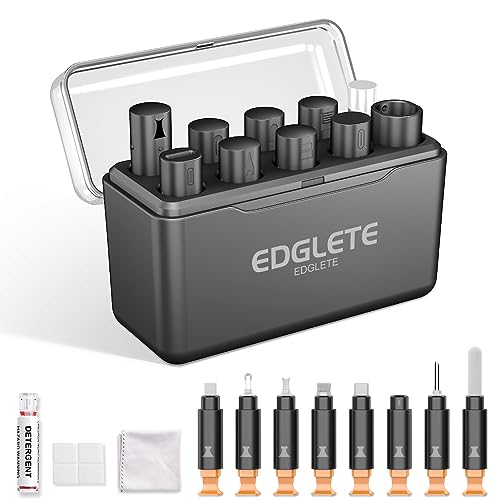
The Matte Black kit distinguishes itself with three named port tools: a hook, a steel U brush, and a port wipe, stored in a compact case measuring 3.6 × 2.0 × 2.4 inches. Its maker also identifies a high-density velvet brush for small speaker, headphone, and switch crevices, with compatibility described for USB-C ports and several device types. Choose this set when the port tools and storage case matter more than a broad multi-device tool count. A steel brush is not appropriate for every opening or surface; use a soft tool and avoid scraping contacts or forcing anything into a port.
Bottom line: Choose this if a dedicated case and named port tools matter most.
STIKKI Putty & Precision Tools

The STIKKI set is the only option here that specifically pairs cleaning putty with precision tools. Its maker positions the combination for debris in ports, speaker grills, earbuds, and other electronics, and names iPhone, AirPods, keyboards, and laptops as compatible uses. The compact kit measures about 3.7 × 2.4 × 0.8 inches. This is a suitable direction for someone who wants putty alongside small tools rather than a port hook-and-brush set. Putty should not be pushed into openings or left behind in a speaker grille; use only a small amount where it can be removed cleanly.
Bottom line: Pick this if you want cleaning putty alongside small detailing tools.
How to choose an iPhone cleaning kit
Choose a kit by the area you need to clean, not by its tool count alone. Port tools are meant for compact openings, while brushes suit surface dust around speaker grilles, earpieces, and accessory cases; putty is a separate approach for accessible debris. For a phone-only routine, prioritize soft, precise tools. If you also clean earbuds or a keyboard, a multi-device set may be more useful. A useful rule is to avoid any tool that cannot enter an opening without pressure: if a pick catches or a brush bends sharply, stop rather than forcing it. A 32-in-1 label describes quantity, not whether each piece is appropriate for every device surface.
How to clean an iPhone port safely
Power the iPhone off and disconnect cables before cleaning any opening. Use a dry, soft tool only for visible lint near the port entrance, and stop if debris is packed beyond easy reach; do not scrape contacts or insert metal tools. Apple advises against getting moisture in openings and against using compressed air, so wet wipes and air blasts do not belong inside a charging port. Keep the phone stable and work under good light. If the port remains obstructed or charging does not work after gentle external cleaning, service is safer than repeatedly probing the connector.
Cleaning screens, speakers, and earbuds
Clean the screen and exterior with a soft, lint-free cloth; if needed, slightly dampen the cloth rather than applying liquid directly to the device. Keep moisture out of speaker grilles, microphones, charging ports, and earbud openings. A small dry brush can lift surface dust from grilles and accessory cases, but pressure can push debris farther in. For earbuds, remove detachable tips first if the device instructions permit it, and let washable tips dry fully before reattaching. Never use a sharp metal point on a screen or speaker mesh. Putty is best limited to accessible surfaces where it can be removed in one piece.
Common iPhone cleaning mistakes
The most common mistake is treating every tool in a kit as safe for every surface. A metal pick can scratch or damage a connector, while excess liquid can reach openings and cause damage. Do not use household cleaners, abrasive materials, or compressed air on the phone; avoid spraying cleaners directly onto it. Cleaning more aggressively is not a reliable fix for a damaged cable or connector. If a port looks bent, corroded, or otherwise damaged, stop cleaning and seek service. For routine dust, a dry, soft tool used only at the opening is the safer choice.
Frequently Asked Questions
Can I use a cleaning kit on an iPhone charging port?
Yes, but use only a dry, soft tool for accessible debris and do not scrape the connector contacts. Power off and unplug the phone first; if lint is packed inside or the connector appears damaged, stop rather than probing deeper.
Can I use alcohol to clean an iPhone screen?
Do not pour or spray alcohol directly onto an iPhone. Apple permits certain disinfecting wipes on exterior surfaces, but liquid must not enter openings; a soft lint-free cloth is the routine cleaning choice.
How often should I clean an iPhone charging port?
There is no fixed schedule; inspect the port when a cable stops seating normally or visible lint appears. Do not make a habit of inserting tools, since repeated probing can damage the connector.
Can cleaning putty go inside an iPhone speaker?
No, do not push putty into a speaker grille or other opening. Use it only on an accessible surface where it can be removed cleanly, since residue trapped in a grille can be difficult to clear.
Should an iPhone be on while cleaning it?
No, power it off and disconnect any cable before cleaning. A powered-off device also removes the risk of accidentally triggering controls while working around its openings.