
Best Privacy Screen Protector S21 Ultra: 5 Picks

S21 Ultra 24° Tempered Glass, 2-Pack is the best fit for most Galaxy S21 Ultra owners because it pairs tempered glass with a 24° privacy angle. Choose a film option instead if you prefer a thinner, flexible protector; the privacy effect can also make the display harder to see from off-center positions.
We earn a commission if you buy through links on this page. As an Amazon Associate I earn from qualifying purchases. Products are compared on manufacturer specifications, not hands-on testing.
- Best overall: S21 Ultra 24° Tempered Glass, 2-Pack – Tempered glass and a 24° privacy angle balance protection and side-view privacy.
- Best for extra coverage: JavoYion S21 Ultra Screen and Lens 2+2 Pack – The 2+2 pack includes screen and camera lens protectors, plus a 25° angle.
- Best for tempered glass: HPTech S21 Ultra Tempered Glass, 2-Pack – Its 0.33 mm tempered glass has a 9H surface hardness rating and oleophobic coating.
| Product | Best for | Material | Privacy angle | Shop |
|---|---|---|---|---|
| S21 Ultra 24° Tempered Glass, 2-Pack | Glass and privacy | Tempered glass | 24° | Check Price on Amazon |
| JavoYion S21 Ultra Screen and Lens 2+2 Pack | Screen and lens | Soft film | 25° | Check Price on Amazon |
| LYWHL S21 Ultra Full-Coverage Film, 2-Pack | Ultrasonic fingerprint | Film | — | Check Price on Amazon |
| HPTech S21 Ultra Tempered Glass, 2-Pack | Glass and coating | Tempered glass | — | Check Price on Amazon |
| S21 Ultra Ceramic Film, 2-Pack | Fingerprint-sensitive film | Ceramic film | 24° | Check Price on Amazon |
S21 Ultra Privacy Screen Protectors
Compare material, privacy angle and pack contents to find the protector that fits your priorities.
S21 Ultra 24° Tempered Glass, 2-Pack

S21 Ultra 24° Tempered Glass, 2-Pack stands out for combining tempered glass with a 24° privacy angle. The two-pack is sized for the Galaxy S21 Ultra’s 6.8-inch display, and the product is described as supporting fingerprint unlock and case use. Its narrow viewing angle is a useful match for commuters or anyone who wants less visibility from the sides.
Privacy filters reduce off-axis visibility by limiting the display’s viewing angle, but that can also make the screen appear darker or harder to read at an angle. Choose this option if glass matters more than a flexible film; confirm fingerprint recognition after installation.
Bottom line: Choose this if you want a two-pack of tempered glass with a 24° privacy angle.
JavoYion S21 Ultra Screen and Lens 2+2 Pack
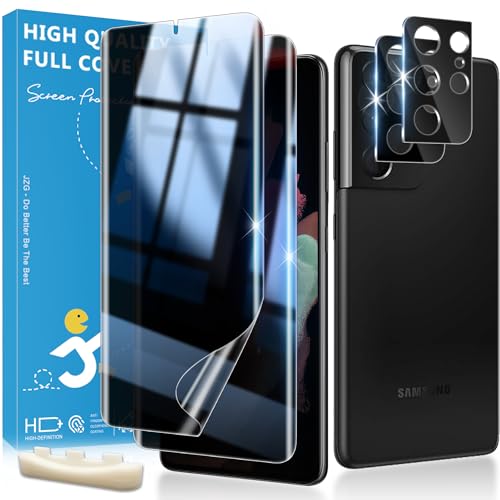
JavoYion S21 Ultra Screen and Lens 2+2 Pack is the only option here whose name specifies both screen and camera lens protectors in a 2+2 pack. Its screen protectors are soft film, with a 25° privacy angle, and the product says it supports fingerprint unlocking and case use. The fit is for the Galaxy S21 Ultra’s curved 6.8-inch screen.
Film bends more readily than glass, which can suit buyers who prefer a flexible protector on a curved display. The product does not give a screen-protector thickness, so buyers prioritizing a specific thickness should compare that requirement before choosing. A privacy angle can also reduce visibility for anyone viewing from beside the phone.
Bottom line: Pick this if you want screen and camera lens protectors in one pack.
LYWHL S21 Ultra Full-Coverage Film, 2-Pack

LYWHL S21 Ultra Full-Coverage Film, 2-Pack emphasizes full-adhesive film and ultrasonic fingerprint compatibility, distinguishing it from the glass-focused choices. The product says to register fingerprints before applying the film and notes that the privacy layer darkens the display, advising higher brightness when needed. Its two-pack is intended for the Galaxy S21 Ultra.
That fingerprint guidance makes this a practical option for buyers focused on the in-display sensor, but its privacy description gives no angle to compare with the 24° and 25° options. If a precise viewing-angle figure is central to your choice, select an option with an angle specified instead.
Bottom line: Choose this if ultrasonic fingerprint support and full-adhesive film are your priorities.
HPTech S21 Ultra Tempered Glass, 2-Pack

HPTech S21 Ultra Tempered Glass, 2-Pack is the clearest choice for buyers who value a glass thickness and surface finish: it uses 0.33 mm tempered glass with a 9H surface hardness rating and an oleophobic coating. The two-pack has 3D rounded edges and is designed for full-screen coverage on the Galaxy S21 Ultra.
The product describes side-view privacy but gives no angle figure, so it cannot be compared numerically with options that state 24° or 25°. Choose it for the defined glass construction and coating rather than a specific privacy-angle target. As with any privacy protector, viewing the display from off-center may be less comfortable.
Bottom line: Choose this if glass thickness, rounded edges and an oleophobic coating matter most.
S21 Ultra Ceramic Film, 2-Pack

S21 Ultra Ceramic Film, 2-Pack is the film-oriented choice with a 24° privacy angle and an installation frame. The product says it is optimized for the in-display ultrasonic fingerprint sensor and recommends re-registering fingerprints after installation.
Select this option if the angle and fingerprint focus suit your needs, and be prepared to adjust display brightness if the privacy layer makes viewing less clear.
Bottom line: Pick this if you want an installation frame and fingerprint-focused film with a 24° angle.
How to choose an S21 Ultra privacy screen protector
Start with the material and sensor features, then compare the privacy angle. Tempered glass is rigid; film is flexible, which may make it easier to conform to a curved display. The products here include both types, and their pack counts range from two screen protectors to a 2+2 screen-and-lens set.
A privacy angle describes how far off-center a viewer can be before the display becomes harder to see; smaller stated angles imply a narrower viewing zone. Compare 24° and 25° claims cautiously because product wording does not establish a shared testing method. If you rely on the in-display fingerprint reader, prioritize an option that explicitly addresses fingerprint compatibility and follow its setup guidance.
Privacy angle and screen brightness
Privacy filters work by restricting the display’s useful viewing angles, so they can reduce legibility for people looking from the side as well as improve privacy. The product with a 25° angle and the products with 24° angles provide figures for comparison, but those figures alone do not establish which screen will look brightest or clearest.
Use a simple decision rule: if you often read your phone from an angle or at low brightness, favor a standard clear protector over a privacy filter. If side-glances are the bigger concern, choose a privacy option and check whether the display remains comfortable to read head-on. Expect to raise brightness if the filter darkens the image, as one film product specifically advises.
Glass, film and fingerprint fit
Tempered glass offers a rigid layer, while film is flexible; thickness, adhesive coverage and edge shape can affect how each protector sits on a curved screen. One glass option gives a thickness of 0.33 mm, and several products describe case-friendly use or full coverage, but only where their specifications say so. Avoid assuming every case will clear every protector.
Ultrasonic fingerprint readers work through the display, so an added layer can affect recognition. Some options explicitly claim fingerprint compatibility and one advises registering fingerprints after installation. Follow that setup advice when applicable, then test the sensor before relying on it for unlocking or payments. Keep the screen clean and dry during installation to limit dust and bubbles.
Installing and maintaining a privacy protector
Clean alignment matters more on a large curved display because a misplaced edge can interfere with touch or a case. Work in a low-dust room, wash and dry your hands, and wipe away lint before applying the protector. Use an included installation frame when available, and press out bubbles gradually rather than lifting the entire layer repeatedly.
After installation, verify touch response, fingerprint recognition and case clearance before everyday use. Re-register fingerprints if the product advises it. Clean the surface with a soft, lint-free cloth; abrasive cleaners and sharp tools can scratch coatings or lift edges. Replace a protector if cracks or lifted edges compromise its fit, and never treat a screen protector as a substitute for careful handling.
Frequently Asked Questions
Do privacy screen protectors make the S21 Ultra darker?
Privacy filters can make a display look darker because they restrict light and viewing angles. One product specifically recommends raising brightness when needed, so check head-on readability at your usual brightness before settling on a protector.
Will a privacy screen protector affect fingerprint unlock?
An added layer can affect an in-display fingerprint reader, so choose a protector that explicitly addresses fingerprint compatibility. Re-register fingerprints after installation when advised, then verify recognition before depending on the sensor.
What does a 24-degree privacy angle mean?
A 24° privacy angle is a viewing-angle figure intended to describe side visibility. It is not a guarantee that every person will lose visibility at exactly the same point, and differences in wording or test methods make cross-brand comparisons approximate.
Can a privacy protector work with a phone case?
Some protectors are described as case-friendly, but that does not guarantee a fit with every case. Check edge clearance after installation; if a case pushes against the protector or lifts an edge, the combination is not a good fit.
Should I choose glass or film for a curved screen?
Glass is rigid, while film is flexible and can better suit buyers who prefer a pliable layer on a curved display. Check the coverage and case compatibility, and choose the material you can install and maintain comfortably.