
Best Raspberry Pi Pico Case: 5 Models Compared by Fit

The best Raspberry Pi Pico case for most breadboard prototyping is MoseleysDesigns Pico Case, because its 0.32-inch height and breadboard compatibility suit that setup. Choose C4Labs Zebra Pico W Case instead if you need explicitly listed compatibility with Pico W, Pico 2, or Pico 2W; confirm your exact board revision and fit before ordering.
We earn a commission if you buy through links on this page. As an Amazon Associate I earn from qualifying purchases. Products are compared on manufacturer specifications, not hands-on testing.
- Best overall: MoseleysDesigns Pico Case – Its 0.32-inch height and stated breadboard compatibility make it a clear fit for prototyping.
- Best for newer boards: C4Labs Zebra Pico W Case – It names Pico W, Pico 2, and Pico 2W compatibility and provides GPIO and debug-pin access.
- Best for USB access: Snap-Fit Pico Case, Red/Black – Its snap-fit design has a front Micro-USB cutout for programming and power connection.
| Product | Best for | Dimensions (L × W × H) | Board compatibility | Access | Shop |
|---|---|---|---|---|---|
| MoseleysDesigns Pico Case | Breadboard prototyping | 2.22 × 1.08 × 0.32 in | Raspberry Pi Pico | Ports, buttons, connectors | Check Price on Amazon |
| C4Labs Zebra Pico W Case | Pico W and Pico 2 | 2.25 × 1.25 × 0.50 in | Pico, Pico W, Pico 2, Pico 2W | GPIO, debug pins, button | Check Price on Amazon |
| Snap-Fit Pico Case, Red/Black | Micro-USB access | 2.50 × 1.00 × 0.75 in | Raspberry Pi Pico | Front Micro-USB cutout | Check Price on Amazon |
| Snap-Fit Pico Case, Black | Black enclosure | 2.50 × 1.00 × 0.75 in | Raspberry Pi Pico | Front Micro-USB cutout | Check Price on Amazon |
| Snap-Fit Pico Case, Blue | Blue enclosure | 2.50 × 1.00 × 0.75 in | Raspberry Pi Pico | Front Micro-USB cutout | Check Price on Amazon |
Raspberry Pi Pico Cases Compared
Compare board fit, dimensions, and the openings or access each case provides.
MoseleysDesigns Pico Case

For breadboard prototyping, this case stands out with breadboard compatibility and a low 0.32-inch height. It measures 2.22 × 1.08 inches across and weighs about 9 grams. The matte PETG shell keeps ports, buttons, and connectors accessible, so it suits projects that need frequent wiring changes without removing the board. Its compatibility names the Raspberry Pi Pico, not Pico W or Pico 2, so check the fit if you have a different board revision or model.
Bottom line: Pick it for a low-profile case that can stay on during breadboard work.
C4Labs Zebra Pico W Case

Unlike the other options, this case explicitly names compatibility with the original Pico, Pico W, Pico 2, and Pico 2W. Its 2.25 × 1.25 × 0.50-inch footprint leaves GPIO and debugging pinout accessible, and the button remains usable. That combination makes it a practical choice when a project needs access to the board’s pins while enclosed. The case is sold as a single pack here; its 0.50-inch height is greater than the 0.32-inch profile of MoseleysDesigns Pico Case, which matters for tight clearances.
Bottom line: Choose it when you need explicitly named Pico W or Pico 2 fit with GPIO access.
Snap-Fit Pico Case, Red/Black

This red-and-black snap-fit enclosure emphasizes front Micro-USB access, letting a cable connect for programming or power without removing the case. Ventilation slots are part of the top surface, and the snap-fit assembly is designed for tool-free installation. It suits a standard Pico setup where the cable port is the main access need. Its dimensions are 2.50 × 1.00 × 0.75 inches, so it is taller than the low-profile MoseleysDesigns Pico Case and may not suit a project with limited vertical space.
Bottom line: Pick it when front Micro-USB access and tool-free assembly matter most.
Snap-Fit Pico Case, Black
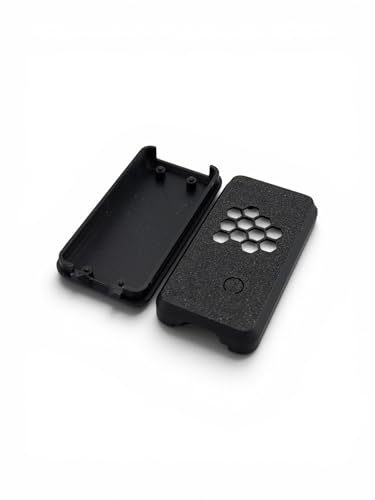
This all-black version offers the same dimensions and access features as the red-and-black snap-fit option, with color as the visible distinction. The 2.50 × 1.00 × 0.75-inch enclosure has a front Micro-USB cutout, top ventilation slots, and a snap-fit construction intended for tool-free assembly. It is suited to a standard Pico build that needs cable access at the front. The 0.75-inch height makes it less suitable than MoseleysDesigns Pico Case for a low-clearance or breadboard-centered setup.
Bottom line: Choose it for the black finish with front cable access and snap-fit assembly.
Snap-Fit Pico Case, Blue

The blue snap-fit enclosure shares its size and access layout with the other vented snap-fit cases, while offering a blue exterior. A front Micro-USB cutout supports programming and power connections with the case on, and the top has ventilation slots. Tool-free snap-fit assembly suits a setup that may need quick access to the board. At 0.75 inches high, it is a bulkier choice than MoseleysDesigns Pico Case; that difference matters when fitting the case beneath a shelf or inside a shallow project space.
Bottom line: Pick it if you want the blue finish and need front Micro-USB access.
How to Choose a Raspberry Pi Pico Case
Start with board compatibility, then match the case openings to the way you use the Pico. The standard Pico board is about 2.0 × 0.8 inches, and its 40 GPIO pins use a 0.1-inch pitch; a case must leave the pins available if you use jumper wires or a breadboard. For a cased board on a breadboard, prefer an explicitly breadboard-compatible design rather than assuming a slim enclosure will fit. If your project needs USB programming or power, confirm the connector opening aligns with the board’s Micro-USB port. For boards beyond the original Pico, favor a case that names that model instead of inferring compatibility from similar dimensions.
Raspberry Pi Pico Case Fit and Clearance
Allow clearance for the board, headers, cables, and any parts that rise above its surface; the board’s roughly 0.8-inch width does not include those additions. A useful rule is to choose a case no taller than your available vertical clearance, with extra room for cable bends and attached components. The case heights here range from 0.32 to 0.75 inches, but height alone does not establish room for soldered headers or add-on boards. Measure your assembled Pico and the project space before choosing. Also check that ventilation slots and port cutouts will not be blocked by a wall, mounting surface, or nearby wiring.
GPIO Access and Enclosure Types
Open GPIO access matters when a Pico project uses external sensors, LEDs, or debugging connections; enclosed sides can protect the board but may make wiring changes harder. This quick comparison helps match the access style to the job.
| Project need | Useful case feature | Trade-off |
|---|---|---|
| Breadboard experiments | Breadboard compatibility and low height | Confirm fit with your specific board |
| External wiring or debugging | Open GPIO and debug-pin access | More exposed pins and wiring |
| USB programming while enclosed | Aligned Micro-USB cutout | Check cable clearance |
GPIO pins are electrical connections, not protective barriers: disconnect power before changing wiring, and avoid shorting adjacent pins with loose conductors.
Using and Maintaining a Pico Case
Keep the USB port, ventilation slots, and GPIO openings clear during use so cables and wiring do not obstruct access or airflow. A case does not eliminate heat from connected components, and a vented top cannot compensate for a blocked enclosure or a hot external module. Before closing the shell, check that the board sits flat and that no wire is trapped at a seam. Snap-fit cases can be opened by releasing their tabs carefully; forcing a tab sideways can damage the enclosure. Recheck cable alignment and board seating after moving a portable project, especially if frequent plugging or unplugging puts strain on the USB connector.
Frequently Asked Questions
Will a case fit a Raspberry Pi Pico W?
Only choose a case that names Pico W compatibility or confirm the fit before ordering. The Pico W shares the Pico’s general board footprint, but added components can affect enclosure clearance.
Can a cased Pico still fit a breadboard?
Some cases are specifically described as breadboard compatible, but a low height by itself does not guarantee fit. Check the case’s compatibility and the width of your breadboard channel before assembly.
How much clearance should I leave above a Pico case?
Leave at least the case’s full height, plus room for plugs or components that extend above it. For example, a 0.75-inch-tall case needs more than 0.75 inches if a cable or add-on board rises above the lid.
Does the Pico need ventilation inside a case?
Ventilation can help air circulate, but airflow depends on the enclosure and what surrounds it. Keep vents unobstructed, and account for heat from attached modules rather than assuming slots alone control temperature.
Should I use a case with GPIO access?
Choose exposed GPIO access when your project uses jumper wires, sensors, or debugging pins. Disconnect power before rewiring, since loose conductors can short adjacent pins.