
Best Speakers for PS5: 5 Gaming Options Compared

For most PS5 setups, choose Edifier G2000 Pro 2.0 because it names PS5 compatibility and offers USB-C, Bluetooth and AUX connections. If you want a smaller USB-powered desktop speaker or prefer a 3.5mm cable connection, consider another option; the connection that works depends on whether you route audio through the console, display or controller.
We earn a commission if you buy through links on this page. As an Amazon Associate I earn from qualifying purchases. Products are compared on manufacturer specifications, not hands-on testing.
- Best overall: Edifier G2000 Pro 2.0 – It names PS5 compatibility and offers USB-C, Bluetooth and AUX inputs.
- Best for USB audio: Deeyaple 40W USB-C Soundbar – Its USB-C digital audio connection is described for PS5 use.
- Best for a compact desk: FUNLOGY 14W Stereo Speaker – Its palm-sized stereo design uses USB power and a 3.5mm audio cable.
| Product | Best for | Peak power | Connections | Dimensions | Shop |
|---|---|---|---|---|---|
| Edifier G2000 Pro 2.0 | PS5 gaming | 64W peak | USB-C, Bluetooth 5.4, AUX | 11.69 × 9.88 × 7.08 in | Check Price on Amazon |
| Deeyaple 40W USB-C Soundbar | USB audio setup | 40W peak | USB-A to USB-C | 13.5 × 2.5 × 3.34 in | Check Price on Amazon |
| FUNLOGY 14W Stereo Speaker | Small desk | 14W total | USB power, 3.5mm audio | 5.20 × 2.72 × 4.25 in | Check Price on Amazon |
| LENRUE G11 Desktop Speakers | Lighted desktop | — | USB power, 3.5mm AUX | 14.96 × 2.48 × 2.55 in | Check Price on Amazon |
| Edifier G2000 | EQ sound modes | 32W peak | USB, Bluetooth, 3.5mm AUX | 13.9 × 8.31 × 9.09 in | Check Price on Amazon |
Speakers for PS5
Compare the connection options and form factors before choosing speakers for a PS5 setup.
Edifier G2000 Pro 2.0

Among these options, this is the clearest fit for a PS5 setup: its features name PS5 compatibility and list USB-C, Bluetooth 5.4 and 3.5mm AUX connections. It has 32W RMS output, 64W peak power, 3-inch full-range drivers and dual bass reflex ports. Virtual 7.1 surround is specified for USB connection with HECATE software on PC, so do not assume that feature applies on PS5. The larger pair may need more desk room than compact bar-style speakers; measure the available space before choosing it.
Bottom line: Choose this if PS5 compatibility and multiple connection choices matter most.
Deeyaple 40W USB-C Soundbar

Unlike the other soundbars, this model emphasizes digital USB audio and explicitly names PS5 compatibility. Its USB-A to USB-C connection carries audio and data, and the unit pairs dual full-range drivers with dual passive bass radiators. The maker claims 40W peak power and distortion-free, room-filling sound; treat those as the maker’s performance claims rather than a guarantee for every room or game. Its 13.5-inch length suits a monitor-width desktop, but it has no separate wireless connection stated in its name or supplied features, so choose another option if Bluetooth is essential.
Bottom line: Pick this for a straightforward USB audio connection and soundbar form.
FUNLOGY 14W Stereo Speaker

This palm-sized stereo speaker is the most compact option here, with a 30-degree upward tilt intended to direct sound toward a seated listener. It uses USB for power and a 3.5mm cable for audio, and its features mention gaming consoles generally rather than naming PS5 specifically. The dual 48mm drivers and passive radiators are paired with a maker-claimed 14W total output. Choose it when desk space is tight and you can connect its analog audio cable to a compatible output; it is not the best match for someone seeking a named PS5 USB-audio connection.
Bottom line: Choose it for a small desk and a compatible 3.5mm audio path.
LENRUE G11 Desktop Speakers

These speakers stand out for a low, wide profile and touch-controlled angular lighting, rather than console-specific audio features. Setup uses a USB cable for power and a 3.5mm audio cable, with a top volume knob and no driver requirement described. The maker claims stereo sound with reduced distortion and noise. Their 2.55-inch height can fit beneath many monitors, but PS5 compatibility is not named; choose this pair only if your chosen audio route provides a compatible 3.5mm output and you want lighting on the desktop.
Bottom line: Pick it for a low-profile, lighted setup with an available AUX output.
Edifier G2000
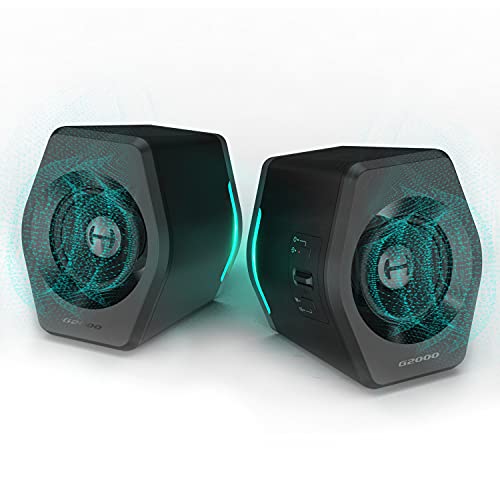
This Edifier model offers three selectable sound modes—Game, Music and Movie—plus USB, Bluetooth and 3.5mm AUX inputs. Its features name PS4 and Xbox compatibility, but do not explicitly name PS5, making the connection route worth checking before purchase. The 2.75-inch full-range drivers are rated at 16W RMS and 32W peak, and a subwoofer output interface is included. It is a larger-format desktop option than the compact USB-powered speaker; choose it if its sound modes and inputs suit your setup, not if you need explicitly named PS5 support.
Bottom line: Choose it for selectable EQ modes and multiple input types, after checking PS5 connection fit.
How to connect speakers to a PS5
For a direct console connection, start with USB audio, but confirm that the speaker is recognized by the PS5 before relying on it. PS5 also sends audio over HDMI to a TV or receiver, which can then feed powered speakers through an available audio output. A 3.5mm speaker cable can connect to the DualSense controller’s headset jack, though that routes audio through the controller rather than directly from the console. USB power and USB audio are separate jobs: a cable used only for power does not carry sound.
Bluetooth speaker support is not a safe assumption for a PS5 setup. Standard Bluetooth audio devices generally need a compatible transmitter or another audio path, and Bluetooth latency can be noticeable in games. If you need low-latency sound, prefer USB audio or a wired output whose compatibility you have confirmed.
Choose by connection and desk space
The connection path matters more than advertised output power when selecting console speakers. Use USB audio when the speaker supports PS5 audio over USB; use HDMI through a TV or receiver when that equipment has an audio output; use 3.5mm only when a compatible jack is available. Bluetooth is convenient for other devices but should not be your only PS5 plan unless you have verified a supported route.
Measure the actual desk footprint, including speaker height beneath the display and room for controls. As a practical rule, if the speaker must sit under a monitor with less than 3 inches of clearance, a model taller than that will not fit there. A soundbar saves horizontal separation between units, while a stereo pair can be spaced to the left and right of the screen.
Speaker connections at a glance
Connection type determines the setup steps and what you need to verify. The table compares common routes, not a promise that every speaker supports each one.
| Route | What it needs | Best fit |
|---|---|---|
| USB audio | PS5-recognized USB audio device | Direct wired console setup |
| HDMI audio | TV or receiver with speaker output | Speakers already connected to the display system |
| 3.5mm analog | Compatible output jack, such as the controller | Wired speakers with AUX input |
| Bluetooth | Supported transmitter or alternate audio route | Wireless use after compatibility is confirmed |
Place and use gaming speakers safely
Powered desktop speakers need a stable, dry surface and unobstructed ventilation around their enclosures. Keep cables clear of chair wheels and walking paths, and avoid placing a speaker where a monitor stand or wall blocks its drivers. Do not turn up volume abruptly; begin at a low level and raise it gradually to reduce the risk of uncomfortable sound exposure.
RGB lighting is a visual feature, not a measure of audio performance. For clearer game positioning, place left and right speakers on opposite sides of the display at roughly equal distances from the listening position, then angle them toward the seat. A soundbar is easier to center beneath a screen, but its compact width may provide less left-right separation than two speakers placed apart.
Frequently Asked Questions
Can I use Bluetooth speakers with a PS5?
Do not assume a standard Bluetooth speaker will pair directly for PS5 game audio. Confirm support for your specific speaker or use a compatible transmitter, USB audio device or HDMI-connected TV/receiver.
Can speakers connect to the PS5 controller?
A speaker with a 3.5mm input can use the DualSense controller’s headset jack with a suitable audio cable. That is an analog route through the controller, and USB-powered speakers still need a separate USB power connection.
Does USB power also carry PS5 sound?
Not always: USB can supply power without carrying audio. For direct USB sound, the speaker must support USB audio and be recognized by the PS5; an AUX model may need a separate 3.5mm audio cable.
Where should I place PS5 desktop speakers?
Place stereo speakers to the left and right of the display, at similar distances from your seat, and angle them toward your listening position. Leave space around the cabinets and keep cords away from walking paths and chair wheels.