
Best WiFi Card for Laptop: 3 AX210 Models Compared

OKN AX210 WiFi 6E M.2 2230 suits most laptop owners seeking a WiFi 6E card because it combines tri-band WiFi with an M.2 2230 module format.
Internal laptop WiFi cards are small modules that connect to a compatible motherboard slot and laptop antenna leads; matching the physical slot and wireless interface matters before choosing a card.
We earn a commission if you buy through links on this page. As an Amazon Associate I earn from qualifying purchases. Products are compared on manufacturer specifications, not hands-on testing.
- Best overall: OKN AX210 WiFi 6E M.2 2230 – M.2 2230 WiFi 6E module with 2.4, 5, and 6 GHz bands.
- Best for slot-fit guidance: AX210 NGW WiFi 6E M.2 2230 – Specifies an M.2 2230 A/E-key slot and an Intel CPU requirement.
- Best for Intel branding: Intel AX210 Tri-Band WiFi 6E – Names the Intel AX210 tri-band WiFi 6E module for notebooks.
| Product | Best for | Interface | WiFi bands | Shop |
|---|---|---|---|---|
| OKN AX210 WiFi 6E M.2 2230 | Tri-band upgrade | M.2 2230 / NGFF | 2.4, 5, 6 GHz | Check Price on Amazon |
| AX210 NGW WiFi 6E M.2 2230 | Slot requirements | M.2 2230 A/E-key | 2.4, 5, 6 GHz | Check Price on Amazon |
| Intel AX210 Tri-Band WiFi 6E | Intel module preference | M.2 notebook card | Tri-band | Check Price on Amazon |
Laptop WiFi Cards
Compare these internal AX210 WiFi 6E modules by wireless bands and the laptop slot each one requires.
OKN AX210 WiFi 6E M.2 2230

OKN AX210 WiFi 6E M.2 2230 combines a compact M.2 2230/NGFF format with tri-band WiFi 6E, making it a fit for compatible laptops that need an internal module upgrade. The manufacturer gives a maximum combined rate of 5,374 Mbps across the three bands and identifies Windows 10/11 64-bit support. Bluetooth 5.3 is also included. The key limitation is physical and platform compatibility: laptops without the matching M.2 network slot cannot use this internal card, so confirm the slot and antenna connections before ordering.
Bottom line: Choose this for a compatible M.2 2230 laptop when you want 6 GHz WiFi and Bluetooth.
AX210 NGW WiFi 6E M.2 2230
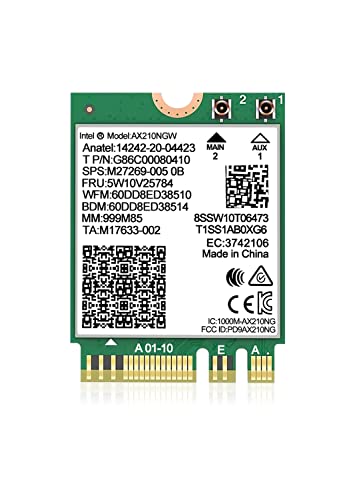
AX210 NGW WiFi 6E M.2 2230 is the clearest choice for buyers checking platform fit because it calls for an Intel-CPU motherboard with an M.2 2230 A/E-key network slot and says it does not support CNVio2. The card supports tri-band WiFi 6E and Bluetooth 5.3, with a claimed maximum of 5,374 Mbps across its bands. Its specific slot and CPU requirements make it less suitable for laptops with a different slot, an incompatible interface, or a non-Intel platform; verify those points before purchase.
Bottom line: Choose this when your laptop matches its Intel CPU and M.2 A/E-key requirements.
Intel AX210 Tri-Band WiFi 6E

Intel AX210 Tri-Band WiFi 6E is identified as an Intel AX210 tri-band WiFi 6E Bluetooth 5.3 network card for notebooks. Unlike the other two options, its specifications do not give a specific M.2 key or operating-system compatibility, so it is a less certain match if you have not already checked your laptop’s module requirements. Its notebook use and AX210 designation make it relevant to buyers replacing a compatible internal card, but confirm the exact module fit and interface before ordering.
Bottom line: Choose this if you specifically want an Intel AX210 and have confirmed your notebook’s module fit.
How to Choose a Laptop WiFi Card
Start with the laptop’s internal slot and wireless interface, not the advertised maximum speed. Many replaceable laptop cards use the 22-by-30-millimeter M.2 2230 format, but physical size alone does not confirm that the interface or keying matches. WiFi 6E adds access to the 6 GHz band; to use that band, the laptop card, operating system, and wireless router must all support it. A 6 GHz-capable module can still connect on 2.4 or 5 GHz when needed.
M.2 Slot Fit and Laptop Compatibility
M.2 2230 describes a module about 22 millimeters wide and 30 millimeters long, while A/E keying identifies the connector notch arrangement; these labels do not guarantee that every laptop accepts the same wireless interface. The AX210 option that names its requirements specifies an Intel CPU, M.2 2230 A/E-key slot, and no CNVio2 support. Check the existing module label, laptop service documentation, and antenna connectors before buying. A card that fits the socket but uses an unsupported interface will not work as intended.
WiFi 6E Bands and Router Requirements
WiFi 6E adds 6 GHz alongside the familiar 2.4 and 5 GHz bands, but a WiFi 6E card alone cannot create a 6 GHz connection. The router must broadcast a compatible 6 GHz network, and the computer’s operating system and drivers must support it. The 2.4 GHz band generally reaches farther and passes through obstacles better; 5 and 6 GHz can provide more capacity at shorter range. Router placement, walls, interference, and network congestion affect real-world throughput, so advertised combined rates are not guaranteed download speeds. Choose a tri-band card if the laptop will connect to a 6 GHz-capable network and the hardware fit is confirmed.
| Need | What to confirm |
|---|---|
| Internal replacement | M.2 2230 size, key, interface, and antenna leads |
| 6 GHz access | WiFi 6E card, compatible OS and drivers, and 6 GHz router |
| Uncertain laptop slot | Check the existing module or service manual before ordering |
Common Laptop WiFi Card Upgrade Mistakes
The most common mistake is treating “M.2 2230” as a complete compatibility guarantee. A laptop can have the right module dimensions but a different key, interface, or firmware restriction. Another mistake is expecting a tri-band card to deliver 6 GHz without a compatible router and operating-system support. Before opening a laptop, shut it down, disconnect power, and follow the manufacturer’s battery-disconnection procedure; internal components can be damaged by static discharge or accidental contact. Take care when removing antenna leads because their small snap connectors can be damaged by pulling on the wires. If the laptop’s service procedure or card compatibility is unclear, avoid forcing a connector or module into place.
Frequently Asked Questions
Will a WiFi 6E card work with a WiFi 5 router?
Yes, a WiFi 6E card can connect using compatible 2.4 or 5 GHz WiFi from an older router. It will not use 6 GHz unless the router also supports WiFi 6E.
Does M.2 2230 guarantee a laptop card will fit?
No, M.2 2230 gives the module’s approximate 22-by-30-millimeter dimensions, not its interface compatibility. Check the key, interface, and laptop support as well.
What does an A/E key mean on a WiFi card?
A/E key describes the connector’s notch arrangement on an M.2 module. It does not by itself confirm the laptop supports that card’s wireless interface.
Can I use 6 GHz WiFi without a 6 GHz router?
No, the router must provide a compatible 6 GHz network for the laptop to use that band. Without one, a tri-band card can connect through a supported 2.4 or 5 GHz band.
Can an AX210 replace a CNVio2 laptop card?
The AX210 option that specifies its compatibility says it does not support CNVio2. Confirm the existing card’s interface and laptop requirements before choosing a replacement.