
Bluetooth Remote Control Selfie Camera Shutter Options

Xenvo Shutterbug is the most broadly compatible choice here, with support for iOS 5.0+ and Android 4.3+ phones and tablets. Choose another remote if you need a two-pack, longer 50-foot reach, or a clearly stated compact size; compatibility and camera-app behavior can vary by device.
We earn a commission if you buy through links on this page. As an Amazon Associate I earn from qualifying purchases. Products are compared on manufacturer specifications, not hands-on testing.
- Best overall: Xenvo Shutterbug – Supports iOS 5.0+ and Android 4.3+ phones and tablets, and can start or stop video.
- Best for a two-pack: zttopo Wireless Shutter, 2-Pack – Includes two remotes and an operating range of up to 30 feet.
- Best for longer reach: Bluetooth 5.0 Remote Shutter – Claims a control range up to 50 feet and Bluetooth 5.0.
| Product | Best for | Operating range | Compatibility | Pack or size | Shop |
|---|---|---|---|---|---|
| Xenvo Shutterbug | Phone and tablet use | — | iOS 5.0+; Android 4.3+ | 4.7 × 2.8 × 1.3 in | Check Price on Amazon |
| zttopo Wireless Shutter, 2-Pack | Two-device setups | Up to 30 ft | Android 4.2.2+; iOS 6.0+ | 2 remotes | Check Price on Amazon |
| Bluetooth 5.0 Remote Shutter | Longer-distance shots | Up to 50 ft | iPhone and Android; iPad, iPod, tablet | 2 × 1 × 0.35 in | Check Price on Amazon |
| CamKix Bluetooth Shutter Remote | Keychain carry | Up to 30 ft | Most iOS and Android phones and tablets | 4.9 × 3.4 × 0.4 in | Check Price on Amazon |
Bluetooth Remote Control Selfie Camera Shutters
Compare stated range, device support and carrying features to match a shutter remote to your shooting setup.
Xenvo Shutterbug
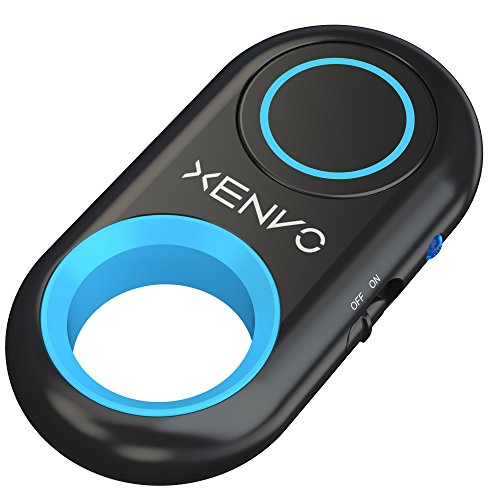
Unlike the other options, the Xenvo Shutterbug explicitly supports both phones and tablets and says it can start and stop video as well as take photos. Its compatibility covers iPhone, iPad, iPod and Android devices, including Samsung and Google Pixel; it does not work with Windows phones. A blue indicator light signals pairing, and an on/off switch controls power. The dimensions are 4.7 × 2.8 × 1.3 inches. The compatibility floor is older than some newer operating systems, so check whether your device meets the minimum before choosing it.
Bottom line: Choose this if you want stated phone and tablet support plus video controls.
zttopo Wireless Shutter, 2-Pack
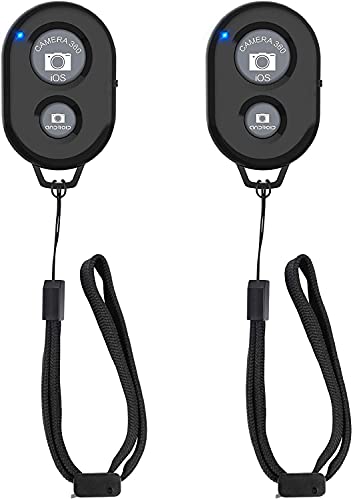
The zttopo stands apart by including two remotes, useful when you want a spare or need separate clickers for two shooters. It operates up to 30 feet (10 meters) and supports Android 4.2.2 and later or iOS 6.0 and later. The maker says it can work with built-in camera apps or Google Camera 360, and it describes short presses for photos and long presses for video in Instagram and Snapchat. Each remote is small enough for a keychain or pocket, with wrist straps included. Its 30-foot reach is shorter than the 50-foot claim on another option.
Bottom line: Pick this if having two remotes matters more than maximum range.
Bluetooth 5.0 Remote Shutter
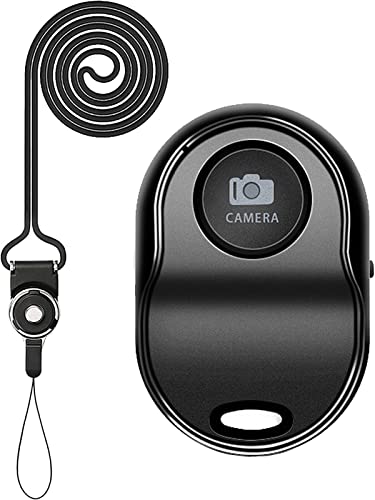
The Bluetooth 5.0 Remote Shutter has the longest reach here: up to 50 feet (15 meters), compared with the 30-foot claims on two alternatives. Its 2 × 1 × 0.35-inch body weighs 12 grams, and a detachable lanyard can be configured for wrist or neck carry. The maker says pairing uses Bluetooth without a separate app and specifies a CR2032 coin battery with 230 mAh capacity.
Bottom line: Choose this when a longer stated range and small form factor are priorities.
CamKix Bluetooth Shutter Remote
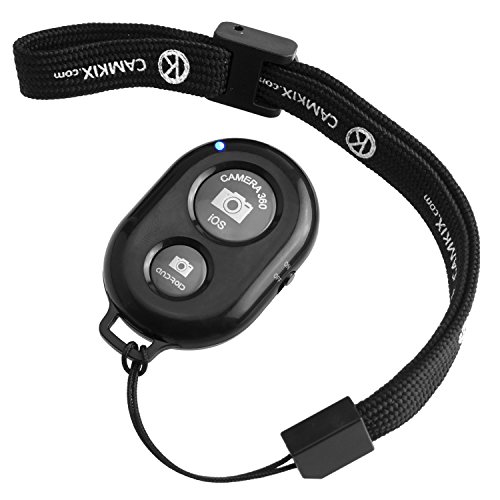
The CamKix is the only option here that specifically calls out certified Bluetooth wireless technology and one-time pairing. It can trigger phones and tablets up to 30 feet (10 meters) away, and its adjustable wrist strap gives another carry option alongside pocket or keychain storage. The maker describes use for hands-free selfies, group shots and steady shots, including photos and videos. Its dimensions are 4.9 × 3.4 × 0.4 inches, so compare the measurements with the smaller 2 × 1-inch remote if pocket space is tight. Compatibility is described broadly rather than with OS version floors.
Bottom line: Pick this if certified Bluetooth and an adjustable wrist strap fit your needs.
How to choose a Bluetooth selfie shutter remote
Choose by device support first, then by how far the phone will sit from the person pressing the shutter. In this group, stated remote ranges run from 30 feet (10 meters) to 50 feet (15 meters); a longer advertised range can help with wide group framing, but obstacles and radio interference may reduce practical Bluetooth reach. For a tripod portrait within 30 feet, the shorter-range options already cover the distance. Also decide whether you need video start/stop, a second remote, or a wrist strap. Bluetooth shutter remotes send a button command to a phone, but camera apps can interpret that command differently, so verify app behavior when a specific social or camera app is essential.
Phone and tablet compatibility for selfie clickers
Compatibility is not universal: minimum operating-system versions differ, and some remotes do not name an OS floor. The Xenvo supports iOS 5.0+ and Android 4.3+, while the zttopo supports iOS 6.0+ and Android 4.2.2+; both are lower bounds rather than promises for every camera app. The Xenvo excludes Windows phones. Pair the remote in the device’s Bluetooth settings, then check that the camera app responds to a shutter-button command before setting up a group shot. For tablet use, favor a model that explicitly mentions tablets rather than assuming every phone-compatible clicker will work with every tablet model.
Range, framing and Bluetooth connection
For a typical group photo, place the camera at the intended framing distance before deciding whether the remote’s claimed reach is sufficient. The 30-foot remotes cover a 10-meter radius under the maker’s range, while the 50-foot model claims up to 15 meters. Bluetooth operates on the 2.4 GHz band, which is shared with Wi-Fi and other devices; walls, bodies and crowded radio environments can affect connection reliability. A practical rule is to test the shutter from the farthest planned position before everyone gathers, especially beyond 30 feet. A tripod or stable surface reduces camera movement, but it does not correct an out-of-range or unpaired remote.
Pairing and camera-app behavior
Most phone shutter remotes act as a Bluetooth input, and the phone’s camera app decides what the button does. Some apps treat the command as a photo shutter; video control can require a long press or a specific app behavior, as described for the zttopo in Instagram and Snapchat. Pair once, open the intended camera app, and test both short and long presses before framing a final shot. If pairing fails, confirm Bluetooth is enabled, remove an obsolete pairing entry, and reconnect with the remote powered on. A remote that pairs successfully may still behave differently across camera apps, so confirm video control separately rather than assuming a photo trigger also starts recording.
Frequently Asked Questions
How far away can a Bluetooth selfie remote work?
The remotes in this comparison claim ranges of 30 feet (10 meters) or 50 feet (15 meters). Walls, people and 2.4 GHz interference can shorten usable range, so test at the farthest spot you plan to stand.
Do Bluetooth camera remotes work with every camera app?
No; apps can handle a Bluetooth shutter command differently. Test the specific app and, for video, verify start/stop behavior before relying on it.
Can a Bluetooth selfie remote start video recording?
Some can, but the behavior depends on the remote and app. The zttopo specifies a long press for video in Instagram and Snapchat, while Xenvo says it can start and stop video.
How do I pair a Bluetooth camera shutter remote?
Turn on the remote, enable Bluetooth on the phone or tablet, and select the remote in the device’s Bluetooth settings. Test the camera app afterward because pairing alone does not confirm shutter behavior.
Will one selfie remote work with an iPad?
Some models explicitly support tablets: Xenvo names iPad and tablets, while the Bluetooth 5.0 option names iPad and tablets. Confirm the exact model and OS compatibility before setting up the shot.