
BM 800 Condenser Microphone: 5 Bundles Compared

For a BM 800 condenser microphone setup with an arm and a simple USB audio adapter, choose BM-800 Bundle with Scissor Arm; it includes a pop filter, shock mount, and foam cap as well. Choose BM-800 Bundle with AM100-V8 Sound Card, BM-800 Bundle with AM200-V8 Sound Card, or CofeLife BM800 Bundle with V8S if you want a sound card with the microphone, or BM-800 Microphone with Shock Mount if you already have a stand and can supply 48V phantom power.
A condenser microphone converts sound using a powered capsule, so the right power and connection path matter as much as the microphone itself.
We earn a commission if you buy through links on this page. As an Amazon Associate I earn from qualifying purchases. Products are compared on manufacturer specifications, not hands-on testing.
- Best overall: BM-800 Bundle with Scissor Arm – Includes the microphone, arm stand, pop filter, shock mount, foam cap, cable, and USB audio adapter.
- Best for V8 sound card: BM-800 Bundle with AM100-V8 Sound Card – Pairs the BM-800 bundle with a live sound card for podcasting and streaming.
- Best for voice effects: CofeLife BM800 Bundle with V8S – Includes a V8S sound card with four voice variations and 10 sound effects.
| Product | Best for | Included support gear | Audio add-on | Shop |
|---|---|---|---|---|
| BM-800 Bundle with Scissor Arm | Simple desktop setup | Arm, pop filter, shock mount, foam cap | USB audio adapter | Check Price on Amazon |
| BM-800 Bundle with AM100-V8 Sound Card | Streaming controls | Arm, shock mount, pop filter, foam cap | Live sound card | Check Price on Amazon |
| BM-800 Bundle with AM200-V8 Sound Card | V8 interface bundle | Arm, shock mount, pop filter, foam cap | V8 sound card | Check Price on Amazon |
| CofeLife BM800 Bundle with V8S | Voice effects | Arm, shock mount, pop filter, foam cap | V8S sound card | Check Price on Amazon |
| BM-800 Microphone with Shock Mount | Existing mic stand | Shock mount | None specified | Check Price on Amazon |
BM 800 Condenser Microphone Bundles
Compare what each BM-800 setup includes before choosing a recording or streaming arrangement.
BM-800 Bundle with Scissor Arm

This bundle pairs a BM-800 microphone with a USB audio adapter rather than a voice-effects sound card. The package also includes a scissor arm, shock mount, double-layer nylon pop filter, foam cap, and audio cable, giving a new setup the basic positioning and wind-noise accessories in one set. The maker says the microphone has high sensitivity and low self-noise; those claims do not establish how it will sound in a particular room or with a particular computer. Choose this option for straightforward voice recording, but verify that the adapter’s ports match your intended connection.
Bottom line: Pick this if you want a basic arm-mounted setup and USB audio adapter.
BM-800 Bundle with AM100-V8 Sound Card
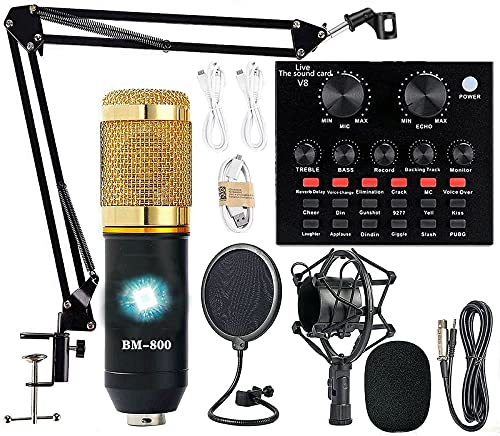
This package stands out by including a live sound card alongside the BM-800 microphone, arm stand, shock mount, pop filter, and foam cap. It is aimed at podcasting, streaming, music recording, and short-video work, so it suits a creator who wants the audio interface included rather than sourcing one separately. The maker identifies a cardioid pickup pattern, which is intended to capture sound most strongly from the front and reject some sound from behind. The maker does not identify the sound card’s connection options, so check compatibility with your computer or mobile device before choosing it.
Bottom line: Choose this if the included live sound card fits your recording device.
BM-800 Bundle with AM200-V8 Sound Card

The AM200-V8 version specifies a V8 sound card in its BM-800 recording bundle, while also including an adjustable arm, shock mount, pop filter, foam cap, and power cable. The maker positions it for podcasting, streaming, music, and short-video recording, and says the microphone uses a cardioid pickup pattern. That front-focused pattern is most useful when the speaker can stay in front of the capsule and unwanted room sound is controlled. The maker does not establish how the V8 card connects or what devices it supports, so confirm the intended hookup before buying.
Bottom line: Pick this if you specifically want the V8 sound card with the mic accessories.
CofeLife BM800 Bundle with V8S

This CofeLife BM800 package distinguishes itself with a V8S sound card that the maker says offers four voice variations and 10 sound effects. It also includes a BM-800 microphone, adjustable arm, shock mount, pop filter, foam cap, and power cable, covering the core mounting and pop-control pieces for a desk recording setup. The extra effects make it the clearest match here for callers or streamers who want voice-changing options.
Bottom line: Choose this if voice variations and sound effects are a priority.
BM-800 Microphone with Shock Mount

Unlike the full bundles, this option is a BM-800 microphone with a shock mount holder and standard screw adapter, not a complete arm-and-interface kit. The maker says it requires a device providing 48V phantom power, so it suits someone who already has compatible audio equipment and a stand. The maker also describes a cardioid pickup pattern and says the shock mount reduces handling noise. Because the package does not include the recording chain found in the larger bundles, choose it only if you already have the necessary power source, connection path, and support.
Bottom line: Pick this if you have a stand and a device that supplies 48V phantom power.
How to choose a BM 800 setup
Choose by the connection and control gear you need, not by the shared BM-800 name. A microphone-to-computer path may use USB, an audio interface, or an XLR input; a sound card bundle adds a separate control device, but device compatibility still matters. For voice recording, a cardioid mic is generally aimed toward the speaker, with its rear toward the main noise source. A pop filter helps reduce bursts of air from sounds such as “p” and “b,” while a shock mount can isolate some desk and stand vibration. Pick BM-800 Bundle with Scissor Arm for the included USB adapter, one of the V8 bundles for a sound card, or BM-800 Microphone with Shock Mount only if your setup provides the required phantom power.
Microphone distance and room placement
Start with the microphone about 6 to 12 inches from your mouth, then adjust level and distance to control room sound and plosives. A pop filter is commonly positioned a few inches from the capsule, with the speaker another few inches behind it; exact spacing depends on the filter and speaking volume. Keep the front of a cardioid capsule pointed at the speaker, and avoid placing a reflective wall immediately behind the speaker when possible. A closer position can make voice sound more present but also makes breaths and plosives more noticeable. Move the mic rather than turning input gain up to compensate for a poor position.
Power and connection checks
Check the required power and connection before assembling the rest of a recording chain. Phantom power is commonly 48 volts for XLR condenser microphones, but not every condenser mic uses the same connection or power method; BM-800 Microphone with Shock Mount explicitly requires a device that supplies 48V phantom power. USB microphones and USB adapters may instead draw power through USB, while a sound card may need its own connection to the computer or phone. Confirm the input port, cable type, and operating-device compatibility as a set. Never connect phantom power to equipment unless its manufacturer says that input supports it.
Common BM 800 setup mistakes
Two common problems are pointing a cardioid microphone away from the speaker and relying on a foam cap to eliminate room echo. A cardioid pattern reduces some rear pickup but does not make a noisy or reverberant room silent; soft furnishings and a quieter recording space help more. Keep the mic stable and avoid tapping the desk, since a shock mount only reduces some mechanical vibration. Set input gain so normal speech is strong without clipping; digital audio peaking at 0 dBFS distorts. Test a short recording at the intended speaking distance before a live session, and adjust placement or gain if loud syllables clip.
Frequently Asked Questions
How far should a BM 800 mic be from my mouth?
Begin about 6 to 12 inches away and make a short recording to judge level and room sound. Move closer for a more direct voice, but watch for plosives and breaths.
Does every BM 800 need 48V phantom power?
No; power requirements depend on the specific microphone and connection. The standalone microphone in this set of options explicitly requires a device with 48V phantom power, so check the individual model before connecting power.
Where should I point a cardioid microphone?
Point the front of the capsule toward the speaker and place the rear toward the main unwanted sound when practical. Cardioid pickup reduces some sound from behind but cannot remove room noise.
Can I use a BM 800 with a phone?
Only if the microphone or included audio interface has a connection compatible with the phone. Check the phone’s input support, adapter requirements, and power needs together before recording.
Will a pop filter stop room echo?
No; a pop filter reduces bursts of air reaching the capsule, not reflections from walls. A quieter room with soft furnishings can reduce echo more effectively.