
CD Player for Cars Without CD Player With USB Compared

For a car without a built-in CD player, Portable USB/AUX Car CD Player is the most versatile match because it offers USB and AUX connections and supports CD, CD-R, CD-RW, MP3 and WAV discs. Choose POSSPO Jupiter USB CD Player instead if your stereo has a USB port and you prefer its USB-drive playback approach; confirm your stereo supports that connection before ordering.
We earn a commission if you buy through links on this page. As an Amazon Associate I earn from qualifying purchases. Products are compared on manufacturer specifications, not hands-on testing.
- Best overall: Portable USB/AUX Car CD Player – USB and AUX connectivity plus support for CD, CD-R, CD-RW, MP3 and WAV.
- Best for USB playback: POSSPO Jupiter USB CD Player – Connects to a car stereo USB port and presents disc tracks through the stereo.
- Best for USB-C adapters: DDup Portable USB-C/AUX CD Player – Includes a USB-C adapter and extension cable alongside USB and AUX connectivity.
| Product | Best for | Connection | Disc support | Standout feature | Shop |
|---|---|---|---|---|---|
| Portable USB/AUX Car CD Player | Flexible connections | USB, AUX | CD, CD-R, CD-RW, MP3, WMA, WAV | Remote; touchscreen and steering-wheel | Check Price on Amazon |
| POSSPO Jupiter USB CD Player | USB-only stereos | USB; AUX with decoder | CD playback; formats not fully established | Anti-skip; resume; extension cable | Check Price on Amazon |
| ENVYCLOUD Portable Car CD Player | Compact placement | USB, AUX | Not established | Touchscreen and steering-wheel controls | Check Price on Amazon |
| DDup Portable USB-C/AUX CD Player | USB-C adapters | USB, AUX; USB-C adapter | CD, CD-R/RW, MP3, WMA, WAV | Anti-skip feet; extension cable; remote | Check Price on Amazon |
USB CD Players for Cars Without a CD Player
Compare the connection method and disc support with your stereo before choosing a portable player.
Portable USB/AUX Car CD Player

USB and AUX connectivity sets this player apart for cars that offer either input. It supports CD, CD-R, CD-RW, MP3, WMA and WAV playback, and the maker says touchscreen and steering-wheel controls work after connection. A remote is included, according to the product name. The player draws power from USB, so check that your vehicle’s USB port supplies power and can work with an external CD player. It does not play DVDs, which matters if your collection includes video discs.
Bottom line: Pick this if your car has USB or AUX and you want broad stated disc-format support.
POSSPO Jupiter USB CD Player

USB-drive-style playback distinguishes this model: the maker says a compatible car stereo recognizes the player as a USB drive and displays the disc tracks. It requires a car stereo with a USB port; the extension cable lets you position the unit away from the port. The product name also mentions AUX use with a decoder, anti-skip and resume playback. Because the available format information does not establish a complete supported-disc list, this is a less certain match for collections heavy on recorded CD-R or MP3 discs.
Bottom line: Choose this if your stereo has USB and the USB-drive playback method suits you.
ENVYCLOUD Portable Car CD Player
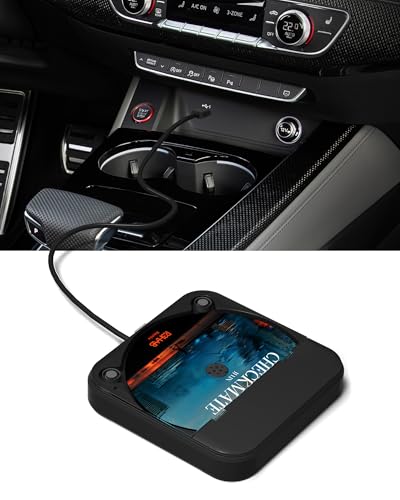
Its compact stated dimensions—4.5 by 4.5 by 0.85 inches—make placement easier to plan than for models without dimensions provided. The maker says it connects through a car’s USB or AUX port and supports touchscreen and steering-wheel controls after connection. It is also described as compatible with laptops, TVs and computers. The available format information does not identify specific disc types, so buyers who need CD-R, CD-RW or MP3 playback should verify format compatibility before choosing this model.
Bottom line: Pick this if a compact footprint matters and your needed disc formats are confirmed.
DDup Portable USB-C/AUX CD Player

The included USB-C adapter is the distinguishing extra for cars whose available connection needs that adapter; the package also includes an extension cable and remote. The maker says the player supports CD, CD-R/RW, MP3, WMA and WAV discs, and describes four rubber feet plus a disc-locking cover intended to help resist skipping on rough roads.
Bottom line: Choose this if the USB-C adapter, remote and anti-skip design suit your setup.
How to choose a USB CD player for a car
Start with the stereo’s input: a USB socket can provide power, data, or both, and a charge-only port will not play disc tracks through the stereo. A USB player may rely on the stereo recognizing its output as a drive, while AUX sends analog audio to the stereo. Check that the player supports the disc types in your collection, especially CD-R/RW and MP3 or WMA files. For MP3 discs, capacity and file limits can vary by player, so avoid assuming every unit reads the same disc structure. If your car has only USB, choose a model that explicitly supports USB playback; if it has AUX, that can provide an alternative audio path.
USB versus AUX playback in a car
USB playback can let a car stereo display tracks and provide controls, but only when the stereo recognizes the external player; AUX generally carries audio without track names or digital track control. Standard audio CDs use 44.1 kHz, 16-bit PCM audio, while MP3 and WMA discs use compressed files and can depend on the player’s supported formats. The table summarizes the practical choice; the exact behavior still depends on the car stereo’s inputs and compatibility.
| Connection | Typical role | Choose when |
|---|---|---|
| USB | Power and possible digital track control | Your stereo supports external USB playback |
| AUX | Analog audio input | Your stereo has an AUX input and USB playback is unavailable |
Do not assume a USB-C adapter changes a charge-only port into a data connection; it only adapts the connector.
Disc formats and compatibility to check
Check the formats you actually play before choosing a portable car CD player: pressed audio CDs, CD-R/RW discs and data discs containing MP3 or WMA files are not interchangeable capabilities. A stereo’s USB menu may expose track names, but that does not prove it can decode every file type or directory structure. DVD support is separate from CD support, and a CD player should not be treated as a DVD drive. If you rely on steering-wheel buttons or a touchscreen, confirm that both the stereo and player support that control path; connection alone does not guarantee integration. Before ordering, check your stereo’s manual for USB audio support and whether its port can power an external player.
Safe placement and use while driving
Place the player where it cannot slide into the pedals, block the driver’s view or interfere with airbags; a glove box or secured console location is preferable to a loose dashboard position. CD mechanisms can skip when shaken, so anti-slip feet or a stable surface matter on rough roads, but they do not make disc changes safe while moving. Load or remove a disc while parked, then start playback before driving. Route USB and AUX cables away from the steering column, pedals and shifter. Keep the player and discs out of direct heat, since a parked car can become much hotter than the outside air and heat can damage electronics or discs.
Frequently Asked Questions
Will a USB CD player work with any car USB port?
No; the port must support data playback as well as provide power. Charge-only ports will not send disc tracks to the stereo, so check the vehicle manual for USB audio support.
Can an AUX connection show CD track names?
Usually not; AUX carries analog audio and typically leaves track display and selection to the CD player. USB playback may expose track names if the car stereo recognizes the player and its files.
Do portable car CD players play DVDs?
Not unless the product explicitly supports DVD playback; CD and DVD drives are distinct capabilities. Check the supported formats if you have video discs.
Is CD-R the same as a regular audio CD?
No; CD-R is a recordable disc, and CD-RW is rewritable, so a player must support those disc types to read them. Compatibility can also depend on how a data disc and its MP3 or WMA files were recorded.
Where should I place a portable CD player in my car?
Secure it away from pedals, airbags and the driver’s sightline, such as in a stable console area. Keep cables clear of moving controls, and handle discs only while parked.