
DAC With Optical In: 4 Converters Compared by Outputs

For a DAC with optical in, choose Fosi Audio K5 Pro if you need optical input plus a headphone amp and microphone input; its range of inputs and outputs makes it the most versatile fit here. Choose another option if you only need a simple converter, want 3.5mm output, or need a dedicated desktop DAC with sub-out.
We earn a commission if you buy through links on this page. As an Amazon Associate I earn from qualifying purchases. Products are compared on manufacturer specifications, not hands-on testing.
- Best overall: Fosi Audio K5 Pro – Combines optical, coaxial and USB-C inputs with headphone amplification, mic input, RCA and 3.5mm outputs.
- Best for 3.5mm output: PROZOR Optical/Coaxial DAC – Provides simultaneous RCA and 3.5mm analog outputs and accepts coaxial or Toslink digital input.
- Best for a home stereo: Fosi Audio Q6 Desktop DAC – Adds USB-C input and sub-out alongside optical and coaxial inputs and RCA output.
| Product | Best for | Digital inputs | Analog outputs | Maximum rate | Shop |
|---|---|---|---|---|---|
| Fosi Audio K5 Pro | Headphone gaming | Optical, coaxial, USB-C | RCA, 3.5mm | 24-bit/192 kHz | Check Price on Amazon |
| AUTOUTLET Toslink-to-RCA Cable DAC | Direct RCA hookup | Optical | RCA male | 24-bit/192 kHz | Check Price on Amazon |
| PROZOR Optical/Coaxial DAC | RCA and 3.5mm | Optical, coaxial | RCA, 3.5mm | 24-bit/192 kHz | Check Price on Amazon |
| Fosi Audio Q6 Desktop DAC | Stereo system | Optical, coaxial, USB-C | RCA, sub-out | PCM 32-bit/768 kHz; DSD512 | Check Price on Amazon |
DACs with optical in
Match the input and output connections to your source and amplifier before choosing a converter.
Fosi Audio K5 Pro
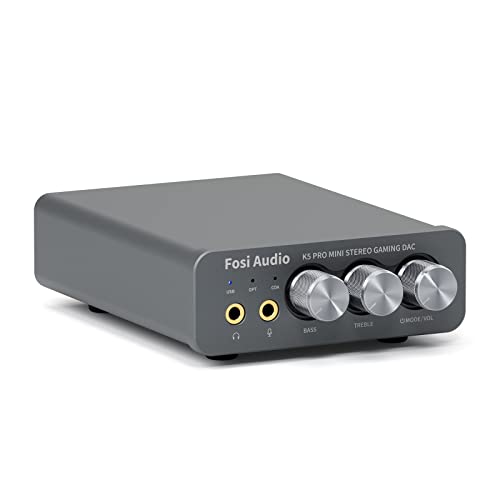
Unlike the compact converters, the K5 Pro combines a DAC with a headphone amplifier and microphone input. It accepts optical, coaxial or USB-C audio and converts it to RCA or 3.5mm analog output, with bass and treble controls. That mix suits a gaming desk or a setup that needs headphones and active speakers. Fosi says it supports audio up to 24-bit/192 kHz. The limitation is its role: it is not a stand-alone source, and the specifications do not establish that it can drive passive speakers directly.
Bottom line: Choose this if you want headphone amplification and mic input along with optical conversion.
AUTOUTLET Toslink-to-RCA Cable DAC

This converter is distinctive because the DAC is built into a 7-foot Toslink-to-RCA male cable, rather than a separate desktop box. It accepts optical digital audio and sends analog RCA output directly to a stereo amplifier or another RCA input. AUTOUTLET gives a 24-bit/192 kHz sampling rate, which describes supported digital input processing, not a guarantee of audible improvement. This can suit a source near an RCA input when a short, simple connection is all that is needed. Its limitation is the single output type: it does not provide 3.5mm or a headphone amplifier.
Bottom line: Pick this for a direct optical-to-RCA connection without extra output options.
PROZOR Optical/Coaxial DAC
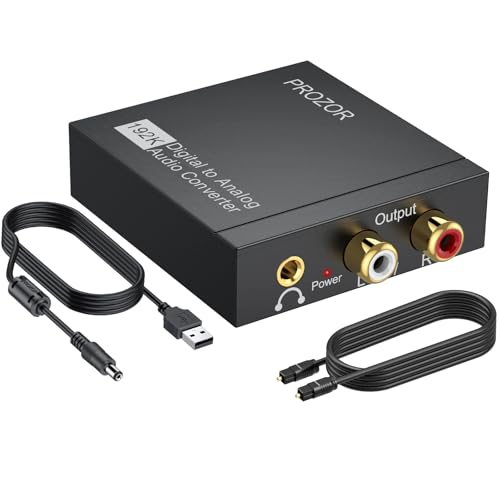
Unlike the cable-style converter, this PROZOR unit offers both RCA and 3.5mm analog outputs, and it accepts either Toslink optical or coaxial digital input. The outputs work simultaneously, which can suit a stereo receiver and a separate 3.5mm-connected device. It supports two-channel uncompressed PCM/LPCM, with sample rates from 32 to 192 kHz and 24-bit incoming audio. That format requirement is the key limitation: a TV sending Dolby Digital or another surround format may need its output changed to PCM before the DAC can decode it.
Bottom line: Choose this when you need both RCA and 3.5mm outputs and can set the source to stereo PCM.
Fosi Audio Q6 Desktop DAC

The Q6 is the dedicated desktop DAC in this group, with optical, coaxial and USB-C inputs plus RCA and sub-out connections. Its sub-out is a distinguishing option for a home stereo chain that includes a subwoofer; its RCA output can feed an amplifier or powered speakers. Fosi says the unit uses an AKM AK4493S DAC and supports PCM up to 32-bit/768 kHz and DSD512. The important limitation is that the Q6 cannot drive headphones or passive speakers directly, so it needs an amplifier or powered speakers downstream.
Bottom line: Pick this for a desktop stereo chain that needs optical input and a sub-out.
How to choose a DAC with optical in
Choose by the complete signal path: optical source, DAC, then the analog input on an amplifier, powered speaker or headphone amp. Toslink carries digital S/PDIF audio over fiber; RCA and 3.5mm carry analog audio, so they cannot substitute for the optical connection at the source. Stereo PCM is the safest format for simple DACs: many converters do not decode Dolby Digital or DTS bitstreams. If a TV has format controls, set its optical output to PCM when a converter produces silence or distorted sound. For headphone listening, select a unit with a headphone amp; for passive speakers, include a separate speaker amplifier. Pick a unit with at least two matching analog output connections only if the downstream devices actually require them.
Optical audio formats and sample rates
Optical input compatibility depends on both channel format and sample rate, not just the connector. S/PDIF commonly carries stereo PCM, including 44.1 kHz and 48 kHz audio; a DAC marked for 192 kHz may accept higher-rate signals, but that does not mean every source sends them. Two-channel PCM and multichannel Dolby/DTS are different signal formats, and an ordinary stereo converter may not decode the latter. Check the source’s digital-audio menu for PCM or LPCM and select stereo output if the DAC requires it. A simple rule: if a converter specifies only two-channel PCM, do not send it a 5.1 bitstream. Also distinguish an input from an output: an optical input receives digital audio, while analog RCA/3.5mm outputs feed the next component.
Match the DAC outputs to your equipment
RCA stereo uses two plugs, one for each channel; a 3.5mm stereo connection combines left and right in one plug. A sub-out is a separate analog connection intended for a subwoofer, while it does not replace the main stereo output. Headphones need a headphone amplifier, and passive speakers need a speaker amplifier; a DAC alone converts digital audio but does not supply speaker power. Use this quick match-up before choosing a connection:
| Connection need | Look for |
|---|---|
| Receiver or stereo amp | RCA output |
| 3.5mm analog input | 3.5mm output |
| Headphones directly | Headphone amplifier |
| Passive speakers | Separate speaker amplifier |
For a TV setup, confirm that its optical output can be set to stereo PCM and that the DAC output matches the amplifier input before connecting the chain.
Frequently Asked Questions
Why is there no sound from my optical DAC?
A common cause is a source sending Dolby Digital or DTS to a DAC that accepts only stereo PCM. Set the source’s digital output to PCM/LPCM and confirm the optical cable is connected to the DAC input.
Can an optical DAC convert surround sound?
A basic stereo DAC generally converts two-channel PCM rather than decoding 5.1 Dolby Digital or DTS. If the DAC specifies two-channel PCM, change the source to stereo PCM instead of sending a surround bitstream.
Can a DAC connect directly to passive speakers?
Connect it to a speaker amplifier first; powered speakers have amplification built in and can accept a compatible line-level output.