
DC 14V Power Cord for Samsung Monitor Compared

Samsung Monitor Adapter, 14V 4A is the closest match for most Samsung monitors that require 14V DC and draw no more than 4A, because it has the highest current limit here. Choose Samsung Monitor Adapter, 14V 3A (100–240V AC) or Samsung SyncMaster Adapter, 14V 3A instead only if your monitor’s label calls for 3A or less and their plug and polarity match.
A DC power adapter converts household AC into the low-voltage DC power a monitor uses; the cord’s voltage, connector, and polarity must all match the monitor.
We earn a commission if you buy through links on this page. As an Amazon Associate I earn from qualifying purchases. Products are compared on manufacturer specifications, not hands-on testing.
- Best overall: Samsung Monitor Adapter, 14V 4A – Its 14V, 4A maximum covers monitors needing up to 4A.
- Best for 3A monitors: Samsung Monitor Adapter, 14V 3A (100–240V AC) – Its 14V output supports up to 3A, and its input range is 100–240V AC.
- Best for legacy models: Samsung SyncMaster Adapter, 14V 3A – Its compatibility examples include older SyncMaster monitor sizes and model families.
| Product | Best for | Max current | Compatibility examples | Shop |
|---|---|---|---|---|
| Samsung Monitor Adapter, 14V 4A | Up to 4A | 4A | SyncMaster CF390, S22A300B, S24D300H | Check Price on Amazon |
| Samsung Monitor Adapter, 14V 3A (100–240V AC) | Up to 3A | 3A | S24D300HL, S27A850D, S24A450B | Check Price on Amazon |
| Samsung SyncMaster Adapter, 14V 3A | Older SyncMaster | 3A | S20B300B, S22B300H, S24B350HL | Check Price on Amazon |
DC 14V Power Cords for Samsung Monitors
Compare the output and current limit, then verify the exact connector and polarity against your monitor’s label before choosing.
Samsung Monitor Adapter, 14V 4A
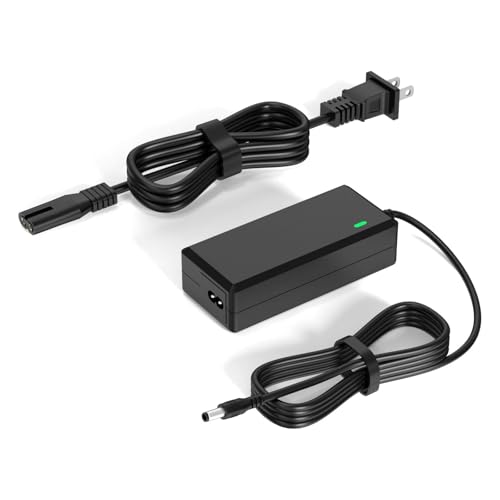
Samsung Monitor Adapter, 14V 4A is the only option here with a 4A maximum, making it the fit to consider when the monitor label requires more than 3A but no more than 4A. The maker lists 14V output and compatibility examples including the SyncMaster CF390 family, S22A300B, and S24D300H. Its long model-number list spans several monitor sizes, but a family name alone is not enough to confirm a match. Check the monitor’s power label and compare the adapter’s connector shape and polarity before ordering; the higher current limit cannot compensate for a wrong plug or voltage.
Bottom line: Choose this for a monitor requiring 14V and up to 4A, after confirming the connector and polarity.
Samsung Monitor Adapter, 14V 3A (100–240V AC)

Samsung Monitor Adapter, 14V 3A (100–240V AC) is the clearest choice when the monitor needs 3A or less: its maker specifies 14V DC, a 3A and 42W maximum, and explicitly warns against using it for 3.5A or 4A models. Compatibility examples include S24D300HL, S27A850D, and S24A450B. That model list still does not establish connector fit or polarity, so compare those against the monitor before use.
Bottom line: Pick this when the monitor requires no more than 3A and its plug and polarity match.
Samsung SyncMaster Adapter, 14V 3A

Samsung SyncMaster Adapter, 14V 3A focuses its compatibility examples on older SyncMaster sizes and model families, including S20B300B, S22B300H, and S24B350HL. Its name and features describe a 14V adapter for 3A and 2.5A monitors, so it belongs only with a display whose label calls for 3A or less. The broad size range is not a substitute for checking the exact model number: monitors of the same screen size can have different power requirements. Confirm the connector dimensions and polarity as well as the voltage before choosing it.
Bottom line: Choose this for an older SyncMaster model requiring 14V and 3A or less.
How to choose a 14V Samsung monitor adapter
Match the monitor’s required voltage first: a 14V DC monitor needs a 14V DC supply, not an adapter with a different output voltage. Next, the adapter’s current rating must be at least the monitor’s required amperage; a lower-rated supply can be overloaded. For example, a monitor requiring 3.5A exceeds a 3A adapter’s limit, even when both are 14V. Finally, match the connector dimensions and polarity shown on the monitor or its original adapter. A 14V label alone does not guarantee compatibility, and screen size or a shared model family is not enough to establish a fit.
How to check the plug and polarity
Connector fit and polarity are separate requirements: a plug can slide into a socket and still be electrically incompatible. Check the polarity diagram on the monitor or original adapter; barrel connectors commonly use center-positive polarity, but do not assume that for a particular monitor. Compare the plug’s outside diameter, inside diameter, and insertion length with the original. A loose connection can interrupt power, while forcing a mismatched plug can damage the socket. If the label or original adapter cannot establish both polarity and connector size, confirm those before connecting a replacement.
What 3A and 4A ratings mean
An adapter’s amp rating is its maximum available current, not a current it forces into the monitor. A monitor draws the current it needs, so a 4A-rated adapter can serve a 14V monitor needing 3A when the connector and polarity also match; a 3A adapter is not suitable for a monitor requiring 4A. The 3A unit is rated for up to 42W, consistent with 14V × 3A. Use the monitor’s own label as the requirement, not a guess based on screen size. Never run an adapter above its current limit.
Common mistakes when replacing a monitor power cord
The most common mistake is matching only the 14V output while overlooking amperage, polarity, or plug size. A second mistake is assuming every Samsung monitor of the same diagonal uses the same adapter; model families and power needs can differ. A third is treating a long compatibility list as proof when the exact model number is absent or abbreviated. Read the full monitor model and its DC input label, then compare those markings with the adapter. Disconnect power before swapping adapters, and stop if a plug feels loose, needs force, or the unit becomes unusually hot.
Frequently Asked Questions
Can a 4A adapter power a 3A monitor?
Yes, if both supplies are 14V DC and the plug and polarity match. The monitor draws the current it needs; the 4A rating is the adapter’s maximum capacity.
Does a 14V plug fit every Samsung monitor?
No. Samsung monitors can use different connector dimensions and polarity even when their required voltage is 14V. Compare the plug and polarity with the monitor’s original adapter or label.
How do I find my monitor’s power requirement?
Check the DC input label on the monitor or its original adapter for voltage and amperage. Use those exact values; for a 14V monitor, the replacement must also output 14V DC and meet or exceed its required current.