
Digital Calendar for Fridge: 5 Models Compared

For a digital calendar on a fridge, EVERBLOG FridgeCal 13.4-inch is the clearest fit because it has a magnetic mount and rechargeable battery for cordless use. Choose JSUSOU 15.6-inch Magnetic Calendar if you want a larger 15.6-inch display; wall-oriented models may suit households that prefer a separate mounting spot.
A digital fridge calendar is a screen-based family planner mounted on or near the refrigerator, often with schedule syncing and household tools. Check that your fridge door and chosen mounting location are compatible before ordering.
We earn a commission if you buy through links on this page. As an Amazon Associate I earn from qualifying purchases. Products are compared on manufacturer specifications, not hands-on testing.
- Best overall: EVERBLOG FridgeCal 13.4-inch – Its magnetic plate and rechargeable battery are designed for cordless fridge mounting.
- Best for a larger screen: JSUSOU 15.6-inch Magnetic Calendar – The 15.6-inch model has a magnetic mount and combines planning tools on one screen.
- Best for a compact display: 10.1-inch White Digital Calendar – The 10.1-inch planner syncs calendars and includes chore tracking and a photo slideshow.
| Product | Best for | Screen size | Mounting | Shop |
|---|---|---|---|---|
| EVERBLOG FridgeCal 13.4-inch | Cordless fridge use | 13.4 in | Magnetic plate | Check Price on Amazon |
| JSUSOU 15.6-inch Magnetic Calendar | Large fridge display | 15.6 in | Magnetic mount | Check Price on Amazon |
| 10.1-inch White Digital Calendar | Compact family planner | 10.1 in | Wall/desk orientation | Check Price on Amazon |
| Skylight Calendar 15-inch | Wall-mounted schedules | 15 in | Wall mount included | Check Price on Amazon |
| White Touchscreen Digital Calendar | Meal planning setup | — | Wall touch screen | Check Price on Amazon |
Digital calendars for fridge use
Compare screen dimensions, mounting approach and power details to find a planner that suits your kitchen setup.
EVERBLOG FridgeCal 13.4-inch

For a cordless refrigerator setup, this 13.4-inch calendar pairs a magnetic mounting plate with an 8,400 mAh rechargeable battery. The maker says typical use lasts up to 3–5 days, with customizable Auto-Sleep to conserve power. Its free app and calendar syncing cover Google, Apple iCloud, Outlook, Yahoo, Cozi and TeamSnap; chore rewards, meal planning and AI recipes add household tools beyond scheduling.
The maker specifies compatibility with metal or glass fridge doors, so confirm your surface works with the included plate. Battery use means occasional recharging is part of ownership, unlike a permanently powered display.
Bottom line: Pick this if cordless magnetic placement and broad calendar syncing are your priorities.
JSUSOU 15.6-inch Magnetic Calendar
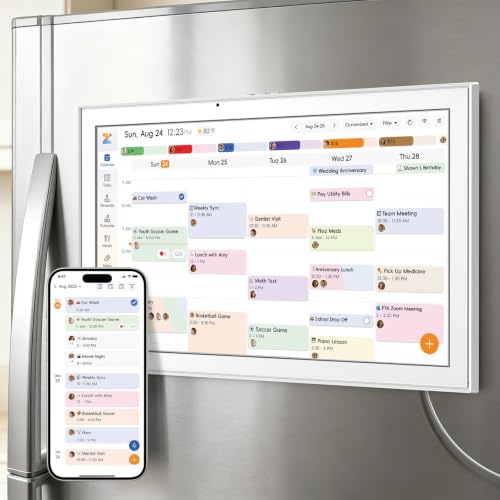
The 15.6-inch screen is the largest size among the fridge-oriented options, and its magnetic mount is intended for refrigerator placement. Its toolset spans chore assignments with color labels and rewards, meal planning, shopping lists, habit tracking, photos, to-do lists, alarms and smart-home control. Calendar syncing supports Google, Outlook and iCloud.
This model suits households that want several planning functions visible on one larger screen. The specifications give no power specification, so buyers who need battery operation or a particular cord arrangement should confirm that before ordering.
Bottom line: Choose this for a larger magnetic display and an extensive set of household planning tools.
10.1-inch White Digital Calendar

This 10.1-inch planner is the compact option, measuring 10.6 by 10.6 inches with a 7.5-inch height. Calendar sync with Google, iCloud and Outlook, a chore tracker with redeemable points, and a photo slideshow make it a family organizer rather than a specifically fridge-mounted model.
Its smaller screen may work better where counter or wall space is limited, but the product name identifies a wall-plan format and the fields do not establish magnetic mounting. Choose it for a nearby shelf or wall if fridge attachment is not essential; verify the mounting method if you intend to place it on a refrigerator.
Bottom line: Pick this for a compact family planner when fridge-specific mounting is not required.
Skylight Calendar 15-inch

Unlike the magnetic fridge models, this 15-inch touchscreen is supplied with a wall mount, making it a better match for a dedicated wall location. It syncs schedules with Google, iCloud, Outlook, Cozi and Yahoo over Wi-Fi and includes an interactive chore chart with color-coded schedules.
The roughly 15-inch format gives a larger viewing area than compact planners, but the wall-mount design is a meaningful distinction for buyers seeking a screen attached directly to a fridge. Choose it when a fixed wall spot near the kitchen works better than magnetic placement.
Bottom line: Choose this for a wall-mounted family calendar with chore-chart features.
White Touchscreen Digital Calendar

This white touchscreen calendar is presented as a wall-oriented family planner and mentions meal planning along with a desk stand and refills. Those form-factor cues distinguish it from the magnetic fridge choices, although its fields do not establish a screen size or mounting mechanism.
It may suit someone comparing a wall or desk planning station rather than a refrigerator-mounted display. The limited specifications make fit harder to judge, so confirm the display dimensions and whether the included stand or wall arrangement matches your intended spot before choosing it for kitchen use.
Bottom line: Consider this when a wall or desk planner is acceptable and its physical fit can be confirmed.
How to choose a digital fridge calendar
Start with the mounting method and power arrangement, then compare screen size and household features. A magnetic calendar attaches to a compatible refrigerator surface; a wall-mounted planner needs a separate spot, while a stand can use counter space. Screen diagonal is measured corner to corner, so a 15-inch display needs more room than a 10.1-inch screen even when the diagonal seems modest. Measure the usable area before selecting a display, and leave room for any mount and charging cable. Choose a cordless model if a cable would cross a walkway or counter; check its battery runtime and plan a place to recharge it. Syncing services matter only if your household already uses those calendars.
Fridge mounting and fit
Magnetic mounting works only when the target surface is compatible with the mount, so check the refrigerator door material and the maker’s compatibility notes. A product that mentions a magnetic plate does not mean every fridge door will hold it; some doors have nonmagnetic exterior panels. Measure the flat mounting area and compare it with the screen dimensions, including any protruding trim or nearby handles. A 13.4-inch or 15.6-inch diagonal is a substantial display, while a 10.1-inch option takes less visual space. For glass doors, use a mount explicitly described as compatible rather than assuming a standard magnet will attach. Wall calendars avoid the fridge-surface question but require a suitable mounting location.
Magnetic, cordless and wall calendars compared
Magnetic calendars prioritize refrigerator placement, cordless calendars reduce visible cable clutter, and wall calendars use a dedicated mounting spot. A model can offer more than one of these characteristics, so compare its actual mount and power details rather than relying on the broad product category.
| Setup | Useful when | Check before choosing |
|---|---|---|
| Magnetic fridge mount | The refrigerator is the household planning hub | Door material and usable flat area |
| Rechargeable cordless | A nearby outlet is inconvenient | Battery runtime and recharge routine |
| Wall mount or stand | A separate, stable display location is preferred | Mount or stand included and space available |
When the fridge door is not compatible with the mount, select a wall or counter location instead of forcing an attachment.
Calendar syncing and family features
Calendar syncing is useful when family members keep events in different accounts, but compatibility varies by model. Compare the specific services named for the display with the calendars your household uses; support for Google or Outlook does not establish support for every service. Chore trackers may assign tasks, show progress or award points, while meal planners can keep menus and shopping lists together. Photo frames and smart-home controls are additional functions, not substitutes for checking schedule sync. Before choosing a feature-heavy screen, decide which two or three functions your household will use routinely. More tools can be convenient, but a clear shared calendar is the core purpose.
Frequently Asked Questions
Will a magnetic calendar stick to every fridge door?
No, the door surface and mounting plate must be compatible. Some refrigerator exteriors are not magnetic, so confirm compatibility or choose a wall or counter location instead.
How often does a cordless fridge calendar need charging?
Charging frequency depends on use and power-saving settings. The FridgeCal maker says its 8,400 mAh battery offers up to 3–5 days of typical use, so plan for periodic recharging rather than continuous operation.
How is the screen size of a digital calendar measured?
Screen size is the diagonal distance across the display, not its width. Measure the intended mounting area separately because the overall body and mount may occupy more space than the screen itself.
Can a digital fridge calendar sync multiple family calendars?
Some models sync multiple services, but the supported platforms differ. Compare the named services with the accounts your family uses, such as Google, iCloud or Outlook, before selecting a planner.
Where should a digital calendar be mounted in a kitchen?
Choose a visible spot with enough flat space and safe access to power or recharging. Keep the screen and any cable clear of heat-producing appliances, sinks and locations where people could snag the cord.