
DIGITNOW USB Audio Capture: 4 Options Compared

For computer-based analog audio transfers, DIGITNOW USB 2.0 Audio Capture Card is the closest match because it captures from 3.5mm or left/right audio inputs over USB and supports Mac and Windows. Choose a different option if you want a portable cassette player or direct recording to a USB flash drive without a PC.
USB audio capture devices digitize an analog audio signal as a computer recording; cassette players with built-in capture use a different workflow.
We earn a commission if you buy through links on this page. As an Amazon Associate I earn from qualifying purchases. Products are compared on manufacturer specifications, not hands-on testing.
- Best overall: DIGITNOW USB 2.0 Audio Capture Card – Captures 3.5mm or left/right audio input to a computer and supports Mac and Windows.
- Best for vinyl input: DigitPro USB 2.0 Audio Capture Card – Supports 3.5mm and left/right audio inputs for analog sources including LPs.
- Best for PC-free recording: DIGITNOW BR607 USB Cassette Player – Records cassette audio directly to a FAT32 USB drive without a computer.
| Product | Best for | Input or source | Recording destination | Compatibility | Shop |
|---|---|---|---|---|---|
| DIGITNOW USB 2.0 Audio Capture Card | Computer audio transfers | 3.5mm and left/right audio | Computer; MP3/WAV | Mac OS 10.11+; Windows XP–10 | Check Price on Amazon |
| DigitPro USB 2.0 Audio Capture Card | Vinyl and tape inputs | 3.5mm and left/right audio | Computer; MP3/WAV | Mac OS 10.7–10.14; Windows XP–11 | Check Price on Amazon |
| DigitNow USB Cassette-to-MP3 Player | Portable tape playback | Cassette tape | Computer; MP3 | Windows XP–7; older Mac OS | Check Price on Amazon |
| DIGITNOW BR607 USB Cassette Player | PC-free tape capture | Cassette tape | FAT32 USB drive; MP3 | USB port or 2 AA batteries | Check Price on Amazon |
DIGITNOW USB Audio Capture Options
The key distinction is whether you want a computer-connected audio interface or a cassette player that records independently.
DIGITNOW USB 2.0 Audio Capture Card

DIGITNOW USB 2.0 Audio Capture Card is the direct computer-connected audio capture card in this group, with 3.5mm and left/right audio inputs and MP3 or WAV output. It connects over USB without an extra power supply and includes Audacity software. The operating-system support includes Mac OS 10.11 and later, plus Windows XP through 10. It suits someone digitizing a source with compatible audio outputs and editing or saving the recording on a computer. The limitation is the computer-based workflow: choose another type if you need a portable cassette player or direct-to-flash-drive recording.
Bottom line: Pick this if your analog source connects by 3.5mm or left/right audio and you want computer recording.
DigitPro USB 2.0 Audio Capture Card

DigitPro USB 2.0 Audio Capture Card is a similar computer-connected capture card, but its Mac support ends at 10.14 and explicitly excludes 10.15. It accepts 3.5mm and left/right audio inputs and transfers analog sources such as cassette tapes, LPs, or radio to a computer for MP3 or WAV conversion. USB power means no separate supply is needed, and Audacity is included or downloadable. This is a reasonable alternative when its operating-system range fits your computer. It is not the best fit for newer Mac systems, and the maker notes it is intended for common use rather than professional-grade needs.
Bottom line: Choose this for analog sources when your computer falls within its supported operating-system range.
DigitNow USB Cassette-to-MP3 Player
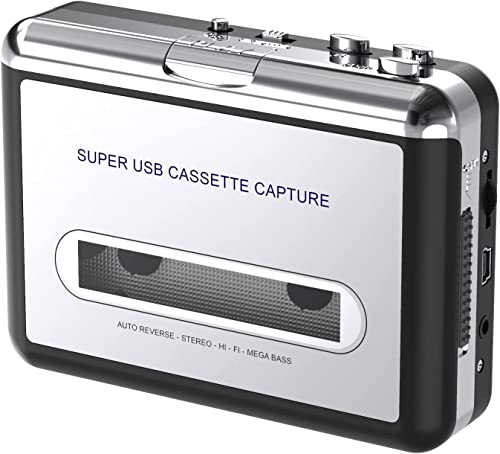
DigitNow USB Cassette-to-MP3 Player differs from the audio interface cards because it is a portable cassette player that connects to a computer by USB for tape-to-MP3 conversion. It also has a 3.5mm headphone output, and the maker describes USB-powered or built-in-battery operation. The compact body measures 3.94 inches long, 1.97 inches wide, and 0.79 inch high. It suits someone whose source is a cassette and who also wants portable playback. Its computer compatibility is limited to Windows XP, Vista, and 7, or Mac versions older than 10.5, so it is a poor match for a newer computer.
Bottom line: Pick this for portable cassette playback and conversion on a compatible older computer.
DIGITNOW BR607 USB Cassette Player
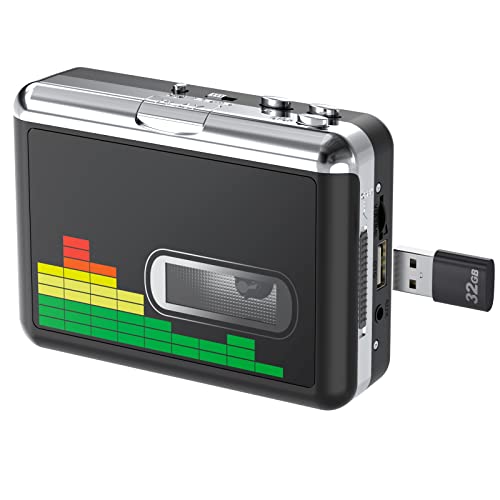
DIGITNOW BR607 USB Cassette Player is the only option here that records cassette audio directly to a USB flash drive, without requiring a PC. It supports FAT32 drives up to 128 GB, has volume control and playback, and can run from a USB port or two AA batteries. That makes it suited to cassette owners who want a standalone transfer workflow rather than computer capture software. The limitation is its source and destination: it handles cassette tapes and a USB drive, not the broader 3.5mm or left/right audio inputs of the capture cards. Confirm the flash drive uses FAT32 before recording.
Bottom line: Choose this when you want standalone cassette-to-USB recording without a computer.
How computer-based audio capture works
A USB audio capture card converts an incoming analog audio signal into a digital recording on a computer. Most home stereo sources provide either stereo RCA left/right connectors or a 3.5mm stereo output; match the source output to the capture device input, and avoid confusing an output jack with a microphone input. Recording from a cassette or record player takes the full playback time, so a 60-minute tape requires about 60 minutes to capture in real time. In Audacity, choose the capture device as the recording input, check that both stereo channels move, then export the finished recording as WAV or MP3. WAV is uncompressed; MP3 saves space but discards audio data.
Choose by source and recording destination
Choose a computer-connected capture card when the source has a compatible audio output and you want computer files; choose a cassette player with USB capture when the source is a tape and you want a standalone transfer. A turntable may need a phono preamp unless it has a built-in preamp or line-level output, because a cartridge signal is much lower than line level. The 3.5mm and left/right connectors are not interchangeable without the right cable, and left/right channels should remain paired to preserve stereo. Check operating-system compatibility before choosing a computer workflow, especially for older software support. The table separates the devices by source and destination rather than treating all USB converters as the same type.
| Device type | Best source fit | Destination |
|---|---|---|
| USB audio capture card | Analog line-level audio output | Computer recording |
| USB cassette player | Cassette tape | Computer or playback |
| Standalone USB cassette capture | Cassette tape | USB flash drive |
Set recording levels before a full transfer
Set the input level so loud passages do not hit 0 dBFS, the maximum digital level; clipped peaks cannot be restored by turning the recording down afterward. Make a short test recording with the loudest section of the source, then adjust the computer input level and listen for distortion or missing channels. Hum can come from poor cable connections or ground loops, so secure connectors and keep audio cables away from power adapters where practical. Keep the original tape or record at a steady playback speed throughout the capture. For cassette transfers, dirty playback heads can muffle high frequencies; clean the deck using a method intended for its head materials before making an archival recording.
Check compatibility and source condition
Confirm the operating system and connection type before setting up a computer-based converter; compatibility ranges differ between models, and some older software may not work on current systems. Test a short segment first so you can verify the input selection, stereo channels, output format, and saved-file playback before digitizing an entire collection. Worn, stretched, or damaged cassette tape can produce dropouts or unstable playback, and capture software cannot recreate audio that the source no longer plays clearly. Keep important tapes away from heat, moisture, and magnetic fields, and store the digital copies on a second device rather than relying on a single file.
Frequently Asked Questions
How long does digitizing a cassette tape take?
A 60-minute cassette takes about 60 minutes to capture at normal playback speed. Add time for checking levels and splitting or naming the resulting tracks.
Does a turntable need a preamp for USB capture?
A turntable usually needs a phono preamp unless it has a built-in preamp or line-level output. The preamp raises the cartridge signal to a usable line level and applies the required playback equalization.
What audio format should I use for an archive?
WAV is a useful choice for an archival master because it is uncompressed, while MP3 uses less storage by discarding audio data. Keep an uncompressed copy before making smaller listening files.
Why does a cassette recording sound muffled?
Dirty tape heads or a worn tape can reduce high-frequency sound. Clean the playback head with a compatible method and test another tape to distinguish a deck issue from a damaged source.
Can I record stereo audio through a 3.5mm connection?
A stereo 3.5mm connection carries left and right channels when both the source and cable are wired for stereo. Check that the recording software shows activity on both channels before capturing a full tape.