
Elbow Pads for Desk: 3 Cushions Compared by Fit

MEKASS L-Shaped Elbow Pads, 2-Piece suits desk users who want two adjustable cushions that wrap around an edge, while its 11.8-inch length gives more coverage than the single pads. Choose a single cushion instead if you want one compact resting spot or have limited desk-edge space.
An elbow pad is a cushion placed between your arm and desk to soften contact; the right size depends on where your forearm rests and how much room your setup allows.
We earn a commission if you buy through links on this page. As an Amazon Associate I earn from qualifying purchases. Products are compared on manufacturer specifications, not hands-on testing.
- Best overall: MEKASS L-Shaped Elbow Pads, 2-Piece – The two-piece L-shaped design lets you adjust cushion spacing and wrap around desk edges.
- Best for a compact spot: Leolee Single Elbow Rest Pad, Black – The 6.3-by-4.3-inch single pad takes up less surface area.
- Best for wider support: Vaydeer Larger Elbow Rest Pad – The 7.37-by-5.07-inch pad offers the largest single-cushion footprint here.
| Product | Best for | Cushion dimensions | Configuration | Shop |
|---|---|---|---|---|
| MEKASS L-Shaped Elbow Pads, 2-Piece | Adjustable edge coverage | 11.8 × 4.3 × 0.78 in | Two-piece L-shaped | Check Price on Amazon |
| Leolee Single Elbow Rest Pad, Black | Compact single support | 6.3 × 4.3 in | Single concave pad | Check Price on Amazon |
| Vaydeer Larger Elbow Rest Pad | Wider single cushion | 7.37 × 5.07 × 0.94 in | Single pad | Check Price on Amazon |
Elbow Pads for Desk Compared
Compare the cushion footprint and layout with the space and resting position at your desk.
MEKASS L-Shaped Elbow Pads, 2-Piece

MEKASS L-Shaped Elbow Pads, 2-Piece stands apart as the only two-piece L-shaped set, so you can vary the gap between cushions and position them along a straight or L-shaped desk. Each piece measures 11.8 × 4.3 × 0.78 inches and combines memory foam with a Lycra fabric surface. The maker says its non-slip design wraps desk edges. This layout suits people who rest both arms or want to shift placement; the tradeoff is that two pieces need more surface area than one compact pad. Check edge thickness and clearance if the desk has a raised lip.
Bottom line: Choose this set if you want adjustable spacing and edge-wrapping coverage.
Leolee Single Elbow Rest Pad, Black
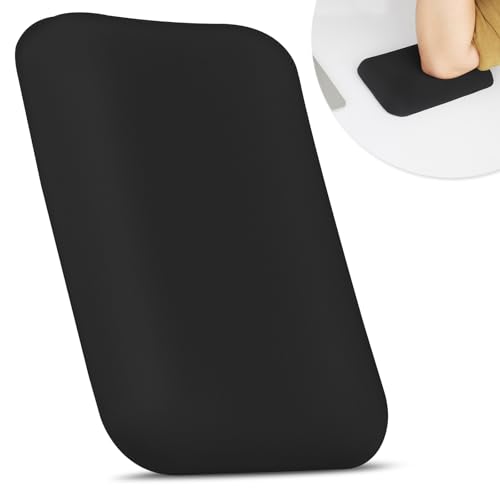
Leolee Single Elbow Rest Pad, Black is the shortest single cushion in this group, making it a reasonable fit when desk space is tight or you only need one resting point. Its 6.3 × 4.3-inch footprint, memory foam, and concave center are intended to cradle the arm; the maker also describes a non-slip base. The smooth milk-silk fabric is another distinguishing feature. The smaller footprint leaves less room to reposition your arm than the wider Vaydeer pad, so measure the area where your elbow or forearm actually lands before choosing it.
Bottom line: Pick this pad when a small, single resting area matters most.
Vaydeer Larger Elbow Rest Pad

Vaydeer Larger Elbow Rest Pad has the broadest and thickest single-pad dimensions among these options: 7.37 × 5.07 × 0.94 inches. The maker says the enlarged cushion provides more contact area and raises the arm higher, with memory foam for support. That extra width can suit a desk user who wants more room to shift position without arranging a pair of pads. Its larger footprint may crowd a narrow keyboard or mouse area, and a raised elbow can alter arm alignment, so confirm the added height keeps your shoulders relaxed.
Bottom line: Choose it if you want a wider single cushion and have room for its footprint.
How to choose an elbow pad for a desk
Choose by resting position first: a single pad fits one landing spot, while a two-piece set lets you position support under both arms or adjust the spacing. Sit with shoulders relaxed and elbows near your sides; a roughly 90-degree elbow bend is a useful starting point, not a fixed requirement. Keep wrists straight rather than bent up against the desk edge. Measure the available surface before selecting a cushion, including space needed for a keyboard or mouse. With less than 6.3 inches of clear depth, none of these listed footprints can lie fully flat without overlapping another item, so reposition the workspace or verify the usable area before ordering.
| Need | Choose |
|---|---|
| Two adjustable resting points | Two-piece set |
| Small single resting point | 6.3 × 4.3-inch pad |
| Wider single resting point | 7.37 × 5.07-inch pad |
Desk edge fit and arm position
Place an elbow cushion where your forearm contacts the desk, not so far forward that your wrist bends upward to reach the keyboard. A desk edge should not press sharply into the forearm; adjust chair height and pad position together until shoulders stay down and elbows remain comfortably near your sides. An L-shaped wrap can work around an edge, but edge thickness and any bevel or raised lip affect how it sits. Measure those features before ordering if the pad must wrap tightly. If the cushion raises your arm enough to lift a shoulder or angle a wrist, move it or choose a thinner profile.
Memory foam and surface materials
Memory foam cushions compress under an arm and recover their shape after pressure is removed; thickness and firmness affect how much the arm is raised. Fabric covers also change surface feel and friction: smooth materials can allow easier repositioning, while textured fabric may feel more ventilated. These products use different descriptions of their cover fabrics, so do not assume identical feel from the shared memory-foam construction. A cushion is a contact surface, not a substitute for keeping the keyboard and mouse close enough to avoid reaching. Avoid leaning body weight onto a soft pad, since a compressible cushion is not a structural armrest.
Safe, comfortable desk-pad use
A desk cushion can soften contact, but it cannot correct a workstation that forces a bent wrist, raised shoulder, or sustained awkward posture. Keep the keyboard near elbow height and position the mouse beside it so the upper arm stays close to the body. Change position periodically rather than resting one elbow on a hard edge continuously; short movement breaks are useful during extended computer work. Stop using a pad if its edge presses into the arm or if its added height causes shoulder tension. Keep cushions clear of keyboard controls and mouse movement, and make sure pads cannot slide into a position that obstructs normal typing.
Frequently Asked Questions
How thick should an elbow pad for a desk be?
Choose thickness based on arm alignment, not cushioning alone. A pad that raises the elbow enough to lift the shoulder or bend the wrist is too high for that setup; compare the cushion height with your relaxed seated position.
Where should an elbow cushion sit on a desk?
Position the cushion under the forearm or elbow contact point while keeping the wrist straight. Keep it far enough from the keyboard that it does not push your hand upward or force you to reach.
Can desk elbow pads fit any desk edge?
A flat pad can rest on a usable surface, but an edge-wrapping design depends on edge thickness and shape. Measure the edge and check for a bevel or lip before relying on a snug wrap.
How do I keep my wrists straight while typing?
Keep the keyboard close and around elbow height, with shoulders relaxed and wrists aligned with the forearms. If a cushion raises the arm so the wrist angles upward, lower or reposition it.
Should I rest my whole arm on an elbow pad?
Use the cushion for light contact rather than supporting your body weight. Keep shoulders relaxed and change position periodically during long computer sessions instead of holding one posture.