
Ender 3 Silent Board: 5 Control Boards Compared

For a straightforward Ender 3 replacement, Creality V4.2.7 TMC2225 Board is the clearest fit because its V4.2.7 board is preconfigured for Ender 3 and uses TMC2225 drivers. Choose BIGTREETECH SKR Mini E3 V3.0 instead if you want the SKR Mini E3 V3.0 with TMC2209 UART drivers; for other Ender 3 variants, match the firmware to the exact printer before installing.
We earn a commission if you buy through links on this page. As an Amazon Associate I earn from qualifying purchases. Products are compared on manufacturer specifications, not hands-on testing.
- Best overall: Creality V4.2.7 TMC2225 Board – Preconfigured for Ender 3, with TMC2225 drivers and a bootloader installed.
- Best for TMC2209 UART: BIGTREETECH SKR Mini E3 V3.0 – Uses TMC2209 UART drivers and adds controllable fan outputs.
- Best for Ender 3 Pro: Creality Ender 3 Pro V4.2.7 – Ships with Ender 3 Pro firmware and supports TMC2225 drivers.
| Product | Best for | Driver | Firmware setup | Printer fit | Shop |
|---|---|---|---|---|---|
| Creality V4.2.7 TMC2225 Board | Ender 3 replacement | TMC2225 | Preinstalled Ender 3 | Ender 3; other variants require firmware | Check Price on Amazon |
| BIGTREETECH SKR Mini E3 V3.0 | UART driver setup | TMC2209 UART | — | Ender 3, Ender 3 Pro, Ender 3 V2 | Check Price on Amazon |
| Creality V4.2.7 Silent Board, Ender 3 Firmware | Basic Ender 3 swap | TMC2225 | Preinstalled Ender 3 | Ender 3; select other variants | Check Price on Amazon |
| Creality Ender 3 Pro V4.2.7 | Ender 3 Pro | TMC2225 | Preinstalled Ender 3 Pro | Ender 3, Pro, Ender 5 | Check Price on Amazon |
| Creality V4.2.7 TMC2225 Board, Marlin/Klipper | Marlin or Klipper | TMC2225 | Marlin or Klipper supported | Ender 3 | Check Price on Amazon |
Ender 3 silent boards
Compare driver type, firmware starting point, and stated printer compatibility before choosing a replacement.
Creality V4.2.7 TMC2225 Board

For an Ender 3 replacement, this Creality V4.2.7 board has the most direct stated setup: its firmware is preinstalled for Ender 3, and its bootloader is already installed. The TMC2225 driver is intended to reduce stepper-motor noise, and the board uses a 32-bit design. The compatibility also includes Ender 3 V2, Pro, Max, Neo, V2 Neo, and Max Neo, but the maker specifies that those other machines need their corresponding V4.2.7 firmware. That firmware step makes this a less direct fit if you want a swap without reconfiguration on another variant.
Bottom line: Choose this for an Ender 3 when you want a board preconfigured for that model.
BIGTREETECH SKR Mini E3 V3.0
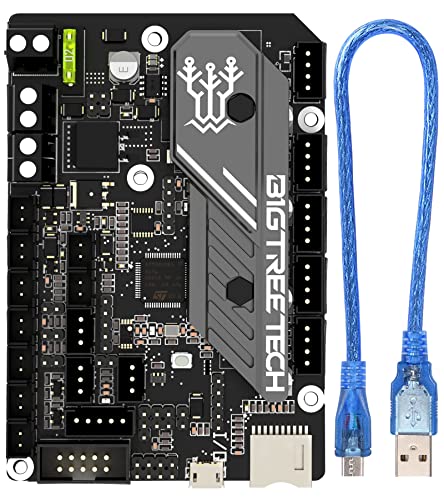
The SKR Mini E3 V3.0 stands apart with TMC2209 UART stepper drivers rather than the TMC2225 drivers on the Creality alternatives. BIGTREETECH also adds three controllable fan connections, a redesigned driver heatsink, and a Micro USB B communication port; the main chip is from STMicroelectronics’ STM32G0 series. The fit covers Ender 3, Ender 3 Pro, and Ender 3 V2. Its feature set is the reason to choose it for a UART-focused setup, but the maker does not establish a preinstalled firmware configuration, so buyers replacing a board should confirm that firmware is suitable for their printer.
Bottom line: Choose this if TMC2209 UART drivers and controllable fans are priorities.
Creality V4.2.7 Silent Board, Ender 3 Firmware
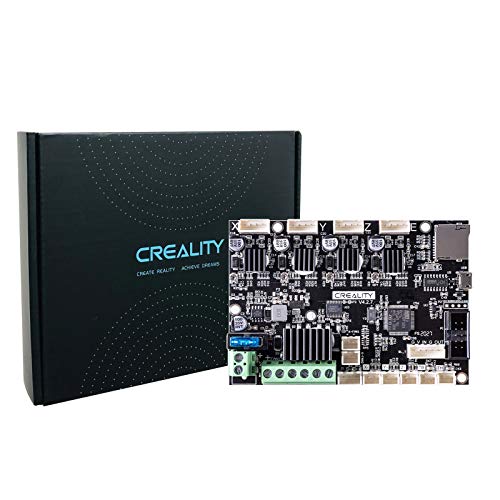
This V4.2.7 Creality board emphasizes a preinstalled Ender 3 configuration and a bootloader for firmware updates. Its TMC2225 drivers are intended for quieter stepper-motor operation, and thermal runaway protection is enabled. The maker also says the circuit is optimized to address heating problems. The compatibility includes Ender 3 Max and several Neo variants, but the Ender 3 firmware should not be assumed to suit every printer in that group. This is a practical option when a preconfigured Ender 3 board is the goal; owners of another variant need to account for the firmware match.
Bottom line: Choose this for a preconfigured Ender 3 board with thermal runaway protection enabled.
Creality Ender 3 Pro V4.2.7
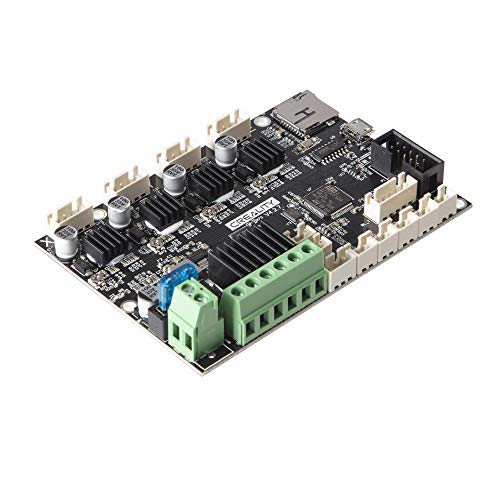
This V4.2.7 Creality board differs from the Ender 3-configured alternatives because it comes with Ender 3 Pro firmware. It uses a TMC2225 driver and Marlin 2.0.1, and the bootloader allows firmware modification over USB. The maker lists Ender 3, Ender 3 Pro, Ender-3S, and Ender 5 as compatible, while explicitly requiring a firmware change for Ender 3 or Ender 5. That firmware change is an important limitation for anyone expecting a direct swap on a non-Pro model. For an Ender 3 Pro, its default firmware matches the intended starting point.
Bottom line: Choose this if your printer is an Ender 3 Pro and you want its firmware preinstalled.
Creality V4.2.7 TMC2225 Board, Marlin/Klipper

This V4.2.7 board’s distinguishing claim is compatibility with both Marlin and Klipper, alongside a TMC2225 stepper driver. The specifications identify Ender 3 as its printer fit and describe a 32-bit board intended for quieter motion. That firmware flexibility may suit someone planning to configure either ecosystem rather than relying only on the preinstalled Ender 3 firmware offered by some alternatives.
Bottom line: Choose this if Marlin-or-Klipper flexibility is the deciding feature.
How to choose an Ender 3 silent board
Start with the exact printer variant and firmware, then compare the stepper-driver family. A control board runs the motors, heaters, fans, and sensors, while its firmware must match the board hardware and printer configuration. TMC2225 and TMC2209 are different driver models, so do not treat their firmware or wiring assumptions as interchangeable. Choose a board preconfigured for your exact printer if you want to minimize setup; when a board is supplied for another variant, plan to flash the matching firmware before printing. For this group, the Ender 3 Pro configuration is not the same as the Ender 3 configuration, despite overlapping compatibility claims.
Firmware fit across Ender 3 variants
Firmware compatibility is the key fit rule: choose the preinstalled configuration matching your printer, or be prepared to install the correct firmware. A board’s connector shape alone does not establish that its firmware is right for a V2, Max, Neo, or Pro variant. Before opening the electronics compartment, record the printer model and current board version; that gives you a baseline when checking the replacement. Boards in this comparison name differing variant support, and some explicitly require firmware changes on models other than the preconfigured one. Do not power a printer with an uncertain firmware match, particularly when heaters are involved, because firmware controls temperature monitoring and motion.
What silent stepper drivers change
Silent-driver boards target motor noise, not every sound a printer makes. The stepper drivers control current to the X, Y, and Z motors and extruder; fans, bearings, belts, and the power supply can still make audible noise. Driver model matters for feature compatibility: this group includes TMC2225 and TMC2209 UART variants, and the board’s firmware and configuration must support its chosen driver. A useful decision rule is to prioritize a documented driver/configuration match over a vague quietness claim if you are changing firmware or electronics. Also distinguish a controllable fan output from a fan itself: the SKR feature refers to fan control connections, not included replacement fans.
Safe control-board replacement basics
Disconnect mains power and unplug the printer before exposing or handling its control board; never work on the board while the printer is energized. Take clear photos of connector positions before removing them, because similar-looking plugs can serve different motors, heaters, and thermistors. Keep heater and thermistor connections in their correct positions: a wiring mix-up can cause unsafe temperature readings or heating behavior. After installation, confirm the printer boots with the right firmware and that temperature readings appear plausible before starting a print. Thermal runaway protection is a firmware safety feature, but it is not a substitute for correct wiring, supervision, or checking that the heater and temperature sensor respond as expected.
Frequently Asked Questions
Will a V4.2.7 board fit every Ender 3 model?
Not by board name alone; check the exact printer variant and firmware configuration. The Creality board options here list different supported variants, and some require a firmware change away from their preinstalled model.
Are TMC2225 and TMC2209 drivers interchangeable?
They are distinct driver models, so treat their configurations as different. Match the board firmware and printer setup to the driver fitted to the board rather than assuming one driver profile suits both.
Does a silent board make the whole printer silent?
No; stepper-driver noise is only one source. Fans, bearings, belts, and the power supply can remain audible after a control-board change.
What should I do before replacing the board?
Unplug the printer from mains power before opening the electronics compartment. Photograph connector positions and identify the exact printer variant and firmware before moving wires.
When should I update the board firmware?
Update it when the board is intended for a different printer variant or when the installed firmware does not match the board and its drivers. Afterward, verify temperature readings before heating or printing.