
English Keyboard Stickers for Laptop: 4 Options Compared

For most laptop owners replacing faded legends, English Stickers with Cleaning Kit is the strongest match because it includes two sticker sets plus tweezers, a brush and a cloth for application. Choose 3D Letter-Only Transfer Stickers instead if you want letter-only transfers rather than full key overlays; confirm the key layout and letter placement before applying any set.
We earn a commission if you buy through links on this page. As an Amazon Associate I earn from qualifying purchases. Products are compared on manufacturer specifications, not hands-on testing.
- Best overall: English Stickers with Cleaning Kit – Includes two sticker sets and three tools for cleaning and accurate placement.
- Best for letter-only transfers: 3D Letter-Only Transfer Stickers – Its borderless transfer design leaves only the letters on the keycaps.
- Best for a three-pack: 3PCS Universal English Stickers – Supplies three sets of universal English keyboard stickers.
| Product | Best for | Pack count | Sticker style | Shop |
|---|---|---|---|---|
| English Stickers with Cleaning Kit | Tool-included application | 2 sets | Matte key overlays | Check Price on Amazon |
| 3D Letter-Only Transfer Stickers | Minimal key coverage | 2 sets | Letter-only transfer | Check Price on Amazon |
| 3PCS Universal English Stickers | Three sticker sets | 3 sets | Matte key overlays | Check Price on Amazon |
| 2-Pack Matte English Stickers | Simple two-pack overlays | 2 sets | Matte key overlays | Check Price on Amazon |
English Keyboard Stickers for Laptop Compared
The main differences are how many sets you get and whether the design covers a key or transfers only its letters.
English Stickers with Cleaning Kit

English Stickers with Cleaning Kit stands apart by pairing two sets of matte overlays with tools for preparation and placement. Each sticker measures 0.43 by 0.51 inches, and the white-on-black design is intended for desktop, laptop and tablet keyboards. The included tweezers, cleaning brush and microfiber cloth may help when positioning small pieces on worn legends. This option suits someone who wants the application tools in the same kit; the set is still made of individual stickers, so check that each key’s flat area can accommodate the sticker size.
Bottom line: Choose this set if having placement and cleaning tools together matters.
3D Letter-Only Transfer Stickers

3D Letter-Only Transfer Stickers uses a letter-only transfer rather than a conventional full-key sticker: the maker says the letter remains on the keypad after pressing. Its micro-convex, raised character design is intended to preserve a familiar key feel, and the white lettering is described as having a strong adhesive. This approach suits buyers who want less visible material around each legend.
Bottom line: Pick this if you want the legend without an overlay covering the key.
3PCS Universal English Stickers
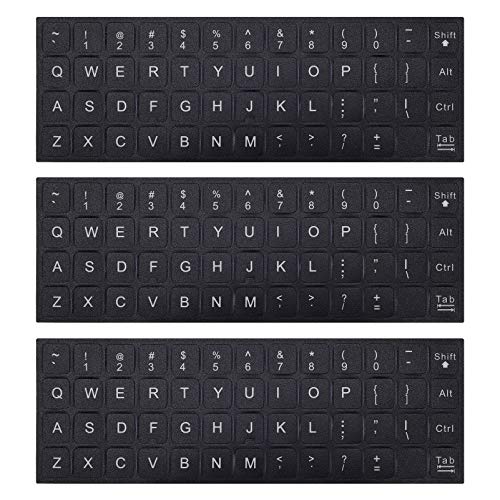
3PCS Universal English Stickers is the only option here that provides three sticker sets, which can be useful when you want spares or need to cover more than one keyboard. The maker describes a matte finish, English white lettering on black, and removal without residue. It is positioned for computer, desktop and laptop keyboards. The larger pack count is the distinguishing point, not a different size: the set measures 7.09 by 2.56 inches overall. No placement tools are identified among its features, so buyers who want help aligning letters may prefer a kit that includes tweezers.
Bottom line: Choose it when having three sets is more useful than included tools.
2-Pack Matte English Stickers
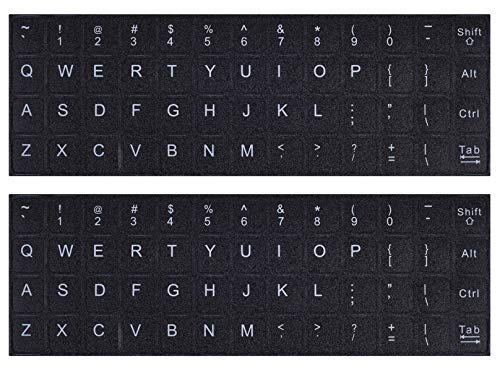
2-Pack Matte English Stickers offers a straightforward two-pack of white-on-black matte letter overlays and calls out notches for the F and J keys, supporting alignment with the raised home-row markers found on many keyboards. The maker says the stickers can be applied and removed without residue. This is a practical fit for someone who wants a basic replacement set without added tools or a transfer-style design. Check the keyboard layout before applying, especially if its F and J keys or character arrangement differ from a standard English layout; removing and repositioning small stickers can be fiddly.
Bottom line: Pick this for a simple two-set overlay with F/J alignment notches.
How to choose English keyboard stickers
Choose first between a full-key overlay and a letter-only transfer, then compare the size with the usable top of each key. Laptop keycaps vary considerably; many ordinary laptop keys are roughly 0.5 to 0.7 inches wide, while compact layouts can be smaller. A sticker around 0.43 by 0.51 inches can cover much of a small key, so measure the flat surface rather than the whole cap. For under 0.5 inches of flat width, favor a smaller character or verify sizing before applying. Matte overlays cover the existing legend, while transfers leave less material over the key. A larger sticker may also obscure backlighting or nearby symbols.
Overlay stickers versus letter transfers
Full-key overlays are individual pieces placed over existing legends; letter transfers place only the new character on the key. Overlays are generally simpler to understand and replace, while transfers require accurate character positioning and may be less forgiving to remove. Laptop keys can have sculpted tops, coatings and small gaps, so clean, dry surfaces and centered placement help either style adhere evenly. Use a need-to-choice comparison rather than assuming all English stickers work alike.
| Need | Style to consider | Tradeoff |
|---|---|---|
| Cover worn legends | Full-key overlay | More surface covered |
| Keep key appearance minimal | Letter-only transfer | Alignment is more exacting |
| Spare sets or multiple keyboards | Three-set pack | Tools may not be included |
Preparing keys and applying stickers
Clean each keycap before application and let it dry fully; skin oil and dust interfere with adhesive contact. A microfiber cloth is suitable for wiping, but avoid spraying liquid directly onto a laptop keyboard because moisture can enter the switches or electronics. Apply one sticker at a time with tweezers or a steady fingertip, aligning the legend before pressing from the center outward. F and J keys commonly have tactile home-row markers, so preserve their feel and keep any sticker centered rather than folding over key edges. Do not press hard enough to force a laptop key downward or pry off a low-profile keycap.
Keyboard layout and fit checks
English keyboard stickers change the visible legends, not the computer’s physical key layout or input settings. Standard US QWERTY keyboards use a familiar arrangement, but international layouts can place punctuation, Enter and Shift keys differently; letter stickers alone will not convert those shapes or software mappings. Compare the sticker positions with the actual key legends before starting, and pause if the set’s character arrangement does not match. Backlit keyboards are another fit consideration: opaque black overlays can reduce light passing through legends, while transfer lettering may behave differently depending on its material. Check that the desired legends remain visible in the lighting where you type.
Frequently Asked Questions
Will English keyboard stickers change my laptop layout?
No; stickers change the visible legends, while the operating system’s keyboard layout setting controls which characters typing produces. Match the physical key arrangement to the language setting before relying on punctuation or symbols.
Can keyboard stickers cover a backlit legend?
Yes, an opaque overlay can block light from an illuminated key legend. If backlighting matters, compare the sticker material and the keyboard’s light path before applying the full set.
How should I clean laptop keys before applying stickers?
Wipe the key tops with a dry or lightly damp microfiber cloth and let them dry completely. Keep liquid away from gaps around the keys, since laptop keyboards contain electronics directly beneath them.
Do F and J keyboard stickers preserve the home-row bumps?
They can if their placement leaves the tactile markers uncovered. F and J commonly have raised alignment bars, so center the sticker carefully and avoid layering material over the bump.
Can I remove keyboard stickers without residue?
Some sticker makers say their overlays remove without residue, but adhesive behavior depends on the keycap coating and time in place. Lift gently from an edge and stop if the surface coating begins to come away.