
Ethernet Adapter for Firestick: 3 Fits Compared

Amazon Micro-USB Ethernet Adapter is the best starting point for most Firestick owners because its micro-USB connector works with a broad range of listed Fire TV devices and supports 10/100 Ethernet. Choose Right-Angle USB-C Ethernet Adapter instead if your Fire TV Stick has USB-C; Micro-USB Ethernet Adapter is an alternative micro-USB adapter with a narrower compatibility list.
An Ethernet adapter connects a streaming device to a router or network switch with a wired cable. Check your Stick’s connector before choosing: micro-USB and USB-C adapters do not fit the same devices.
We earn a commission if you buy through links on this page. As an Amazon Associate I earn from qualifying purchases. Products are compared on manufacturer specifications, not hands-on testing.
- Best overall: Amazon Micro-USB Ethernet Adapter – Micro-USB, 10/100 Ethernet, and compatibility with a broad range of listed Fire TV models.
- Best for USB-C: Right-Angle USB-C Ethernet Adapter – Made for Fire TV Sticks with USB-C connectivity.
- Best for Chromecast too: Micro-USB Ethernet Adapter – Its compatibility includes several Chromecast models as well as some Fire TV Sticks.
| Product | Best for | Connector | Ethernet speed | Listed Fire TV fit | Shop |
|---|---|---|---|---|---|
| Amazon Micro-USB Ethernet Adapter | Broad Fire TV fit | Micro-USB | 10/100 Mbps | Lite, 2nd Gen, HD 1st Gen, 4K, 4K Plus | Check Price on Amazon |
| Micro-USB Ethernet Adapter | Fire TV and Chromecast | Micro-USB | 10/100 Mbps | Basic, 2nd Gen, 4K, Lite | Check Price on Amazon |
| Right-Angle USB-C Ethernet Adapter | USB-C Fire TV Sticks | USB-C | Up to 480 Mbps | USB-C Fire TV Sticks | Check Price on Amazon |
Ethernet Adapters for Firestick
Match the adapter connector to your Fire TV Stick’s port, then compare its device compatibility and Ethernet speed.
Amazon Micro-USB Ethernet Adapter
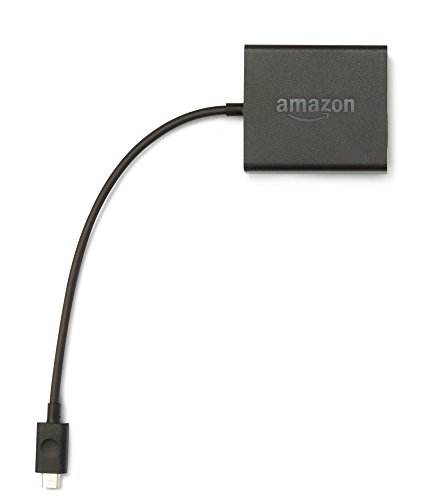
Amazon Micro-USB Ethernet Adapter has the broadest Fire TV compatibility among these micro-USB options, including multiple Stick generations, Fire TV Cube, and the 3rd Gen pendant-style Fire TV. Amazon says it connects a compatible Fire TV device to a router by Ethernet, and the adapter supports 10/100 Ethernet. Its micro-USB plug is the key fit check: this adapter does not work with the USB-C Fire TV Stick HD (2nd Gen). Choose another connector type if your device has USB-C.
Bottom line: Pick this if your compatible Fire TV device has a micro-USB port.
Micro-USB Ethernet Adapter

Micro-USB Ethernet Adapter stands out for cross-device compatibility: its list includes several Chromecast models and Google Home Mini alongside select Fire TV devices. The adapter has a micro-USB male connector and an RJ45 female Ethernet port, and the maker says it supports 10/100 Mbps Ethernet. Its Fire TV list is narrower than Amazon Micro-USB Ethernet Adapter’s and specifically excludes Fire TV Stick 4K Max, so verify the model and port before choosing it. It is also not compatible with Chromecast with Google TV (HD/4K).
Bottom line: Choose this if you also need a micro-USB Ethernet adapter for a Chromecast model.
Right-Angle USB-C Ethernet Adapter
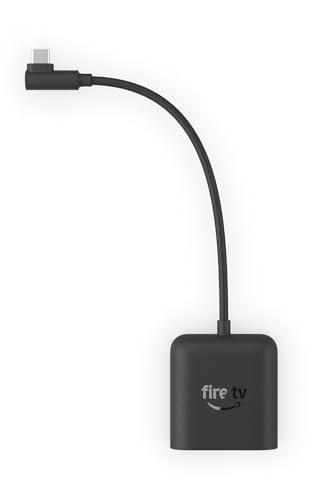
Right-Angle USB-C Ethernet Adapter is the USB-C choice in this group, making it distinct from the micro-USB adapters. It is intended for Fire TV Sticks with USB-C connectivity, and the maker says it supports speeds up to 480 Mbps when used with those devices. This connector-specific fit is also its main limitation: it is incompatible with Fire TV Sticks that use micro-USB. Confirm the port on your Stick before ordering rather than relying on the product family name alone.
Bottom line: Pick this for a Fire TV Stick with USB-C, not a micro-USB model.
How to choose an Ethernet adapter for Firestick
Choose by connector first, then by the Fire TV model list and Ethernet speed. Fire TV Sticks may use micro-USB or USB-C, and the two plugs are not interchangeable; the product names and model generations alone can be misleading. If your Stick has micro-USB, compare the model compatibility of Amazon Micro-USB Ethernet Adapter and Micro-USB Ethernet Adapter. If it has USB-C, Right-Angle USB-C Ethernet Adapter is the option designed for that connection. A 10/100 Ethernet adapter has a maximum link rate of 100 Mbps, while real throughput can be lower because of the network, cable, router, and streaming service. For typical 4K streaming that needs roughly 15–25 Mbps, a 100 Mbps link is generally ample when the connection is otherwise stable.
Firestick connector fit and model compatibility
Connector type is the decisive fit rule: USB-C fits only a USB-C port, and micro-USB fits only a micro-USB port. Product generations can include connector changes, so check the physical port and the exact model name rather than assuming that every Fire TV Stick in one family shares a port. For example, Amazon Micro-USB Ethernet Adapter excludes the Fire TV Stick HD (2nd Gen) with USB-C, while Micro-USB Ethernet Adapter excludes the 4K Max despite listing other Fire TV Stick versions. Right-Angle USB-C Ethernet Adapter is described for USB-C Fire TV Sticks and excludes micro-USB models. This table summarizes the critical distinction; verify that your exact device appears in the adapter’s compatibility information before buying.
| Adapter choice | Connector | Key fit condition |
|---|---|---|
| Amazon Micro-USB Ethernet Adapter | Micro-USB | Listed models; excludes HD (2nd Gen) USB-C |
| Micro-USB Ethernet Adapter | Micro-USB | Listed models; excludes 4K Max |
| Right-Angle USB-C Ethernet Adapter | USB-C | Fire TV Stick with USB-C |
Wired speeds and streaming needs
A 10/100 Ethernet adapter tops out at a 100 Mbps link rate, not a guaranteed streaming speed. Actual throughput depends on the router or switch port, cable condition, network congestion, and the internet connection. For comparison, 4K streaming commonly calls for about 15–25 Mbps, so a functioning 100 Mbps wired connection usually has headroom for one stream. A wired connection can avoid Wi-Fi signal problems, but it cannot increase a slower internet plan or repair a congested router. Use a sound Ethernet cable and a router or switch port; a Cat5e cable supports gigabit Ethernet over standard runs, though a 10/100 adapter remains the speed ceiling.
Setting up a Firestick Ethernet connection
An Ethernet setup requires the adapter, a cable from its RJ45 port to a router or network switch, and a compatible Fire TV connection. Connect the adapter to the Stick and attach the cable to the network port; Amazon Micro-USB Ethernet Adapter is described as connecting directly through the Fire TV USB port. Confirm the wired connection in the device’s network settings after plugging everything in. Some adapters and streaming devices need a power source in addition to the network cable, so check the adapter’s included components and power requirements before setup rather than assuming the Ethernet cable powers the Stick. Keep the adapter and cable clear of strain so the small device port is not pulled sideways.
Frequently Asked Questions
Will an Ethernet adapter make Firestick streaming faster?
A wired connection can improve consistency when Wi-Fi signal or congestion is the problem, but it cannot exceed the adapter, router, or internet plan limits. A 10/100 adapter has a 100 Mbps link ceiling, while 4K streams commonly need about 15–25 Mbps.
How do I know whether my Firestick uses USB-C?
Check the connector opening on the Stick itself: USB-C is oval and reversible, while micro-USB has a smaller, asymmetrical shape. Compare the port to the adapter connector before buying, especially across model generations.
Can I use a micro-USB adapter with Fire TV Stick 4K Max?
Compatibility depends on the specific adapter. Amazon Micro-USB Ethernet Adapter includes 4K Max in its Fire TV fit, while Micro-USB Ethernet Adapter explicitly excludes 4K Max, so check both the exact model and connector before choosing.
Does a Firestick Ethernet adapter need its own power?
Power requirements vary by adapter and streaming device, so check the adapter’s included components and connection instructions before setup. Ethernet cable carries network data, and a device may still need USB power to operate.
What Ethernet cable should I use for a Fire TV Stick?
A Cat5e Ethernet cable supports gigabit connections over standard runs and is suitable for a 10/100 adapter. The adapter’s 100 Mbps ceiling remains the limit even when the cable supports a higher rate.