
Extendtecc WiFi Booster: 3 Alternatives Compared

No Extendtecc model is among these options, but Dual-Band 1200 Mbps WiFi Extender is the closest match for shoppers seeking a dual-band WiFi booster with a 1,200 Mbps combined rate. Choose 8470 Sq. Ft. WiFi Repeater or M15X WiFi Repeater instead if their advertised coverage figures matter more than a dual-band speed.
A WiFi extender repeats a router’s signal to reach areas with weak reception; real-world performance depends on placement, walls and the router’s connection.
We earn a commission if you buy through links on this page. As an Amazon Associate I earn from qualifying purchases. Products are compared on manufacturer specifications, not hands-on testing.
- Best overall: Dual-Band 1200 Mbps WiFi Extender – It specifies dual-band operation and a combined rate of up to 1,200 Mbps.
- Best for stated reach: 8470 Sq. Ft. WiFi Repeater – Its advertised coverage reaches up to 8,470 square feet.
- Best for Ethernet: M15X WiFi Repeater – It explicitly includes an Ethernet port and advertises coverage up to 9,800 square feet.
| Product | Best for | Advertised coverage | Advertised speed | Ethernet port | Shop |
|---|---|---|---|---|---|
| Dual-Band 1200 Mbps WiFi Extender | Dual-band speed | 5,000 sq. ft. | 1,200 Mbps | Yes | Check Price on Amazon |
| 8470 Sq. Ft. WiFi Repeater | Wide stated reach | 8,470 sq. ft. | 300 Mbps | — | Check Price on Amazon |
| M15X WiFi Repeater | Ethernet connection | 9,800 sq. ft. | — | Yes | Check Price on Amazon |
WiFi Booster Alternatives
Compare the coverage, speed and connection features before choosing an extender.
Dual-Band 1200 Mbps WiFi Extender

Dual-Band 1200 Mbps WiFi Extender is the only option here with a dual-band rate: up to 300 Mbps on 2.4 GHz and 867 Mbps on 5 GHz, for a combined rate of about 1,200 Mbps. The manufacturer also advertises coverage up to 5,000 square feet and support for 35 devices, and the product name specifies an Ethernet connection. This makes it the clearest fit for buyers prioritizing a speed and band split. The coverage figure is an advertised maximum, not a guarantee through walls or across floors.
Bottom line: Choose this if you want a dual-band rate and can work with its advertised 5,000-square-foot coverage.
8470 Sq. Ft. WiFi Repeater

8470 Sq. Ft. WiFi Repeater emphasizes advertised reach, with coverage up to 8,470 square feet, while its peak speed is 300 Mbps. It supports repeater and access-point modes, and setup can be completed using a phone, laptop or desktop. That makes it a possible choice for someone who values the coverage and wants a choice of operating modes. The 300 Mbps figure is lower than Dual-Band 1200 Mbps WiFi Extender’s combined advertised rate, and the maker does not establish an Ethernet connection, so buyers who need either feature should compare those requirements carefully.
Bottom line: Pick this when its advertised coverage and repeater/AP modes matter more than a higher stated speed.
M15X WiFi Repeater
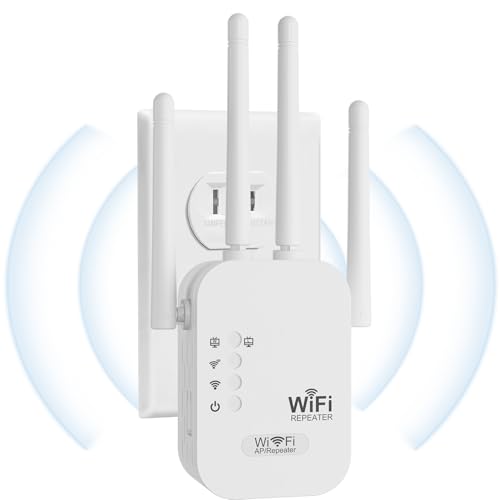
M15X WiFi Repeater is the only option whose coverage reaches up to 9,800 square feet, and its product name specifies an Ethernet port. Its setup process starts by plugging it in and joining its designated WiFi network from a phone; the maker describes operation on the 2.4 GHz band. This option may suit a buyer who needs a wired connection or wants the highest advertised coverage figure among these choices. No speed figure is provided, so it is harder to compare its throughput with the other two based on the specifications.
Bottom line: Choose this if an Ethernet port or its advertised coverage figure is your priority.
How to Choose a WiFi Booster
Choose an extender by matching its radio bands and speed to the router and devices you use, not by coverage claims alone. A dual-band extender can use 2.4 GHz for longer reach and 5 GHz for higher potential throughput over shorter distances; obstacles and interference affect both. A repeated signal also shares airtime with the router connection, so the speed reaching a device is usually lower than the router’s direct speed. If your plan or local WiFi is below 300 Mbps, a 1,200 Mbps combined rate does not make the internet connection itself faster. Look for Ethernet only when you have a device or access point that can use a wired connection.
Where to Place a WiFi Extender
Place an extender where the router’s signal is still reliable, roughly halfway between the router and the weak-signal area as a starting point. Putting a repeater inside a dead zone gives it a poor connection to repeat, while putting it too close to the router may not extend coverage meaningfully. Try an open outlet away from thick masonry, metal cabinets, microwaves and other sources of obstruction or interference. If the target room still has weak service, move the unit closer to the router before adding another extender. A wired access point is often a better fit when Ethernet can be run to a distant room.
Repeater and Access Point Modes Compared
Repeater mode receives the router’s WiFi and rebroadcasts it; access-point mode uses a wired network connection to create WiFi at another location. A repeater avoids running cable but depends on a usable wireless link back to the router. An access point needs Ethernet but avoids that wireless backhaul hop. Use the mode that fits your home’s wiring and signal path rather than choosing by mode name alone.
| Setup | Connection back to router | Best fit |
|---|---|---|
| Repeater | WiFi | No Ethernet run available |
| Access point | Ethernet | Wired connection to the coverage area |
Before setup, confirm the router has an available Ethernet port if you plan to use access-point mode; a repeater-only installation does not need that cable.
What Coverage Claims Mean
Square-foot coverage figures are best treated as advertised maximums, not a measured promise for a particular floor plan. Walls, floors, building materials, router placement and nearby networks can shrink practical reach. A multi-story home with concrete floors presents a different signal path from an open single-level space of the same area. Decide by the location of the dead zone and the signal available at a potential extender outlet. Test several outlets before settling on one, and prioritize a stable connection to the router over the largest printed coverage number.
Frequently Asked Questions
Will a WiFi extender increase my internet plan speed?
No; an extender cannot raise the speed supplied by your internet plan or router. The speed at a connected device depends on the router link, extender placement, band and interference.
Should I connect devices to 2.4 GHz or 5 GHz?
Use 2.4 GHz when range or obstacle penetration is the priority, and use 5 GHz when the device is closer and higher potential throughput matters. Walls and competing networks can change the result, so check the connection at the device’s actual location.
How far from my router should I place an extender?
Start near the midpoint between the router and the weak-signal area, where the extender can still receive a solid router signal. Move it toward the router if the repeated connection remains unreliable.
Can I use an extender with any WiFi router?
Many extenders are intended to extend an existing WiFi network, but compatibility depends on the router’s bands and setup requirements. Confirm that the extender supports the router’s WiFi generation and security settings before configuring it.
Does a WiFi extender need an Ethernet cable?
A repeater uses WiFi for its connection back to the router, while access-point mode uses Ethernet. Choose access-point mode when a wired network connection reaches the extender’s location.