
EZ Tracer Art Projector: Models Compared by Fit

For a straightforward EZ Tracer art projector, choose Artograph EZ Tracer 4×4 if its 4-by-4-inch copy area and up-to-10× enlargement suit your source art. Choose Artograph LED Tracer 5×5 instead for a 5-by-5-inch original or up to 14× enlargement; Artograph EZ Tracer 2-Pack is a two-unit pack, but it requires bulbs sold separately.
These opaque projectors enlarge physical artwork onto a vertical surface for tracing. If you need to project digital images or video, choose a digital projector rather than an optical tracing model.
We earn a commission if you buy through links on this page. As an Amazon Associate I earn from qualifying purchases. Products are compared on manufacturer specifications, not hands-on testing.
- Best overall: Artograph EZ Tracer 4×4 – Its 4-by-4-inch copy area and 2× to 10× enlargement match a typical tracing setup.
- Best for larger originals: Artograph LED Tracer 5×5 – The 5-by-5-inch copy area and up-to-14× enlargement allow a larger source and projection range.
- Best for two work areas: Artograph EZ Tracer 2-Pack – The package includes two projectors, though each needs a separately supplied bulb.
| Product | Best for | Copy area | Enlargement | Light source | Shop |
|---|---|---|---|---|---|
| Artograph EZ Tracer 4×4 | Single-projector tracing | 4×4 in | 2×–10× | 25 W LED | Check Price on Amazon |
| Artograph LED Tracer 5×5 | Larger source artwork | 5×5 in | 2×–14× | LED | Check Price on Amazon |
| Caydo S1 Optical Projector | Dark-room tracing | 5×5 in | 2.5×–11× | — | Check Price on Amazon |
| Artograph EZ Tracer 2-Pack | Two tracing stations | 4×4 in | 2×–10× | Bulbs sold separately | Check Price on Amazon |
EZ Tracer art projectors compared
Compare copy size, enlargement range and bulb setup to match a projector to your source artwork and tracing space.
Artograph EZ Tracer 4×4

Artograph EZ Tracer 4×4 is the single-projector EZ Tracer option with a built-in 25 W LED, so it avoids the separate-bulb setup required by the two-pack alternative. Its 4-by-4-inch copy area suits small drawings, while 2× to 10× enlargement covers modest transfers through larger wall outlines. The maker says the LED produces 3,050 lumens at 5,000 K and has a 25,000-hour lifespan. This model is a fit when the original artwork stays within 4 inches square; choose a 5-inch copy area if your source is larger.
Bottom line: Choose this for a single setup with a built-in LED and a 4-inch source area.
Artograph LED Tracer 5×5

Artograph LED Tracer 5×5 accepts artwork up to 5 by 5 inches and enlarges it as much as 14×, giving it a wider source area and maximum enlargement than the standard EZ Tracer. Its 200 mm optical glass lens and LED distinguish this model from the 4-inch EZ Tracer, while the 5.5-by-12.75-by-9-inch dimensions help when planning shelf or table space. It suits larger sketches, quilt patterns or murals, but the larger copy area does not help if your artwork already fits within a 4-inch square and you prefer the named EZ Tracer configuration.
Bottom line: Choose this when your source art needs the extra inch of copy area or enlargement.
Caydo S1 Optical Projector
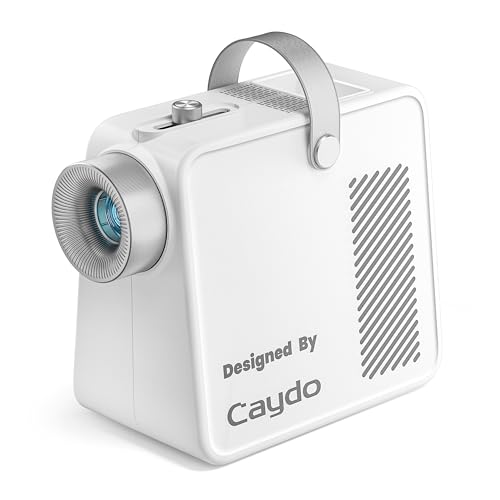
Caydo S1 Optical Projector is a dedicated optical tracing projector with a 5-by-5-inch copy area and projection sizes from 20 to 80 inches diagonal. Unlike the Artograph models, it explicitly has no wireless, HDMI or USB input, so it is for physical artwork rather than digital media. The maker says it reaches 5,000 lumens and recommends a darkened room for the outline to show clearly. Its 9.7-by-10-by-5.7-inch size and roughly 2.9-pound weight make portability relevant, but buyers seeking an EZ Tracer-branded model should select an Artograph option instead.
Bottom line: Choose this for optical tracing when a 5-inch source area and dark room suit your setup.
Artograph EZ Tracer 2-Pack

Artograph EZ Tracer 2-Pack packages two EZ Tracer projectors, making it the only option here intended to provide a pair of tracing units. Each copies artwork up to 4 by 4 inches and enlarges it from 2× to 10×. Unlike Artograph EZ Tracer 4×4, this set does not include a bulb: each unit requires a 15 W LED or 23 W CFL bulb, so account for that before setting up both stations. This pack suits a class or shared craft space that can use two projectors; a single artist who needs a ready-to-use light source may prefer the built-in LED model.
Bottom line: Choose the two-pack for two simultaneous work areas and plan to supply compatible bulbs.
How to choose an opaque art projector
Match the copy area to the original drawing first, then check how much enlargement the projector supports. A 4-by-4-inch source area handles small sketches; a 5-by-5-inch area accommodates a source with an extra inch on each side. Enlargement is a ratio: a 4-inch original at 10× becomes 40 inches in the corresponding projected dimension, subject to focus and the usable projection surface. A larger maximum ratio does not guarantee a sharper result at every distance. For physical line art, opaque projectors shine light through or reflect from the original; they are different from digital projectors, which accept video or image inputs.
Choose a darkened room when ambient light washes out the projected outline. Keep the projector stable and square to the wall or canvas so the image is less distorted; move it to change projection size, then refocus before tracing.
Copy area and enlargement explained
Copy area sets the largest original that fits under the projector, while enlargement describes how much bigger its projection can become. A 5-inch copy area is a practical choice when source art exceeds 4 inches in either direction; cropping an oversized original can cut off edges. A 10× maximum covers most small-to-large transfer tasks, while 14× provides more enlargement headroom for a very small original. The projected size also depends on the distance from projector to surface, so measure the available wall or easel space before choosing a high magnification.
Use this rule: if the artwork is larger than 4 inches square, favor a 5-inch copy area; if it fits within 4 inches and needs no more than 10× enlargement, the standard EZ Tracer range is sufficient.
| Need | Relevant spec | Choice |
|---|---|---|
| Original up to 4 inches square | 4×4-inch copy area | Standard EZ Tracer |
| Original between 4 and 5 inches | 5×5-inch copy area | 5-inch optical model |
| Two simultaneous stations | Two units; bulbs required | EZ Tracer two-pack |
Setting up for clear tracing
A dark room improves contrast because overhead lighting and daylight can fade a projected outline. Place the original flat over the copy area, aim the projector toward a vertical surface, and adjust distance until the projected image fits the work area. Moving the projector farther away generally enlarges the image, but the exact ratio depends on the optical design and surface distance. Once positioned, focus the projection before tracing; refocus after moving the unit or changing the target distance.
For a mural, mark the intended projected width on the wall before committing to a full drawing. Keep the projector on a steady, level surface, and avoid blocking its ventilation openings during use; lamps and housings can become warm. Use the bulb type and wattage specified for the particular model, especially for a pack that does not include bulbs.
Opaque and digital projectors serve different work
Opaque tracing projectors are built around physical source art, while digital projectors display a signal from a compatible device. The distinction matters: the optical Caydo model specifically has no wireless, HDMI or USB input, and the EZ Tracer models here are presented for physical artwork. A projector with high brightness claims is not automatically best for tracing if it cannot copy the artwork directly.
Consider source size, room light and intended surface before choosing. A larger copy area helps with bigger originals; a greater enlargement limit is useful when a small sketch must cover a large surface. For detailed work, test the desired projected size and focus on a spare area first, since clarity can vary with distance, ambient light and how flat the original rests.
Frequently Asked Questions
Can an EZ Tracer projector enlarge a photograph?
An opaque projector can enlarge a physical photograph placed over its copy area. Keep the source within the model’s copy-size limit and use a darkened room so the projected image is easier to see.
How large can an EZ Tracer image become?
The standard EZ Tracer option here enlarges up to 10×, while another Artograph model reaches 14×. A 4-inch source dimension at 10× corresponds to 40 inches, though actual framing depends on projector distance and focus.
Does an art tracing projector work in daylight?
Bright daylight can reduce the contrast of a projected outline, so a darkened room generally works better. Closing curtains and turning off overhead lights can make tracing easier.
What bulb fits the EZ Tracer two-pack?
Each unit in the two-pack requires a 15 W LED or 23 W CFL bulb, and the bulbs are not included. Match the bulb type and wattage before operating the projector.
Can I connect a phone to an opaque tracing projector?
Opaque tracing projectors copy physical artwork rather than displaying a phone’s digital image. The Caydo S1 explicitly lacks wireless, HDMI and USB inputs, so use a digital projector for phone media.