
Galaxy Note 20 Ultra Screen Protectors Compared by Type

For most Galaxy Note 20 Ultra owners, Tempered Glass + Camera Lens Protector stands out for pairing 0.25 mm tempered glass with a camera lens protector. Choose 4-Pack TPU Film or Supershieldz 2-Pack TPU Film instead if you prefer flexible TPU film, or LYWHL Privacy Flexible Film + Camera Glass if limiting side views matters more than a clear screen.
These protectors are made for the 6.9-inch Note 20 Ultra; confirm your phone model before ordering because the Note 20 and Note 10 are not interchangeable.
We earn a commission if you buy through links on this page. As an Amazon Associate I earn from qualifying purchases. Products are compared on manufacturer specifications, not hands-on testing.
- Best overall: Tempered Glass + Camera Lens Protector – Pairs 0.25 mm tempered glass with camera lens protection.
- Best for clear glass: 3-Pack 0.26 mm Tempered Glass – 0.26 mm clear tempered glass supports ultrasonic fingerprint unlocking.
- Best for flexible film: 4-Pack TPU Film – Four TPU film protectors offer a soft-film alternative to glass.
- Best for privacy: LYWHL Privacy Flexible Film + Camera Glass – Flexible privacy film darkens the display to limit nearby viewing.
| Product | Best for | Material | Pack contents | Fingerprint support | Shop |
|---|---|---|---|---|---|
| Tempered Glass + Camera Lens Protector | Glass with camera cover | Tempered glass | 2 screen + 2 camera | Ultrasonic supported | Check Price on Amazon |
| 3-Pack 0.26 mm Tempered Glass | Clear glass screen | Tempered glass | 3 screen protectors | Ultrasonic supported | Check Price on Amazon |
| 4-Pack TPU Film | Soft film feel | TPU film | 4 screen protectors | — | Check Price on Amazon |
| Supershieldz 2-Pack TPU Film | Simple TPU film | TPU film | 2 screen protectors | — | Check Price on Amazon |
| LYWHL Privacy Flexible Film + Camera Glass | Privacy viewing | Flexible privacy film | 2 screen + 2 camera | Ultrasonic supported | Check Price on Amazon |
Galaxy Note 20 Ultra Screen Protectors
Compare glass and film by feel, screen visibility, and the protection included in each pack.
Tempered Glass + Camera Lens Protector

Tempered Glass + Camera Lens Protector combines a screen protector with a separate camera lens protector, unlike the screen-only glass options. The screen glass is 0.25 mm thick, and the maker says its second-generation ultrasonic fingerprint adhesive supports fingerprint recognition. It also claims case-friendly fit. Choose this set if you want camera coverage in the same pack and prefer a rigid glass surface.
The camera cover adds a separate piece to position during installation, and the specifications do not establish its exact fit with every case. Check clearance around the camera before applying a case with a raised camera rim.
Bottom line: Pick this set if you want tempered glass plus a separate camera lens protector.
3-Pack 0.26 mm Tempered Glass

3-Pack 0.26 mm Tempered Glass is the clear tempered glass option with three screen protectors and no camera lens piece mentioned. Its 0.26 mm thickness and 9H hardness are maker claims; the maker also says the glass supports ultrasonic fingerprint unlocking and has 99% HD clarity. That combination suits buyers who want a hard, transparent surface and spare screen pieces.
The curved 3D design is intended for the Note 20 Ultra, but fit around a case edge can be sensitive to case dimensions. If you use a tight-fitting case, check that its rim does not press on the protector.
Bottom line: Choose this if you want clear tempered glass and multiple screen-only replacements.
4-Pack TPU Film
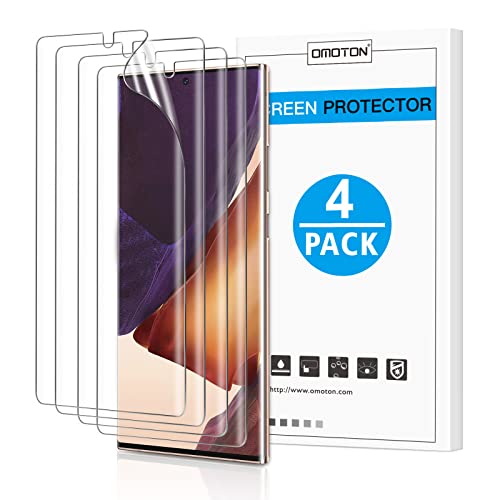
4-Pack TPU Film differs from the glass choices by using soft TPU film, supplied as four screen protectors. The maker says the film has self-healing properties for minor scratches and tiny bubbles, and provides an installation tool kit. Its instructions emphasize checking the phone model and using the kit to work bubbles toward the edges.
Film does not provide the same rigid surface as tempered glass, so choose it for a flexible layer rather than a glass-like feel. The package requires careful installation; buyers who want a simpler rigid-glass application may prefer a glass option.
Bottom line: Choose this if you prefer flexible TPU film and want four screen pieces.
Supershieldz 2-Pack TPU Film

Supershieldz 2-Pack TPU Film is a two-piece TPU film set focused on a natural touch feel and clear transparency. The maker says the film installs without residue when removed and protects against daily scratches, dust, and scrapes.
Choose this pack if straightforward flexible film matters more than spare quantity.
Bottom line: Pick this for a basic two-piece TPU film set with clear viewing.
LYWHL Privacy Flexible Film + Camera Glass

LYWHL Privacy Flexible Film + Camera Glass is the privacy-focused option: its flexible black film darkens the display to limit viewing from nearby angles, and the pack includes camera lens glass. The maker says the film supports ultrasonic fingerprint recognition and recommends registering fingerprints before installation. This suits commuters or shared spaces where reducing side views is more important than maximum screen brightness.
A privacy filter can make the display appear darker, and the maker says users may need to raise brightness. Buyers who prioritize viewing clarity in bright conditions may prefer a clear protector instead.
Bottom line: Choose this if side-view privacy is worth a darker display.
How to choose a Note 20 Ultra screen protector
Start with material and viewing needs: tempered glass is rigid, while TPU film is flexible. Glass is typically around 0.3 to 0.5 mm thick; flexible films are often around 0.1 to 0.2 mm, though exact products vary. A thinner film can preserve a close-to-screen feel, while glass provides a harder surface against direct scratches. For a clear screen, choose transparent material; privacy films intentionally narrow the viewing angle and often make the display look darker.
Fingerprint support deserves separate attention on the Note 20 Ultra because it uses an ultrasonic in-display sensor. A protector can change how reliably a finger is read, so favor an option whose maker explicitly claims support and re-register fingerprints after installation if recognition falters. With a privacy film, expect to raise brightness in some settings.
Note 20 Ultra fit and case clearance
Match the protector to the exact Galaxy Note 20 Ultra, not merely a similarly sized Samsung phone. The Note 20 Ultra has a 6.9-inch display, and screen protectors cut for the standard Note 20 or Note 10 may not align with its edges, sensors, or camera area. A wrong model can leave exposed glass or interfere with the front sensors.
Case fit depends on the protector’s edge coverage and the case lip. As a practical rule, if a case rim visibly presses against the protector or lifts an edge during installation, use a more case-friendly cut or a less bulky case; even a small edge gap can collect dust. Wipe away grit before applying film or glass, since trapped particles create persistent bubbles or lifted spots.
Tempered glass, TPU film, and privacy film compared
Choose rigid glass for a hard, clear surface, flexible TPU when you want a soft film, and privacy film when limiting side-angle visibility is the priority. Neither glass nor film makes a phone shatterproof: a screen protector is a sacrificial layer and cannot guarantee protection from a drop. Camera lens covers are separate pieces, so align them carefully and check that a case does not push against their edges.
The comparison below matches the protector type to the main buying need.
| Need | Protector type | Trade-off |
|---|---|---|
| Clear, rigid surface | Tempered glass | More rigid edge and case interaction |
| Flexible screen layer | TPU film | Less rigid feel than glass |
| Reduce side viewing | Privacy film | Darker screen appearance |
Installing and maintaining a screen protector
Install a screen protector in a low-dust room after cleaning the display; dust under the adhesive is the most common cause of a stubborn bubble. For wet or adhesive-based film systems, let the film settle for the period specified by its maker before judging the finish. Dry glass protectors generally need careful alignment on the first placement because lifting and resetting can attract lint or weaken adhesion.
Inspect the protector regularly for cracks, lifted corners, or scratches that cross the touch area. Replace a cracked glass protector rather than pressing on broken edges, and remove it carefully to avoid cuts. Fingerprint recognition may need fresh registration after a protector change, particularly when switching between glass and film.
Frequently Asked Questions
Will a screen protector affect Note 20 Ultra fingerprint unlocking?
It can, because the phone’s ultrasonic fingerprint reader works through the display and an added layer changes the interface. Choose a protector whose maker explicitly claims fingerprint support, then re-register fingerprints if recognition is unreliable.
Can I use a Note 20 screen protector on the Ultra?
No; choose one made specifically for the Galaxy Note 20 Ultra’s 6.9-inch display. The standard Note 20 and Note 10 are different models, and their cutouts and edge dimensions may not align.
Does tempered glass protect against drops?
Tempered glass can take scratches and some direct impacts, but it cannot guarantee that the phone screen will survive a drop. A raised case lip and keeping the phone away from hard surfaces reduce exposure, but neither makes the device shatterproof.
Why does a privacy screen look darker?
Privacy film narrows the angles from which the display is visible, so the screen can appear dimmer than a clear protector. Increase brightness when needed, but choose clear film or glass if screen visibility from wider angles matters most.
How do I remove bubbles under a TPU protector?
For small bubbles, gently push them toward the nearest edge with a clean applicator rather than pressing hard across the display. A dust particle under the film will not smooth out, so lift and clean only if the film’s adhesive allows repositioning.