
Tenda Nova Mesh WiFi System MW5G: Models Compared

Tenda Nova MW5G 3-Pack is the closest match for someone seeking the Tenda Nova MW5G because its AC1200 mesh system is listed for up to 3,500 square feet and 80 devices. Choose another model if you need the specific MW6 designation or a system stated for up to 90 devices; those differences may matter for model matching or a larger device load.
Mesh WiFi uses multiple access points under one network name, helping devices stay connected as they move through a home.
We earn a commission if you buy through links on this page. As an Amazon Associate I earn from qualifying purchases. Products are compared on manufacturer specifications, not hands-on testing.
- Best overall: Tenda Nova MW5G 3-Pack – It is the named MW5G model and combines AC1200 with a 3,500-square-foot coverage area.
- Best for MW6 buyers: Tenda Nova MW6 3-Pack – This 3-pack is explicitly identified as MW6 and is stated for up to 3,500 square feet.
- Best for more devices: Tenda Nova MW6 AC1200 3-Pack – Its AC1200 system is stated to support up to 90 devices.
| Product | Best for | Coverage | Device capacity | Shop |
|---|---|---|---|---|
| Tenda Nova MW5G 3-Pack | MW5G model match | Up to 3,500 sq ft | Up to 80 | Check Price on Amazon |
| Tenda Nova AC1200 3-Pack | AC1200 mesh basics | — | — | Check Price on Amazon |
| Tenda Nova MW6 3-Pack | MW6 model match | Up to 3,500 sq ft | — | Check Price on Amazon |
| Tenda Nova MW6 AC1200 3-Pack | Higher device count | Up to 3,500 sq ft | Up to 90 | Check Price on Amazon |
Tenda Nova Mesh WiFi Systems
Compare these Tenda Nova systems by their model identity, coverage claims and stated device capacity.
Tenda Nova MW5G 3-Pack

The MW5G is the only system here explicitly named for the requested model, with AC1200 dual-band WiFi and a coverage area of up to 3,500 square feet. Tenda says the three units use one network name and password, and that devices can connect to the strongest access point as they move around the home. MU-MIMO and beamforming are also listed. This is the clearest fit when matching the MW5G model matters. Its device capacity is up to 80, so households with a heavier connected-device load may prefer a system with a higher stated limit.
Bottom line: Choose this if you want the MW5G model and its 80-device capacity suits your household.
Tenda Nova AC1200 3-Pack

This Nova 3-pack is an AC1200 alternative without an MW5G or MW6 model name in its product name. Its features describe dual-band mesh, one network name and password, roaming between nodes, MU-MIMO and beamforming, making it relevant for someone comparing core mesh functions rather than matching a specific model. The product name gives a 3,000-square-foot coverage figure, while its maker gives 3,500 square feet; confirm the coverage figure before ordering.
Bottom line: Pick this if AC1200 mesh is the priority and you can verify its coverage figure.
Tenda Nova MW6 3-Pack
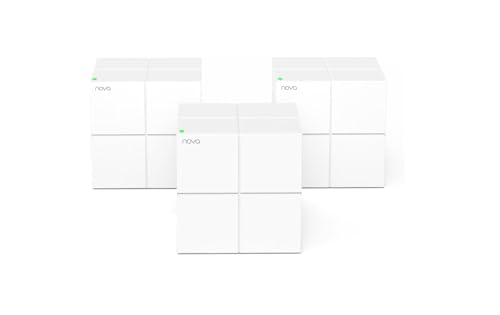
The MW6 differs from the MW5G by model designation and by its fit for homes with four to six bedrooms. Tenda describes this three-unit system as AC1200 dual-band mesh with coverage up to 3,500 square feet, a shared network name and password, MU-MIMO and beamforming. It suits a buyer specifically comparing MW6 units or whose layout falls within the bedroom range. No device limit appears in the specifications, so households selecting primarily by the number of connected devices should favor a model that gives a capacity figure.
Bottom line: Choose this when the MW6 model name or four-to-six-bedroom fit is your deciding factor.
Tenda Nova MW6 AC1200 3-Pack

This MW6 3-pack is the option with the highest device capacity here: up to 90, compared with the MW5G’s limit of 80. It is described as an AC1200 dual-band gigabit mesh system for up to 3,500 square feet, with one shared SSID and password, app setup, MU-MIMO and beamforming. It is a relevant alternative for a connected household that values that larger stated capacity. It is not the named MW5G model, so buyers who need that exact model should choose accordingly.
Bottom line: Pick this if the capacity of up to 90 devices matters more than matching MW5G.
How to choose a Tenda Nova mesh system
Choose first by the model you need, then by the coverage and connected-device figures that fit your household. AC1200 is a WiFi 5 class with a theoretical combined rate near 1,200 Mbps: roughly 300 Mbps on 2.4 GHz plus 867 Mbps on 5 GHz, before real-world overhead and interference. Those are band totals, not a single-device speed guarantee. A mesh kit’s coverage claim is also an estimate; walls, floors, building materials and node placement can reduce usable signal. If you have a large or multi-story home, compare the model’s coverage claim with your layout rather than relying on a square-foot figure alone. For this group, distinguish the MW5G from the MW6 by name and compare device limits where provided.
Where to place mesh nodes
Place each mesh node in an open area roughly halfway between the main node and a weak-signal room, not inside the dead zone it is meant to fix. Thick masonry, metal cabinets, large appliances and floors can weaken WiFi, so a clear line through open space is preferable when practical. A practical decision rule is to start with nodes about 30 to 50 feet apart indoors, then adjust based on walls and signal quality; that is a starting range, not a promise of coverage. Keep nodes away from enclosed media cabinets and avoid placing every unit at the edge of the home, where the upstream connection may already be weak. A wired Ethernet connection between nodes can help avoid wireless backhaul congestion when supported by the specific system.
Use this comparison to match the model to the need that decides your purchase.
| Need | Relevant choice | Decision point |
|---|---|---|
| Exact MW5G match | Tenda Nova MW5G 3-Pack | Up to 80 devices |
| MW6 model name | Tenda Nova MW6 3-Pack or Tenda Nova MW6 AC1200 3-Pack | One states up to 90 devices |
| AC1200 mesh without a named MW5G | Tenda Nova AC1200 3-Pack | Coverage figure needs confirmation |
What AC1200 dual-band means
AC1200 describes a WiFi 5 speed class, not the internet speed a home will receive. The combined theoretical rates are typically about 300 Mbps at 2.4 GHz and 867 Mbps at 5 GHz, but clients generally use one band at a time and real throughput is lower. The 2.4 GHz band reaches farther and passes through obstacles better, while 5 GHz can provide higher throughput at shorter range. Interference from neighboring networks, older client radios, internet plan speed and wireless communication between mesh nodes all affect results. Treat advertised square-foot coverage and device counts as planning limits, not guarantees of a particular speed in every room.
Mesh setup mistakes to avoid
Do not place a satellite node where the signal is already unreliable; each wireless hop needs a usable connection back to the main node. Start with a central main unit and position additional nodes in open, elevated spots, then test rooms at normal device locations. A single SSID and password make roaming easier, but the client device usually decides when to move between access points, so a brief transition can still occur. Device capacity also does not mean every connected device can stream at full speed simultaneously. If video calls or gaming falter, check whether the affected device is far from a node, whether a wall blocks the path, and whether simultaneous traffic is saturating the internet connection.
Frequently Asked Questions
Does AC1200 mean 1,200 Mbps per device?
No. AC1200 is a combined theoretical class across the 2.4 GHz and 5 GHz bands, typically about 300 Mbps plus 867 Mbps. A device normally connects on one band at a time, and actual throughput is lower.
How far apart should mesh WiFi nodes be?
Start around 30 to 50 feet apart indoors, then adjust for walls, floors and interference. Put a node where it still receives a solid signal from the preceding node, not in the weak-signal room itself.
Will mesh WiFi cover a two-story home?
It can, but floor construction affects coverage; concrete and metal can weaken a signal more than open wood framing. Place nodes on different floors near open stairwells when possible and use the system’s coverage figure as an estimate, not a guarantee.
Does a single WiFi network name guarantee seamless roaming?
No. A shared SSID and password let compatible devices move among mesh access points, but the client device generally chooses when to switch. A short interruption may occur, especially with older devices or weak signal between nodes.
Can too many devices slow down a mesh network?
Yes. A device limit does not guarantee full speed for every device at once; simultaneous video, downloads and cloud backups compete for airtime and internet bandwidth. If several devices stream high-resolution video together, consider both the internet plan and node placement.