
Garage Door Monitors Open or Closed Compared

For an open-or-closed alert without Wi-Fi, Garage Door Minder Version II is the best fit; choose Brocel GarageDoorBuddy Monitor for monitoring from elsewhere over compatible Wi-Fi, or Chamberlain Smart Garage Control myQ-G0401-ES if you also want door control. These monitors report door status, but an alert-only model does not close the door.
Pick Garage Door Minder 2-Door + 2-Room Combo instead when you need to monitor two separate doors and want in-home notifications.
We earn a commission if you buy through links on this page. As an Amazon Associate I earn from qualifying purchases. Products are compared on manufacturer specifications, not hands-on testing.
- Best overall: Garage Door Minder Version II – Provides in-home light and beeper alerts without relying on Wi-Fi.
- Best for remote monitoring: Brocel GarageDoorBuddy Monitor – Supports app monitoring over 2.4 GHz or dual-band Wi-Fi.
- Best for two doors: Garage Door Minder 2-Door + 2-Room Combo – Monitors two individual doors and alerts in multiple rooms.
| Product | Best for | Network | Controls door | Shop |
|---|---|---|---|---|
| Garage Door Minder Version II | In-home alerts | No Wi-Fi | No | Check Price on Amazon |
| Brocel GarageDoorBuddy Monitor | Remote monitoring | 2.4 GHz or dual-band Wi-Fi | No | Check Price on Amazon |
| Chamberlain Smart Garage Control myQ-G0401-ES | App control | Wi-Fi and Bluetooth | Yes | Check Price on Amazon |
| Garage Door Minder 2-Door + 2-Room Combo | Two-door alerts | No Wi-Fi | No | Check Price on Amazon |
Garage Door Monitors for Open or Closed Status
Choose by where you need alerts, how many doors you monitor, and whether monitoring alone is enough.
Garage Door Minder Version II

For home-wide alerts without Wi-Fi, this monitor uses a transmitter and receiver that pair before peel-and-stick installation. The sensor blinks and beeps to signal door status, and the beeper can be switched off, set to half volume, or delayed while the lights remain unchanged. Choose it if you want a simple status reminder inside the house rather than an app notification. The manufacturer says installation takes two minutes; this device only monitors the door and cannot close it, so it is not a remote-control option.
Bottom line: Choose this for customizable in-home alerts without Wi-Fi.
Brocel GarageDoorBuddy Monitor

For checking garage door status away from home, this standalone monitor works with free iOS and Android apps and does not require another product. The manufacturer says it supports 2.4 GHz Wi-Fi and dual-band networks, but not a 5 GHz-only network. That makes it a fit for buyers whose router offers a supported band and who want app-based monitoring rather than an in-home-only alert. It does not control the opener, so choose another product if opening or closing the door from an app is essential.
Bottom line: Choose this for app-based status checks on compatible Wi-Fi.
Chamberlain Smart Garage Control myQ-G0401-ES
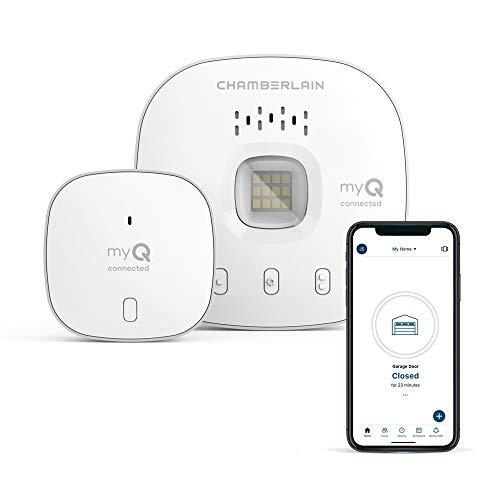
Unlike alert-only monitors, this hub and sensor pair offers app-based monitoring and door control, including the ability to open or close the garage remotely. The manufacturer says it works with most garage door openers made after 1993 that use photoelectric sensors that do not shut off. It also supports scheduled closing and sharing access with family or friends. Choose it when control matters as well as status checks. Compatibility depends on the opener and its sensor behavior, so confirm that your opener meets the requirements before choosing it.
Bottom line: Choose this when you want app monitoring plus opener control.
Garage Door Minder 2-Door + 2-Room Combo

For homes with two separate garage doors, this combo monitors both individual doors and sends status alerts to multiple rooms without Wi-Fi. Its transmitters pair with lightsticks, and the manufacturer describes the setup as peel-and-stick with auto pairing. Choose it when seeing both door statuses around the house matters more than checking them remotely. Like the single-door Minder, this system does not operate or close either door, so it cannot correct an open door after an alert.
Bottom line: Choose this for in-home alerts across two separate doors.
How to Choose a Garage Door Status Monitor
Choose by alert location first: in-home beeps and lights work without a router, while app monitoring requires a compatible network. A monitor that only reports status is different from a smart hub that can also operate the opener. Decide whether you need one door or multiple doors before comparing alert styles. For remote checks, verify that your Wi-Fi includes the band the device supports; a 5 GHz-only network will not work with a monitor limited to 2.4 GHz. If you need to close a door remotely, select a control-capable system rather than assuming every status monitor can operate the opener.
Wi-Fi, In-Home Alerts, and Door Control
Wi-Fi monitors can send app status beyond the house, while receiver-based alerts are useful when the goal is to notice an open door from another room. A dual-band router offers both 2.4 GHz and 5 GHz bands; devices that require 2.4 GHz cannot join a 5 GHz-only network. Wi-Fi signals also weaken through walls and metal garage construction, so test the intended sensor location before relying on alerts. Status monitoring and opener control are separate functions: an alert can tell you a door is open without having any way to close it. Do not treat a notification system as a substitute for the opener’s safety features.
How Many Garage Doors Should a Monitor Cover
Count each independently moving garage door as a separate door to monitor. A two-door system is useful only if it can distinguish the status of both doors; a single-door monitor should not be assumed to cover a second opening. Place each sensor on the specific door and pair it with its receiver or hub as directed by the product’s setup. A common setup mistake is pairing the receiver but leaving one transmitter unpaired, which can make one door’s status unavailable. After installation, move each door through a full open-and-close cycle and confirm that the expected alert changes for each one.
Garage Door Monitor Safety and Limitations
A status monitor reports whether a door is open or closed; it does not provide the opener’s entrapment protection unless it also controls the opener and is designed for that role. Federal safety requirements for residential garage door openers include entrapment protection, commonly through photoelectric eyes and an automatic reverse function. Test the opener’s reversal system monthly using its manual’s procedure; a commonly used test places a 1½-inch object flat on the floor under the closing door. Keep children away from moving doors and never rely on a phone alert to stop a door in motion. Monitoring systems do not replace the opener’s safety sensors or maintenance.
Frequently Asked Questions
Can a garage door monitor close the door for me?
Only a system with opener-control capability can close the door; alert-only monitors report status but cannot operate it. Check the product’s control features before choosing it if remote closing is required.
Will a 2.4 GHz monitor work on 5 GHz-only Wi-Fi?
No, a monitor that requires 2.4 GHz cannot connect to a 5 GHz-only network. A dual-band router must have its 2.4 GHz band enabled for that type of device.
How can I verify a garage door sensor is working?
Open and close the door fully and confirm the monitor changes status at both positions. Test each door separately on a multi-door setup so you know which alert corresponds to each opening.
Do garage door alerts replace opener safety sensors?
No, a status alert does not replace entrapment protection on the opener. Test the opener’s auto-reverse and photoelectric safety system monthly, following its manual’s test procedure.