
Garmin Venu 3 Screen Protector: 4 Films Compared

ArmorSuit MilitaryShield TPU Film is the best fit for most Garmin Venu 3 owners because it is made specifically for the 45mm watch and comes as a six-film pack. Choose LK TPU Film for Venu 3/4 45mm or EPU Film for Garmin Venu 3 45mm if self-healing film is the deciding feature; choose Supershieldz TPU Film for Venu 3 for a straightforward three-film TPU option.
These are flexible screen films, not hard glass covers. Confirm your watch is the 45mm Garmin Venu 3 before applying a film, since a mismatch can leave edges uncovered or interfere with fit.
We earn a commission if you buy through links on this page. As an Amazon Associate I earn from qualifying purchases. Products are compared on manufacturer specifications, not hands-on testing.
- Best overall: ArmorSuit MilitaryShield TPU Film – Made specifically for Garmin Venu 3 (45mm) and supplied as a six-film TPU pack.
- Best for self-healing TPU: LK TPU Film for Venu 3/4 45mm – The maker says minor scratches and installation bubbles can disappear within 24 hours.
- Best for full coverage: EPU Film for Garmin Venu 3 45mm – Flexible EPU film is described as offering edge-to-edge coverage for the 45mm Venu 3.
| Product | Best for | Material | Pack size | Fit | Shop |
|---|---|---|---|---|---|
| ArmorSuit MilitaryShield TPU Film | Six-film pack | TPU film | 6 films | Venu 3 45mm | Check Price on Amazon |
| LK TPU Film for Venu 3/4 45mm | Self-healing film | TPU film | 6 films | Venu 3/4 45mm | Check Price on Amazon |
| EPU Film for Garmin Venu 3 45mm | Edge coverage | EPU film | 6 films | Venu 3 45mm | Check Price on Amazon |
| Supershieldz TPU Film for Venu 3 | Three-film pack | TPU film | 3 films | Garmin Venu 3 | Check Price on Amazon |
Garmin Venu 3 screen protectors
Compare the compatible film options by material, pack size and the protection features that matter most to you.
ArmorSuit MilitaryShield TPU Film

ArmorSuit MilitaryShield TPU Film is the dedicated Garmin Venu 3 45mm option among these films, with six clear TPU protectors in the pack. The maker says its MilitaryShield material is intended to guard against scratches and impacts, and says touch sensitivity remains responsive. A flexible film is a practical choice if you prefer a thin layer rather than a rigid glass cover. The main limitation is that the features supplied do not give a self-healing claim or a timed bubble-dissipation claim, so choose another option if either feature is central to your decision.
Bottom line: Choose this if you want a dedicated Venu 3 fit and six TPU films.
LK TPU Film for Venu 3/4 45mm
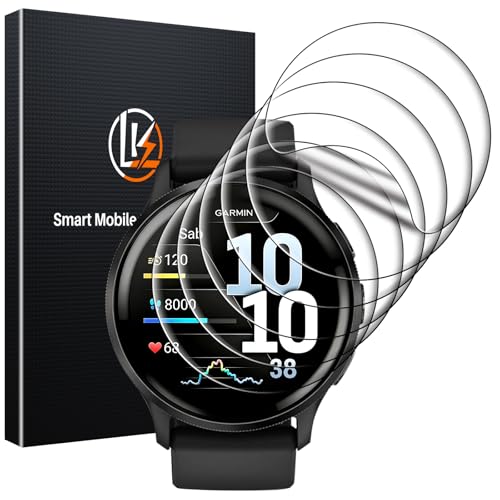
LK TPU Film for Venu 3/4 45mm covers both Garmin Venu 3 and Venu 4 models in the 45mm size, making its compatibility range broader than the Venu 3-only options. The maker says the flexible TPU film has oil- and water-repelling coating, reduces fingerprints, and can recover from minor scratches or small trapped bubbles within 24 hours. It is suited to buyers who want those claimed surface and installation properties as well as a six-film pack. Its key constraint is size: the maker limits compatibility to the 45mm Venu 3 or Venu 4, so verify the watch model before fitting.
Bottom line: Pick this if you want a self-healing film compatible with Venu 3 and Venu 4.
EPU Film for Garmin Venu 3 45mm

EPU Film for Garmin Venu 3 45mm is the only option here whose features specifically call out full, edge-to-edge coverage, and it includes four dust plugs. Its flexible EPU film is intended for the Garmin Venu 3 45mm. The maker says minor marks become less noticeable over 24 hours and that small installation bubbles dissipate during that period. This suits buyers who prioritize coverage and the self-healing behavior.
Bottom line: Choose this if edge-to-edge film coverage is your priority.
Supershieldz TPU Film for Venu 3

Supershieldz TPU Film for Venu 3 is the smaller pack choice, with three TPU films and a focus on clear viewing and natural touch response. The maker says the film is easy to install and removes without residue, and describes it as protection against everyday scratches, dust, and scrapes. It suits a buyer who wants a basic clear film rather than a pack with a claimed self-healing feature or extra accessories.
Bottom line: Pick this if three clear TPU films meet your needs and fit is confirmed.
How to choose a Garmin Venu 3 screen protector
Choose first by exact watch model and size, then by film features you will actually use. A protector sized for the 45mm Venu 3 should align to the screen rather than merely match the watch family name; a 41mm watch is a different fit. Flexible TPU and EPU films bend more readily than rigid glass, which can help them sit against curved screen edges. Compare the claimed coverage, surface coating, self-healing behavior, and pack count instead of treating all films as interchangeable. With no confirmed screen measurement in hand, match the product’s Venu 3 45mm compatibility before application. A six-film pack offers more replacement pieces than a three-film pack, but material and claimed features may matter more than quantity.
TPU and EPU film versus glass
Flexible films and tempered glass differ mainly in feel and rigidity. TPU and EPU films are pliable and thin; glass covers are stiffer and generally feel more like a hard surface. A film can be easier to conform around a curved display, while a rigid cover may be more prone to lifting at edges if the screen shape and fit are not matched. This comparison includes film products, not standalone glass covers. Remember that a screen protector adds a layer over the touchscreen: keep the surface clean and dry during application, and check touch response afterward.
How to apply a watch screen film
Apply a screen film in a clean, dry, low-dust space; even a small dust particle can create a visible bump beneath a film. Wash and dry your hands, clean the display, and align the film before pressing it down. Avoid applying a protector while the watch or screen is wet, and do not trap moisture under the adhesive layer. Press gradually from the center toward the edges to push out air rather than sealing it at the perimeter. Small bubbles may dissipate with some self-healing films, but trapped dust will not disappear; lift and reposition only if the film’s own application guidance allows it. Check the screen’s touch response after installation and correct any misalignment before relying on the watch.
Fit and care mistakes to avoid
Model and size mismatch is the most common preventable fit mistake: a Venu 3 label alone is not enough if the protector is intended only for a different case size. Confirm the watch is the 45mm model and compare its model name before applying adhesive. Do not confuse a film with a protective case; a case can cover the sides and add bulk while a film sits directly on the screen. Keep the display clean before installation, since dirt under the layer remains visible and can compromise adhesion. After application, clean the film gently with a soft, lint-free cloth; abrasive cleaners and sharp tools can scratch or lift thin film edges.
Frequently Asked Questions
How do I confirm my Garmin Venu 3 screen size?
Check the watch model and case size in its device settings or on the watch packaging before choosing a film. These film options target the 45mm Garmin Venu 3; do not assume a protector fits solely because it says Venu 3.
Do TPU screen protectors affect touchscreen response?
A thin, correctly aligned film is designed to preserve touch use, but bubbles, dirt, or a poorly fitted edge can affect interaction. Test taps and swipes after applying the protector, before depending on the touchscreen during activity.
Can small bubbles disappear under a screen film?
Some small air bubbles can dissipate over about 24 hours when the film maker specifically claims that behavior. Dust trapped beneath the film will not dissipate, so clean the display carefully before installation.
How often should I replace a watch screen protector?
Replace a film when it is torn, lifting, or too scratched to see through clearly; there is no universal replacement interval for screen protectors. Inspect the film edges periodically, especially after a snag or hard impact.
Can I wear a watch while applying a screen protector?
The display should be clean and dry during installation, so remove the watch from your wrist first. Keep water away from the adhesive while fitting the film, then check the touchscreen once the protector is seated.