
Hand Engraving Tools for Metal: Gravers and Pens

For direct hand engraving on metal, Six-Piece Steel Stone-Setting Graver Set is the closest fit because its six high-speed steel gravers include flat, onglette, round, and knife profiles for different cuts. Choose a cordless pen instead if you want a motorized tool for marking or decorative work; its bit and speed control, rather than a hand-pushed graver, determine the approach.
We earn a commission if you buy through links on this page. As an Amazon Associate I earn from qualifying purchases. Products are compared on manufacturer specifications, not hands-on testing.
- Best overall: Six-Piece Steel Stone-Setting Graver Set – Six steel graver profiles cover stone-setting work, decoration, and marking.
- Best for simple marking: General Tools Cordless Diamond-Tip Engraving Pen – A diamond-tip cordless pen runs on two AAA batteries and is specified for metal and other surfaces.
- Best for speed control: Resparked Customizer Cordless Engraving Pen – Five settings span 7,500–20,000 RPM, with an LED ring light and 31 bits.
| Product | Best for | Tool type | Power or drive | Included tools | Shop |
|---|---|---|---|---|---|
| Six-Piece Steel Stone-Setting Graver Set | Manual jewelry engraving | Hand graver set | Hand-pushed | 6 gravers | Check Price on Amazon |
| General Tools Cordless Diamond-Tip Engraving Pen | Cordless identification marks | Powered engraving pen | 2 AAA batteries | 3/32-inch diamond tip | Check Price on Amazon |
| Resparked Customizer Cordless Engraving Pen | Adjustable craft engraving | Powered engraving pen | Rechargeable; up to 2 hours | 30 bits | Check Price on Amazon |
| Vanlgs Grey Pro Engraving Pen | Lit variable-speed work | Powered engraving pen | Rechargeable | 31 bits; 5 speeds | Check Price on Amazon |
Hand Engraving Tools for Metal
Choose a hand-pushed graver for controlled cuts or a powered pen for motor-driven marking and decoration.
Six-Piece Steel Stone-Setting Graver Set

Unlike the powered pens, this set uses hand-pushed gravers for direct cuts in metal. The six high-speed steel profiles include three flat gravers, two onglette gravers, one round graver, and one knife graver; wooden handles and a model plate are included. The maker says the tools are intended for stone setting as well as jewelry decoration, identification marks, and personalization. This is the most relevant choice for jewelry work that calls for distinct graver shapes. It is not a motorized tool, so choose a powered pen if you want rotary engraving rather than hand-cut lines.
Bottom line: Choose this set for manual jewelry engraving and a range of graver profiles.
General Tools Cordless Diamond-Tip Engraving Pen

For quick, motor-driven marking rather than hand-pushed cuts, this pen has a 3/32-inch diamond tip and a 20,000 RPM motor. It runs on two AAA batteries and has a fingertip-controlled switch, aluminum body, and tri-lobal grip. The maker says it can engrave metal, glass, ceramic, plastic, and wood. Its compact pen form suits small identifying marks and personalization where cordless operation matters. Unlike the graver set, it does not provide multiple cutting profiles; buyers who need varied hand-cut line shapes should choose a graver set.
Bottom line: Pick this pen for cordless, motor-driven identification marks.
Resparked Customizer Cordless Engraving Pen
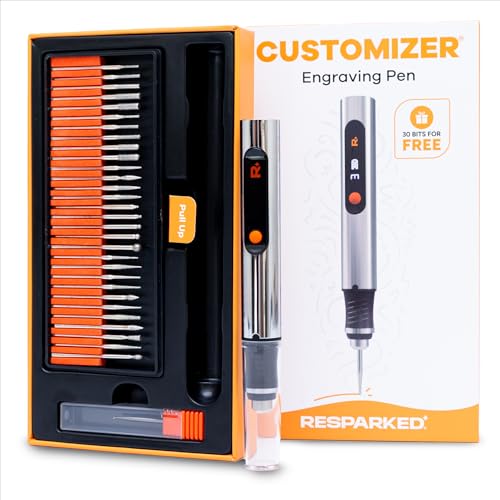
Among these powered options, this pen emphasizes adjustable speed and a broad craft-material range. The maker says its three-speed motor works on more than 50 surfaces, including metal, wood, glass, plastic, and ceramics, and that its rechargeable battery lasts up to two hours with USB-C charging. The package includes 30 bits and a mastery guide. That combination suits a crafter switching between materials and bit shapes.
Bottom line: Choose it for rechargeable, variable-speed craft engraving across materials.
Vanlgs Grey Pro Engraving Pen

The Grey Pro is the powered option here with both an LED ring light and a five-speed range of 7,500–20,000 RPM. It comes with 31 bits, eight stencils, and four test pieces; the maker says it is intended for more than 50 surface types, including metal, glass, and wood. The light and stencils are useful additions for craft personalization where visibility and repeatable lettering matter. Unlike the manual graver set, this tool relies on a motor and bit. Its included test pieces are a sensible place to check control before marking a finished object.
Bottom line: Pick it for adjustable speed, illuminated work, and stencil-supported craft marking.
Hand gravers versus powered engraving pens
Hand gravers and powered pens make marks in different ways, so choose by the cut you need rather than by the word “engraving.” A graver is a shaped steel cutting tool pushed by hand; its profile helps determine whether a line is flat, narrow, rounded, or sharply tapered. A powered pen rotates a bit, making it better suited to motor-driven marking and surface decoration. Rotary speed is measured in revolutions per minute (RPM), but a high RPM alone does not establish how cleanly a particular metal will engrave. For deliberate jewelry cuts or stone-setting work, start with a graver. For small identifying marks or craft decoration, a powered pen is the more direct category match.
| Need | Tool type | What to compare |
|---|---|---|
| Hand-cut lines | Graver | Profile and handle |
| Powered surface marks | Engraving pen | Bit, speed, and power |
Choosing a graver profile for metal
Graver profile matters because the cutting edge shapes the line and the amount of metal removed. Flat gravers make a broader cut, while narrow profiles such as onglette gravers are suited to finer line work; round and knife profiles provide other edge geometries. The six-piece set here includes all four profile types, though three are flat. Beginners should practice on scrap metal of a similar type and thickness before attempting a finished piece: pressure and angle change the cut, and a slipping graver can mar the work or injure a hand. Keep the work securely supported and direct the cutting path away from fingers. A graver that drags or skates may need sharpening or a change in technique.
How to choose a powered metal engraving pen
For a powered pen, compare the bit, speed control, and power source before choosing. A diamond tip is specified on General Tools Cordless Diamond-Tip Engraving Pen, while Resparked Customizer Cordless Engraving Pen and Vanlgs Grey Pro Engraving Pen are supplied with multiple bits; bit shape and material affect the mark each can make. A RPM range is useful when the job calls for speed adjustment: Vanlgs Grey Pro Engraving Pen spans 7,500–20,000 RPM, while Resparked Customizer Cordless Engraving Pen offers three speeds without a numerical range. Battery type also changes setup: General Tools Cordless Diamond-Tip Engraving Pen uses two AAA batteries, whereas Resparked Customizer Cordless Engraving Pen and Vanlgs Grey Pro Engraving Pen are rechargeable. Start with light pressure on a test surface; excessive force can reduce control and damage the bit or workpiece.
Safe setup for engraving metal
Eye protection and a stable workpiece are essential when engraving metal because cutting or rotary work can produce sharp fragments and burrs. Clamp or otherwise secure the piece rather than holding a small object in the path of a graver or rotating bit. Keep fingers clear of the cutting line, and avoid loose sleeves or jewelry near a powered tool. Work with enough light to see the mark, and use a scrap piece to check the tool’s behavior before engraving an object you want to keep. Metal edges and newly cut grooves can be sharp, so handle and clean the work carefully after engraving.
Frequently Asked Questions
Can a cordless engraving pen cut like a hand graver?
No; a hand graver is pushed through metal by hand, while a powered pen rotates a bit. Choose a graver when the job calls for hand-cut lines and a pen for motor-driven marking or decoration.
What does engraving pen RPM tell me?
RPM is the number of motor revolutions per minute, not a guarantee of cut quality. A range such as 7,500–20,000 RPM provides speed settings to compare, but bit choice and pressure still affect the mark.
Should I practice before engraving finished metal?
Yes; practice on scrap metal with a similar thickness and surface before working on a finished piece. A secure workpiece and light, controlled pressure help reduce slipping and unwanted marks.
What safety gear matters when engraving metal?
Wear eye protection and secure the workpiece, since engraving can create sharp fragments and burrs. Keep hands away from the cutting path and loose clothing away from rotating bits.
How do I choose between a diamond tip and multiple bits?
Choose a diamond tip when you want the specified single-point option for marking, and multiple bits when you want to change tip shapes. The bit’s shape and material affect the mark, so try it on scrap before using it on a finished object.