
Insignia RCA to HDMI Converter: 3 Options Compared

The INSIGNIA RCA to HDMI Converter is the closest match for converting a legacy composite device to an HDMI display, with selectable 720p or 1080p output and an AC power supply. Choose an alternative if you need bundled connecting cables or USB power instead.
We earn a commission if you buy through links on this page. As an Amazon Associate I earn from qualifying purchases. Products are compared on manufacturer specifications, not hands-on testing.
- Best overall: INSIGNIA RCA to HDMI Converter – Selectable 720p or 1080p output and an included AC power supply suit a straightforward setup.
- Best for USB power: Tengchi RCA to HDMI Converter – Powered by an external USB cable and supports several PAL and NTSC-family formats.
- Best for included cables: RCA to HDMI Converter Kit – Includes RCA, HDMI and micro-USB power cables in the kit.
| Product | Best for | Output | Power | Shop |
|---|---|---|---|---|
| INSIGNIA RCA to HDMI Converter | AC-powered setup | 720p or 1080p | AC supply | Check Price on Amazon |
| Tengchi RCA to HDMI Converter | USB-powered setup | 1080p | USB, 5V 1A | Check Price on Amazon |
| RCA to HDMI Converter Kit | Cable bundle | 720p or 1080p | Micro-USB | Check Price on Amazon |
RCA to HDMI Converters
Compare output options, power connections and included cables before choosing an adapter for a composite AV source.
INSIGNIA RCA to HDMI Converter

The INSIGNIA converter stands apart with an AC power supply and selectable 720p or 1080p output. It converts composite RCA audio and video from devices such as VCRs, video cameras and game systems for playback on a display with HDMI input. The product supports PAL and NTSC. This is a fit for a setup where continuous AC power is convenient and output resolution choice matters. Its input is composite RCA, so it will not serve devices that send video only through HDMI; confirm the source has yellow, white and red RCA outputs before ordering.
Bottom line: Choose this when you want AC power and a choice of 720p or 1080p output.
Tengchi RCA to HDMI Converter
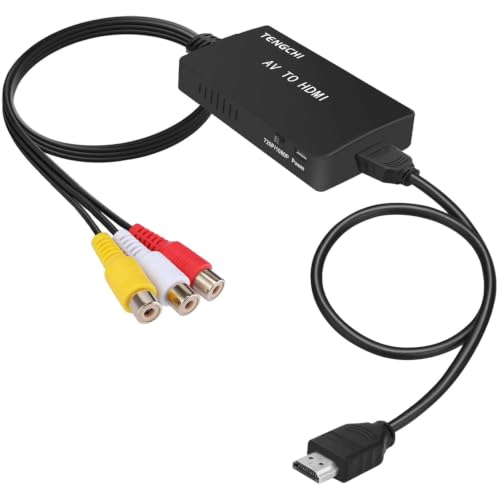
The Tengchi adapter uses USB power and has a single RCA-female composite input with HDMI 1.3 output. It supports 1080p output and PAL, NTSC 3.58, NTSC 4.43, SECAM, PAL/M and PAL/N input formats. The USB cable is included, but a 5V 1A power source is required and not included, so plan for a suitable USB port or power supply. The adapter does not support 3D or 4K, making it less suitable for a display setup that requires either format.
Bottom line: Choose this for a USB-powered 1080p conversion setup.
RCA to HDMI Converter Kit

The converter kit separates itself by including male RCA, HDMI and micro-USB power cables, while the other options do not specify a cable bundle. It converts composite RCA input to 720p or 1080p HDMI output and supports PAL, NTSC 3.58, NTSC 4.43, SECAM, PAL/M and PAL/N. The cables can be detached for other uses. This kit suits buyers who need the connecting leads together; its power lead is micro-USB, so make sure a compatible 5V USB power source is available for the setup.
Bottom line: Choose this when you need RCA, HDMI and micro-USB cables together.
How RCA to HDMI conversion works
An RCA-to-HDMI converter digitizes analog composite audio and video so an HDMI display can receive it. Yellow RCA carries composite video, while red and white carry stereo audio; HDMI combines digital audio and video over one connection. Conversion changes the connection format, but it does not restore detail absent from the original signal. Composite video has lower resolution and more interference than modern digital sources, so a 1080p output setting does not mean the source becomes native 1080p. Match the converter’s RCA input to the source and connect its HDMI output to the display. These adapters work in one direction only: RCA source to HDMI display, not HDMI source to RCA television.
Choosing an output resolution
Choose 720p when you want a lower output setting or the display handles it more reliably; choose 1080p when the display accepts Full HD and you prefer that output mode. The original composite signal remains the limiting factor, so upscaling cannot recover detail that was never recorded. Confirm the display’s HDMI input accepts the converter’s output mode, especially when connecting older televisions or capture equipment. PAL and NTSC are analog video standards with different frame rates and line counts; a converter’s format support matters when the source uses one of these systems. A multi-format adapter can accept more regional variants, but it still needs the correct physical RCA connections.
Power and cable planning
Plan a power source before connecting the converter, because these adapters need power in addition to the RCA and HDMI signal cables. AC-powered models suit a fixed entertainment center with an outlet nearby, while USB-powered models can use a compatible 5V supply when one is available. USB power cables and USB power supplies are not the same thing; verify that the required supply is on hand before setup. Also count the leads: some kits include RCA and HDMI cables, while other units may require separate cables. Keep the converter near the source and display to avoid stretching short leads or placing tension on the ports.
Common connection mistakes
Connect the source to the converter’s RCA input and the display to its HDMI output; reversing that direction will not convert HDMI into analog RCA. Match the yellow video plug and the red and white audio plugs to their corresponding colors, then select the correct HDMI input on the display. Composite connections combine video into one signal, unlike component video, which uses separate video channels and different colored connectors; a composite converter is not a component-video adapter. Finally, use the correct power connection before expecting a picture. If video appears but audio does not, recheck the red and white RCA connections and the display’s selected input.
Frequently Asked Questions
Can an RCA to HDMI converter work in reverse?
No, these converters carry composite RCA input to HDMI output, not HDMI input to RCA output. For the reverse direction, use a converter specifically designed for HDMI-to-AV output.
Does 1080p output make VHS look like HD?
No, 1080p output is an upscaled HDMI format, not new detail from the VHS recording. Composite VHS signal quality remains the main limit on the picture.
What do the yellow, red and white RCA plugs carry?
Yellow carries composite video, while red and white carry the two channels of stereo audio. Match each plug to the same-colored input to avoid missing or misrouted signals.
Can I power a USB converter from a TV?
A USB-powered converter needs a compatible 5V, 1A power source when that requirement applies. Check the TV’s USB output rating first; otherwise use a suitable USB power supply.
Why is there no picture after connecting the converter?
First confirm the source is connected to RCA input and the display to HDMI output, then select that HDMI input on the display. Also check that the converter is powered and the yellow composite-video plug is seated.