
Handbrake for Logitech G29: PC and Console Options

For a Logitech G29 on PS4 or PS5, choose HCXLELD G29 Console Handbrake; for Windows PC, the standalone USB options include Aikeec USB Handbrake with Clamp T1, 64-Bit USB PC Handbrake, Red, Clamp T1, 64-Bit PC USB Handbrake, 2 m Nylon and 64-Bit USB PC Handbrake, Black. Platform support is the deciding factor because the PC-only models do not work on consoles.
Choose a different option if you need a console setup or want a handbrake that supports multiple listed wheel and game combinations.
We earn a commission if you buy through links on this page. As an Amazon Associate I earn from qualifying purchases. Products are compared on manufacturer specifications, not hands-on testing.
- Best overall: Aikeec USB Handbrake with Clamp T1 – It is a Windows PC USB handbrake that lists G29 compatibility and includes a table clamp.
- Best for PS4 and PS5: HCXLELD G29 Console Handbrake – It explicitly supports the G29 PS-style wheel on PS4 and PS5.
- Best for a longer cable: 64-Bit PC USB Handbrake, 2 m Nylon – Its product name specifies a 2-meter nylon cable for Windows PC use.
| Product | Best for | Platform | Sensor | Clamp or cable | Shop |
|---|---|---|---|---|---|
| Aikeec USB Handbrake with Clamp T1 | Windows PC setups | Windows PC | Hall sensor | Clamp T1; 2 m cable | Check Price on Amazon |
| HCXLELD G29 Console Handbrake | Console G29 play | PS4/PS5; Xbox | — | Table clamp | Check Price on Amazon |
| 64-Bit USB PC Handbrake, Red, Clamp T1 | Red PC setups | Windows PC | Hall sensor | Clamp T1 | Check Price on Amazon |
| 64-Bit PC USB Handbrake, 2 m Nylon | Longer cable reach | Windows PC | 64-bit Hall sensor | 2 m nylon cable | Check Price on Amazon |
| 64-Bit USB PC Handbrake, Black | Windows 11 setups | Windows PC | 64-bit | — | Check Price on Amazon |
Handbrakes for Logitech G29
Start by matching the handbrake’s platform support to the G29 setup you use.
Aikeec USB Handbrake with Clamp T1
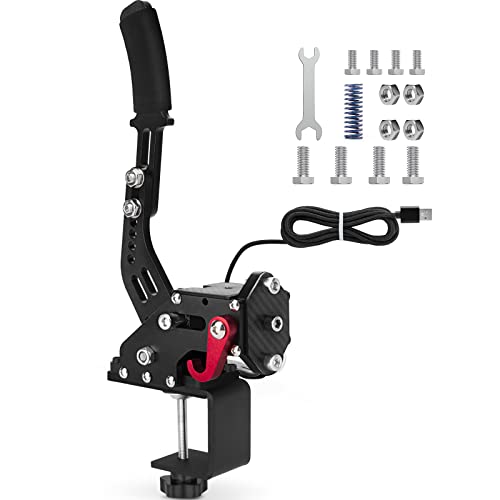
For a Windows PC G29 setup, this Aikeec unit pairs a Hall sensor with a table clamp and a 2-meter nylon cable. The maker says it works with G29 and names games including Assetto Corsa, DiRT Rally 2 and Forza Horizon 4/5/6. Its standalone USB connection is intended as an added control, not a console accessory. The main limitation is platform: it is not for Xbox, PlayStation or Mac, so choose another model if you play on a console.
Bottom line: Pick this for a Windows PC G29 setup that needs a clamp.
HCXLELD G29 Console Handbrake
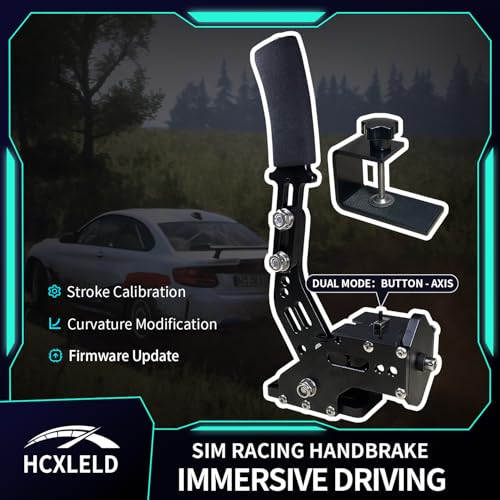
Unlike the PC-only choices, this model is the option here that explicitly supports a G29 on PS4/PS5; the maker also gives Xbox compatibility for the G920 and Xbox-style G923. It includes a table clamp, and the maker specifies a connection sequence for consoles: plug the wheel’s USB into the handbrake’s USB-A port rather than directly into the console. That platform-specific setup is its key qualification. It is not a general console add-on for other wheels, so verify that your wheel is one of the supported combinations.
Bottom line: Choose this for the G29 console combination.
64-Bit USB PC Handbrake, Red, Clamp T1

This red 64-bit USB handbrake offers a Windows PC alternative to the black Aikeec model, with a Hall sensor and a T1 clamp. The maker lists G29 support and names games such as Assetto Corsa, DiRT Rally 2, Forza Horizon 4/5 and ETS2/ATS. It operates as an independent add-on, so the wheel and handbrake compatibility are separate considerations. This option is not for Xbox, PlayStation or Mac; console players should choose a handbrake made for their platform.
Bottom line: Pick this if you want a red, clamped Windows PC unit.
64-Bit PC USB Handbrake, 2 m Nylon

This unit is distinguished by its 2-meter nylon cable and red-and-black finish, rather than a clamp named in its specifications. The maker says its 64-bit Hall sensor is non-contact and lists G29 compatibility for Windows PC, along with Assetto Corsa, iRacing, DiRT and ETS2/ATS. The maker specifically excludes Forza Horizon 4, unlike several other options here. It does not support Xbox, PlayStation or Mac, so it suits a PC-only rig with a suitable mounting arrangement.
Bottom line: Choose this for a Windows PC rig where a 2-meter cable is useful.
64-Bit USB PC Handbrake, Black

This black model explicitly lists Windows 7, 8, 10 and 11, making its operating-system range a useful distinction among the options. The maker names G29 support and compatibility with games including Assetto Corsa, DiRT Rally 2, Forza Horizon 4/5, Project CARS 2/3 and WRC 7/8/9. It is a standalone USB handbrake for PC, not a console accessory. Choose another model if console use matters or if a clamp is essential to your setup.
Bottom line: Pick this for a Windows PC setup, including Windows 11.
How to choose a G29 handbrake by platform
Match platform before comparing sensors or mounting: a USB handbrake sold for Windows PC may not work when plugged into a console. PC-only units in this group explicitly exclude Xbox and PlayStation, while the console model ties support to specific wheel and console combinations. For a G29 on PS4 or PS5, use a model that explicitly names that pairing; for a Windows PC, choose among the standalone USB options.
Game support is a separate check from wheel support. A game can recognize a wheel but still need the handbrake assigned as a separate control in its settings. Confirm the game and platform combination, then verify the handbrake input appears in the game’s controls before adjusting its response or dead zone.
Mounting and handbrake fit for a sim rig
Clamp style matters when the rig has a desk or table edge available; a clamp-equipped model can attach there without relying on a permanent mount. Check the edge thickness and the available space around the wheel before ordering, since a clamp must have room to seat securely. A fixed cockpit may instead need a mounting point suited to the handbrake’s shape.
Place the lever where your hand can reach it without leaning or crossing over the wheel. Keep the cable clear of pedals and any moving seat hardware. Before driving, pull the lever through its full travel while the game is paused and make sure it returns freely without hitting the desk, wheel, or other equipment.
How USB handbrakes work with racing games
A standalone USB handbrake is an additional control input; it does not replace the steering wheel. In a PC game, assign the handbrake axis or button in the control menu, then test it in a safe practice session. Axis-based controls can need calibration so the game recognizes the full release and full pull instead of treating part of the lever travel as a constant input.
Console arrangements can use a different connection path from PC. For the supported console pairing, the maker says the wheel’s USB connects to the handbrake’s USB-A port rather than directly to the console. Do not assume that a USB plug alone makes a peripheral console-compatible: the wheel, handbrake and console combination all need to be supported.
Common G29 handbrake setup mistakes
The most common mistake is buying a Windows-only handbrake for a console G29 setup. Check the platform wording first, then match the exact wheel variant: G29, G920 and G923 are not interchangeable labels in every compatibility claim. A PC game also needs to support handbrake input, even when its wheel support is already working.
A second mistake is mounting the lever where the clamp can shift or the cable can snag. Tighten the attachment, keep the cable away from pedals, and test lever return before starting a race. If a game shows no input, confirm the USB connection and its control assignment before changing game settings at random.
Frequently Asked Questions
Can a Logitech G29 handbrake work on PS5?
Yes, if the handbrake explicitly supports the G29 and PS5 combination. A Windows-only USB model does not become PS5-compatible just because it has a USB plug.
Do PC handbrakes work with every G29 game?
No; wheel support and handbrake support are separate. Check that the game recognizes a handbrake input, then assign it in the control settings.
How should I connect a G29 handbrake on console?
Use only a supported wheel-and-console combination and follow its connection path. For the console model described here, the maker says to connect the wheel USB to the handbrake’s USB-A port.
Does a USB handbrake need calibration?
It may need axis calibration in the game so the released and fully pulled positions register correctly. Test the input before driving and adjust the game’s dead zone if small lever movement causes unwanted input.
Where should I mount a sim racing handbrake?
Mount it within easy reach and where the clamp or attachment can sit securely. Keep its cable clear of pedals and seat movement, then check that the lever travels and returns without obstruction.