
Power Supply 600 Watt: 4 Models Compared

For a 600-watt power supply, choose Thermaltake SMART 600W if you want a certified 600W unit with two PCIe 6+2-pin connectors and a 5-year warranty; its 80 PLUS certification is rated for 80% efficiency under typical load. Choose Thermaltake Toughpower GX2 600W instead for Gold-rated efficiency and six SATA connectors, or Apevia SPIRIT600W if you need four SATA plugs.
A PC power supply converts AC wall power to regulated DC rails for components; confirm the case supports the unit’s ATX dimensions and that its connectors match the motherboard and graphics card.
We earn a commission if you buy through links on this page. As an Amazon Associate I earn from qualifying purchases. Products are compared on manufacturer specifications, not hands-on testing.
- Best overall: Thermaltake SMART 600W – It combines 600W continuous output, two PCIe 6+2-pin connectors, and a 5-year warranty.
- Best for Gold efficiency: Thermaltake Toughpower GX2 600W – Its 80 PLUS Gold certification supports efficiency up to 90%.
- Best for four SATA drives: Apevia SPIRIT600W – It has four SATA connectors alongside two PCIe 6+2-pin connectors.
| Product | Best for | Efficiency | PCIe connectors | SATA connectors | Shop |
|---|---|---|---|---|---|
| Thermaltake SMART 600W | General ATX builds | 80 PLUS; 80% typical load | 2 × 6+2-pin | — | Check Price on Amazon |
| Thermaltake Toughpower GX2 600W | Gold-rated efficiency | 80 PLUS Gold; up to 90% | 2 × 6+2-pin | 6 | Check Price on Amazon |
| Apevia SPIRIT600W | Four SATA devices | — | 2 × 6+2-pin | 4 | Check Price on Amazon |
| MSI MAG A600DN II | Flat cable routing | 80 PLUS Certified | — | — | Check Price on Amazon |
600 watt power supplies
Compare output, efficiency ratings, and connectors to match a unit to your PC build.
Thermaltake SMART 600W
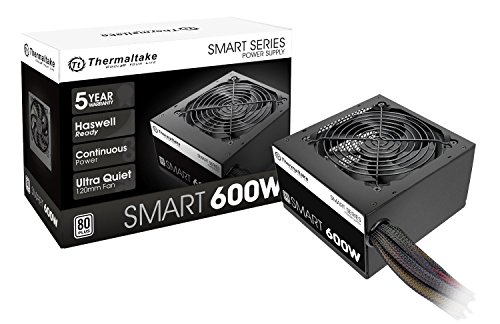
Thermaltake SMART 600W is the straightforward choice among these 600W models, with 600W continuous output at 40°C, a 12V rail, and two PCIe 6+2-pin connectors. Thermaltake says the unit meets ATX 12V 2.31 and EPS 12V 2.92 standards and provides OPP, OVP, and SCP protection. The 80 PLUS certification corresponds to 80% efficiency under typical load. Its 5-year warranty is a useful support term to compare. The limitation is efficiency: builders prioritizing a Gold certification should consider Thermaltake Toughpower GX2 600W instead.
Bottom line: Choose it for a conventional 600W ATX build that needs two PCIe power connectors.
Thermaltake Toughpower GX2 600W

Thermaltake Toughpower GX2 600W distinguishes itself with an 80 PLUS Gold certification supporting efficiency up to 90%, compared with the standard 80 PLUS rating on Thermaltake SMART 600W. Its non-modular wiring includes six SATA connectors, two PCIe 6+2-pin connectors, three peripheral plugs, and one FDD connector. Thermaltake describes the 120mm dynamic-bearing fan as quiet and highlights a single 12V rail and C6/C7 state readiness. This combination suits a system with several SATA devices. The tradeoff is non-modular cabling, which can leave unused leads to route inside a smaller case.
Bottom line: Pick it when Gold-rated efficiency and six SATA connections matter most.
Apevia SPIRIT600W
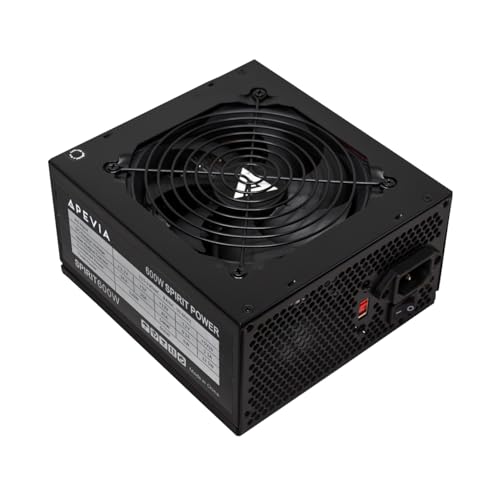
Apevia SPIRIT600W offers four SATA connectors and four Molex plugs, a different mix from Thermaltake Toughpower GX2 600W, which has six SATA connectors. The output includes a single +12V output rated at 45A, plus a 120mm thermally controlled fan and protections for short circuit, over-current, over-voltage, over-power, under-voltage, and over-temperature. The two PCIe 6+2-pin connectors support graphics cards requiring that plug type.
Bottom line: Choose it for a build that benefits from four SATA and four Molex plugs.
MSI MAG A600DN II

MSI MAG A600DN II stands out for its flat-cable design, which can simplify routing behind a motherboard tray, and a 120mm fan for cooling. The specifications identify 600W output, 80 PLUS certification, active PFC, and OCP, OVP, OPP, and SCP protection. Its non-modular cable arrangement means the cables are attached rather than removable, so case space for unused leads still matters.
Bottom line: Choose it for a 600W build where flat cable routing is appealing.
How to choose a 600 watt power supply
Start with the PC’s required output and connectors, then compare efficiency ratings and cable layout. A 600W unit is not automatically suitable for every graphics card: GPU and CPU demand, transient load, and the rest of the system determine the needed capacity. Keep some headroom rather than planning to run at the supply’s limit. For a quick screening rule, if a component’s required plug is absent from the PSU connector set, reject that match before considering wattage. ATX power supplies typically use a 24-pin motherboard connector and a 4+4-pin CPU connector; graphics cards may need one or more PCIe 6+2-pin plugs. Check the exact GPU and motherboard requirements, especially when replacing an existing supply.
A higher 80 PLUS tier indicates greater conversion efficiency under defined load conditions, not more available wattage. Gold certification can be a useful differentiator when two units otherwise suit the build.
Efficiency ratings and cable choices
80 PLUS labels compare power-conversion efficiency, while modularity describes whether cables can be detached; these are separate buying criteria. The models here range from standard 80 PLUS certification to Gold certification, and the Gold option claims up to 90% efficiency. Actual efficiency varies with load, so the peak figure is not guaranteed at every operating point. Non-modular units keep every cable attached, which can complicate routing in compact cases; flat cables may bend and route more neatly but remain attached if the supply is non-modular.
Use this comparison to identify the key tradeoff before checking case fit and connector compatibility.
| Need | Useful selection cue |
|---|---|
| More SATA devices | Compare SATA connector counts with the number of drives and accessories |
| Gold efficiency tier | Look for an 80 PLUS Gold certification |
| Compact cable routing | Check modularity, cable style, and case clearance |
| Graphics card power | Match the exact PCIe plug count and type required |
Check ATX fit and power connectors
Physical fit and connector fit are different checks: an ATX supply can be too long for a case bay, and compatible wattage does not guarantee compatible plugs. Measure the case’s PSU bay depth and compare it with the unit dimensions, leaving room to bend cables and close the side panel. ATX 24-pin, CPU 4+4-pin, SATA power, and PCIe 6+2-pin leads serve different components and cannot substitute for one another. Never force a connector that does not seat in its keyed socket. Before ordering, confirm the graphics card’s exact power-input requirements and the case’s permitted PSU length; the specifications do not provide complete connector counts for every model.
For safe installation, disconnect the computer from wall power and avoid opening the PSU enclosure; internal capacitors can retain dangerous voltage after unplugging.
Frequently Asked Questions
Is a 600 watt power supply enough for a gaming PC?
A 600W unit can suit a gaming PC only when its CPU, graphics card, and other components fit within the system’s power requirement. Check the GPU maker’s recommended PSU capacity and connector requirements, and leave headroom for transient demand rather than sizing exactly to typical draw.
What does 80 PLUS Gold mean for a power supply?
80 PLUS Gold is an efficiency certification tier, not a wattage increase. The Gold model here supports efficiency up to 90%, but efficiency changes with operating load.
How many PCIe plugs should my power supply have?
Match the number and type of plugs to the graphics card’s power sockets; cards may need one or more PCIe 6+2-pin connectors. A 6+2-pin plug can be configured for a 6-pin or 8-pin socket, but it does not replace a different connector type.
Can a 600W power supply run two graphics cards?
Wattage alone cannot confirm dual-card suitability: the exact GPUs’ combined draw, connector needs, and system load must fit the supply. This group’s connector counts and ratings differ, so verify every card’s required power plugs before planning a multi-GPU build.
Is it safe to open a power supply for cleaning?
No; do not open the PSU enclosure, even after unplugging it, because internal capacitors can retain dangerous voltage. Clean exterior vents with the unit disconnected and use a dry, nonconductive method without inserting tools through the grille.