
InkSonic DTF Printers: 5 Models Compared by Setup

For most buyers, InkSonic H13 F1080 with Oven, Laptop & Cutter is the most complete choice because its H13 A3+ package includes an oven, laptop, and built-in film cutter. Choose InkSonic C13B R1390 with Oven or InkSonic Spark F13 A3 DTF Printer instead if you want a 13-inch model, or another H13 bundle if its included finishing equipment better matches your workflow.
Direct-to-film (DTF) printers put designs on transfer film for later application to garments; package equipment determines how much of the powdering and curing process is handled for you.
We earn a commission if you buy through links on this page. As an Amazon Associate I earn from qualifying purchases. Products are compared on manufacturer specifications, not hands-on testing.
- Best overall: InkSonic H13 F1080 with Oven, Laptop & Cutter – The H13 A3+ package combines a printer, oven, laptop, and built-in film cutter.
- Best for 13-inch printing: InkSonic C13B R1390 with Oven – The R1390 package pairs a 13-inch printer with an infrared curing oven.
- Best for automated finishing: InkSonic H13 F1080 14-inch Shaker & Dryer – Its H13 bundle includes automatic powdering and drying equipment.
| Product | Best for | Print width or format | Included equipment | Footprint (L × W × H) | Shop |
|---|---|---|---|---|---|
| InkSonic H13 F1080 with Oven, Laptop & Cutter | Complete H13 setup | A3+ | Oven, laptop, film cutter | 29.5 × 11 × 12.2 in | Check Price on Amazon |
| InkSonic C13B R1390 with Oven | 13-inch printing | 13 in | Printer, infrared oven | 31.5 × 9.4 × 13 in | Check Price on Amazon |
| InkSonic H13 F1080 14-inch Shaker & Dryer | Automated finishing | 14 in | Auto shaker and dryer | 29.5 × 11 × 12.2 in | Check Price on Amazon |
| InkSonic H13 F1080 Shaker & Dryer with Laptop | Laptop included | A3+ | Shaker, dryer, laptop | 29.5 × 11 × 12.2 in | Check Price on Amazon |
| InkSonic Spark F13 A3 DTF Printer | Home studio setup | 13 in | Printer, heat press | 31.5 × 9.4 × 13 in | Check Price on Amazon |
InkSonic DTF printers compared
Compare the print formats and bundled equipment to find the setup that matches your transfer workflow.
InkSonic H13 F1080 with Oven, Laptop & Cutter

Unlike the other H13 bundles here, InkSonic H13 F1080 with Oven, Laptop & Cutter includes a built-in film cutter along with an oven and laptop. Its A3+ F1080 setup is aimed at buyers who want those pieces in one package. InkSonic says the H13 can print a full A3 design in 3 minutes, and its feature set includes white ink circulation and 12-hour vacation mode. This combination suits a workspace that can accommodate the 29.5 × 11 × 12.2-inch footprint. The limitation is that the package still requires room for the printer and finishing workflow; the compact footprint alone does not establish the clearance needed around it.
Bottom line: Choose this if an oven, laptop, and built-in film cutter are all useful in your setup.
InkSonic C13B R1390 with Oven

InkSonic C13B R1390 with Oven is the only R1390 in this group, and its 13-inch print width is the clearest fit for buyers working with that format. The package pairs the printer with a matched infrared curing oven; the feature set also names white ink circulation, auto cleaning, and vacation mode. InkSonic says vacation mode runs an automatic cleaning cycle every 12 hours. The R1390 is a fit for a smaller transfer workflow that does not need an H13 bundle’s laptop or automatic powdering equipment. Its package does not include a laptop in the product name, so buyers who need one should plan that separately.
Bottom line: Pick this for a 13-inch printer-and-oven setup rather than an H13 bundle.
InkSonic H13 F1080 14-inch Shaker & Dryer

InkSonic H13 F1080 14-inch Shaker & Dryer stands apart from the other H13 packages by specifying a 14-inch print width and an auto shaker-and-dryer bundle. That combination suits buyers looking to include automatic powdering and drying in their workflow. The feature set also names the F1080 printhead, white ink circulation, and auto cleaning; InkSonic says the H13 can print a full A3 design in 3 minutes. Its footprint is 29.5 × 11 × 12.2 inches, so measure the work area before choosing it. The package name does not call out a laptop, making it less suited to someone who needs that included.
Bottom line: Choose this if you want a 14-inch H13 with automatic powdering and drying.
InkSonic H13 F1080 Shaker & Dryer with Laptop

InkSonic H13 F1080 Shaker & Dryer with Laptop is the H13 package that explicitly includes a pre-installed laptop with its shaker and dryer, unlike the oven-and-laptop package or the H13 bundle that specifies a film cutter. Its A3+ F1080 setup is intended for buyers who want a computer included as part of the package. InkSonic says the H13 prints a full A3 design in 3 minutes; the features also include white ink circulation and auto cleaning. This suits a buyer setting up a bundled print-and-finish station. The product name does not specify a built-in film cutter, so do not choose it on the assumption that one is included.
Bottom line: Pick this when a pre-installed laptop matters more than a named film cutter.
InkSonic Spark F13 A3 DTF Printer
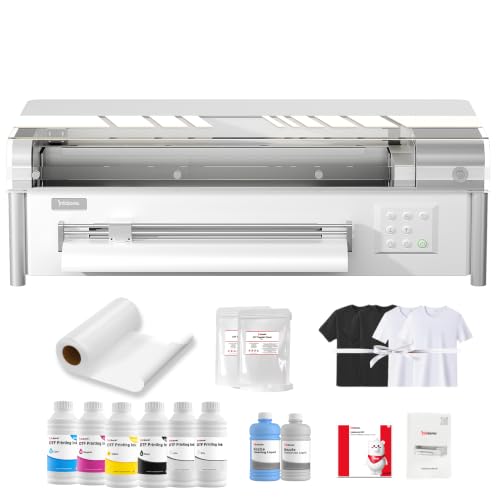
InkSonic Spark F13 A3 DTF Printer is the Spark F13, a 13-inch option packaged with a heat press rather than the infrared oven bundled with InkSonic C13B R1390 with Oven. Its feature set names vacuum suction, a film cutter, white ink circulation, and 12-hour vacation mode. The package is positioned for home studios and small apparel businesses, and the printer’s footprint is 31.5 × 9.4 × 13 inches. It may suit buyers who prefer a heat press in the package and want a film cutter.
Bottom line: Choose this for a 13-inch Spark package with a heat press and film cutter.
How to choose an InkSonic DTF printer
Choose by print width and finishing steps first, then compare convenience features. DTF transfers are printed onto film, coated with adhesive powder, cured, and heat-pressed onto fabric; a printer alone does not perform every step. An oven or dryer handles curing, while a shaker can distribute powder. A film cutter is a separate convenience, not a substitute for curing. If your largest design must span more than 13 inches, compare it against the 14-inch width named for InkSonic H13 F1080 14-inch Shaker & Dryer rather than assuming A3+ means a specific usable width. Also check whether a laptop is included if you need one for the RIP workflow. For regular orders, prioritize the finishing equipment that removes the most manual steps from your intended process.
What A3 and A3+ mean for DTF transfers
A3 paper measures 11.7 × 16.5 inches, while A3+ is a larger format whose exact dimensions can vary by printer and media standard. The named 13-inch and 14-inch widths are useful clues, but usable image area can be narrower than the film or printer width because of margins and feed constraints. Measure the widest artwork you expect to produce, including a small safety margin, before selecting a format. A design that fits the film width still needs room for registration and handling. Keep the chosen transfer within the printer’s supported media path; forcing wider film can cause feed or alignment problems.
This table matches package needs to the features called out for each model.
| Workflow need | Package detail to prioritize |
|---|---|
| 13-inch printing with curing oven | R1390 printer-and-oven package |
| 14-inch width and automatic powdering | H13 shaker-and-dryer bundle |
| Laptop included with shaker and dryer | H13 laptop package |
| Heat press and film cutter | Spark F13 package |
DTF curing and heat-press safety
DTF powder and curing involve both fine particles and heat, so keep the work area ventilated and avoid breathing airborne powder. Use a stable, heat-resistant surface for a curing oven or press, and keep hot components away from paper, fabric scraps, and other combustibles. Follow the adhesive and film makers’ curing temperature and dwell-time ranges because the right settings vary by material; excessive heat can damage a transfer or create a burn hazard. Use suitable heat-resistant gloves when handling freshly cured film or a pressed garment. Leave clearance around powered equipment and do not assume a printer’s dimensions include the extra space needed to load film or safely operate the curing equipment.
Keeping white ink moving during downtime
White ink can settle when a DTF printer sits idle, so circulation and maintenance cycles matter more than they do for a printer used every day. The InkSonic models here name white ink circulation, and several name 12-hour vacation or auto-cleaning cycles; those features support downtime management but do not remove the need to prepare a maintenance routine. Store inks within the maker’s recommended conditions and keep film and powder sealed against dust and moisture. Before a seasonal pause, arrange the printer’s maintenance mode and consumables for the idle period rather than letting white ink sit undisturbed. Frequent production and occasional use place different demands on upkeep, so pick a workflow you can maintain consistently.
Frequently Asked Questions
Does DTF printing require garment pretreatment?
DTF transfers are printed and powdered on film before being heat-pressed onto a garment, so the garment does not need the pretreatment used by some direct-to-garment workflows. The product features also describe these InkSonic options as requiring no garment pretreatment. Fabric compatibility and press settings still depend on the transfer materials.
What does a DTF shaker and dryer do?
A shaker distributes adhesive powder over printed film, and a dryer or curing unit heats that powder so the transfer can be pressed later. Automatic equipment reduces manual handling, but it does not eliminate the need to use compatible powder and curing settings. Keep the powder process ventilated because airborne particles are a breathing hazard.
How wide a design can a 13-inch DTF printer print?
A 13-inch printer width does not necessarily mean a full 13 inches of printable image area; feed margins and the media path reduce usable width. Measure the actual artwork and preserve room for alignment before selecting film. If a design approaches 13 inches, check the printer’s supported printable width before ordering.
How often should white ink be circulated?
White ink needs movement during idle periods because pigment can settle, and these InkSonic models name 12-hour vacation or cleaning cycles. Treat that cycle as a maintenance aid rather than proof that no other upkeep is needed. Follow the printer’s operating instructions for extended downtime and resume with an appropriate nozzle check.
Can DTF transfers be applied to any fabric?
No single transfer setting works for every fabric; heat tolerance, texture, and stretch affect adhesion and durability. Check the film and adhesive guidance for compatible materials and test a small transfer before a larger run. Avoid pressing heat-sensitive fabric unless its care guidance permits the required temperature.