
IR Blaster USB-C: 5 Phone Remote Adapters Compared

For most Android phones, OCRUSTAR USB-C IR Blaster is the broadest fit because it claims compatibility with both iOS and Android and lists many appliance types. Choose another adapter if your phone or app is not supported; USB-C shape alone does not guarantee compatibility.
A USB-C IR blaster plugs into a phone and sends infrared commands through an app, much like a handheld remote.
We earn a commission if you buy through links on this page. As an Amazon Associate I earn from qualifying purchases. Products are compared on manufacturer specifications, not hands-on testing.
- Best overall: OCRUSTAR USB-C IR Blaster – Claims iOS and Android support and lists a wide range of appliance types.
- Best for keychain carry: Universal Remote USB-C IR Adapter – Includes a keychain and silicone case, and claims a 10-meter transmission distance.
- Best for compact size: R09 Mini USB-C IR Adapter – Measures about 1.22 inches long and claims a 10-meter control range.
| Product | Best for | Phone compatibility | Claimed range | Carry accessory | Shop |
|---|---|---|---|---|---|
| OCRUSTAR USB-C IR Blaster | Broad appliance coverage | iOS and Android | — | — | Check Price on Amazon |
| Universal Remote USB-C IR Adapter | Keychain carry | Android; Lightning for Apple | 10 m | Keychain and silicone case | Check Price on Amazon |
| R09 Mini USB-C IR Adapter | Compact Android use | Android; excludes iPhone 15 USB-C | 10 m | Keychain | Check Price on Amazon |
| Mini Type-C IR Controller | App-based control | Android | — | Silicone cover | Check Price on Amazon |
| Type-C IR Controller Kit | Longer claimed range | — | 15 m | Keychain and silicone case | Check Price on Amazon |
USB-C IR Blaster Adapters
Compare phone support, claimed range and portability before choosing an adapter for your appliances.
OCRUSTAR USB-C IR Blaster

OCRUSTAR USB-C IR Blaster stands out for its broad appliance list, including TVs, air conditioners, projectors, fans, robot vacuums and blinds. The maker says its USB-C adapter works with iOS and Android and uses the Ocrustar Remote App. Its brand list includes Samsung, Sony, Panasonic, TCL, Hisense and LG. That breadth may suit a home with several kinds of infrared-controlled equipment. The tradeoff is that no operating-system version or transmission range is given, so verify app support for your specific phone before relying on it.
Bottom line: Choose this if you want one adapter intended for varied appliances across iOS and Android.
Universal Remote USB-C IR Adapter
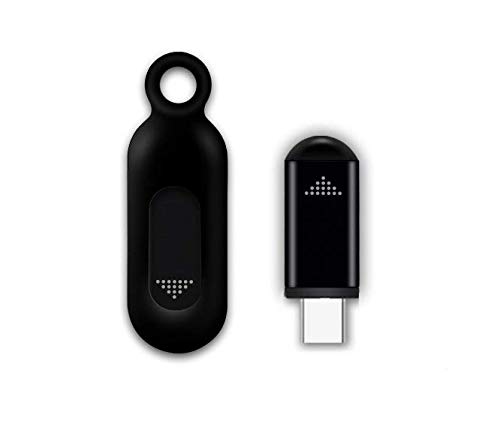
Universal Remote USB-C IR Adapter pairs its Android USB-C version with a keychain and silicone case, making the carry setup its distinguishing feature. The maker says it controls appliances through the uniTV Remote app and claims a transmission distance of up to 10 meters. Its device examples include air conditioners, TVs and DVD players, along with Roku, Apple TV and several television brands. The package is described as having separate Lightning and Type-C options, so check that the selected connector matches your phone; this adapter is not presented as USB-C support for Apple phones.
Bottom line: Pick this if a keychain and protective cover matter more than broad phone compatibility.
R09 Mini USB-C IR Adapter

R09 Mini USB-C IR Adapter is a particularly small option, measuring about 1.22 inches long, 0.45 inches wide and 0.24 inches high. The maker says it works with Android phones that have USB-C and claims a 10-meter wireless control range without charging. A keychain attachment helps keep the adapter with the phone. The phone exclusion matters: the maker says it is not compatible with the iPhone 15 USB-C port, so do not choose it for that phone. It also requires a separate app for control.
Bottom line: Choose this for a small Android adapter, but not for an iPhone 15 USB-C port.
Mini Type-C IR Controller

Mini Type-C IR Controller highlights a fifth-generation chip and operation without a Bluetooth connection, rather than giving a measured range. The maker says it can control air conditioners, TVs, set-top boxes and projectors after installing a phone app. A silicone cover is included to help prevent loss. This can suit an Android user who wants a small plug-in controller for common home appliances. The limitation is that the phone compatibility claim is narrower than products that explicitly mention iOS; confirm the app is available for your Android device before choosing it.
Bottom line: Pick this for its app-based control of common appliances on Android.
Type-C IR Controller Kit

Type-C IR Controller Kit claims the longest control distance among these adapters, up to 15 meters, and includes a keychain and silicone case. The maker describes plug-and-play use and says the adapter pairs with home appliances, including air conditioners, TVs, DVD players and set-top boxes. That makes it harder to judge fit than options with named platform support; verify that both the phone and control app support this USB-C adapter before purchase.
Bottom line: Choose this if the claimed 15-meter range is your priority and you confirm phone support first.
How to Choose a USB-C IR Blaster
Start with phone and app compatibility, not the connector alone. USB-C describes the plug shape, but the adapter still needs an app that supports the phone’s operating system and the appliances’ infrared commands. Next, check that the app has a control profile for each device; universal adapters rely on matching command sets, and not every model or function is guaranteed. Infrared is a one-way signal, so many adapters cannot confirm whether a device received a command or report its current state. If a phone’s operating system is not named for an adapter, confirm support before ordering. A claimed range is useful only when the adapter and appliance have a clear infrared path.
Infrared Range and Line of Sight
Infrared remotes generally need a clear path to the appliance’s receiver; walls and closed cabinet doors block the signal. A range such as 10 or 15 meters is a maker claim, not a guarantee across rooms, since receiver angle, obstructions and bright ambient light can affect response. Aim the phone-end transmitter toward the device and test commands nearby before placing equipment behind furniture. Infrared control also differs from Wi-Fi control: it sends a command rather than connecting to a network, so it is usually limited to devices within signal reach. If the appliance sits inside a closed cabinet or another room, a USB-C IR adapter may not reach it reliably.
Which Appliances Can a Phone IR Adapter Control
Phone IR adapters are intended for appliances with infrared receivers, commonly televisions, air conditioners, DVD players and set-top boxes. The exact functions depend on the app’s command profile for each brand and model; basic power and volume commands may work even when less-common functions do not. The table below helps match the adapter type to the buyer’s main constraint.
| Need | What to check |
|---|---|
| Use with iPhone | Explicit iOS support and the correct connector |
| Use with Android | USB-C support and app compatibility |
| Control appliances through a wall | Choose another control method; infrared needs a clear path |
| Operate several device types | Confirm each device type and model is supported in the app |
Do not assume that a phone’s USB-C port means every USB-C remote app will work on it.
Common USB-C IR Blaster Setup Mistakes
The most common setup mistake is choosing by connector while overlooking the phone platform or an explicitly excluded device. Check the adapter’s operating-system fit and install its required app before depending on it for a daily remote. Another mistake is pointing the phone away from the appliance: infrared emitters need a direct path, and the receiver may sit on the front panel rather than the screen. Test power, volume and one appliance-specific function at close range first; if commands work only from certain angles, adjust the aim. Keep in mind that infrared control sends commands, not device status, so the phone may not know whether a command succeeded.
Frequently Asked Questions
Can a USB-C IR blaster work with any phone?
No; USB-C fit alone does not establish app or operating-system compatibility. Confirm that the adapter’s app supports your phone, especially when using an iPhone with a USB-C port.
Do phone IR blasters work through walls?
No, infrared generally needs a clear line of sight to the appliance’s receiver. A closed cabinet door or wall can block the command even when the range is long.
What devices can a phone IR adapter control?
It can control infrared-equipped appliances when the companion app has a matching command profile. TVs, air conditioners, DVD players and set-top boxes are common examples.
Can an IR adapter confirm a command worked?
Usually not; infrared remotes send one-way commands and do not report appliance status. Check the device itself after sending a command if confirmation matters.
Why does my phone IR remote miss commands?
A blocked or poorly aimed infrared signal is a common cause. Point the transmitter toward the appliance receiver and test from a few feet away before trying it at the claimed maximum range.