
Keyboard for Long Fingernails: 5 Options Compared

130-Piece Raised Sticker Set is the most adaptable choice for long fingernails because its 130-piece set includes letters, numbers, function keys, and tactile position markers. Choose Black-and-Pink Wireless Bubble Keyboard Combo instead if you want a complete wireless keyboard and mouse rather than stickers added to your existing keyboard.
Raised stickers are add-on keycaps that create more height or fingertip space; check your keyboard’s layout and key shape before choosing a set, since sticker fit can vary.
We earn a commission if you buy through links on this page. As an Amazon Associate I earn from qualifying purchases. Products are compared on manufacturer specifications, not hands-on testing.
- Best overall: 130-Piece Raised Sticker Set – Its 130 pieces cover letters, numbers, and function keys, with tactile markers on F, J, and 5.
- Best complete setup: Black-and-Pink Wireless Bubble Keyboard Combo – It combines a full-size wireless keyboard with a mouse and has raised, spaced bubble keys.
- Best for a sparkly set: 80-Piece Sparkly Raised Stickers – The 80-piece set has printed characters on the top and side of its silicone keycap tops.
| Product | Best for | Pieces | Format | Color | Shop |
|---|---|---|---|---|---|
| 130-Piece Raised Sticker Set | Broad key coverage | 130 | Adhesive stickers | Purple | Check Price on Amazon |
| Black-and-Pink Wireless Bubble Keyboard Combo | Complete wireless setup | — | Keyboard and mouse | Black and pink | Check Price on Amazon |
| 80-Piece Sparkly Raised Stickers | Top-and-side labels | 80 | Adhesive silicone keycap tops | Purple and pink | Check Price on Amazon |
| 64-Piece Clear Raised Stickers | Clear accents | 64 | Silicone stickers | Clear | Check Price on Amazon |
| 70-Piece Pink Raised Stickers | Pink key accents | 70 | Adhesive silicone stickers | Pink | Check Price on Amazon |
Keyboards for Long Fingernails
Compare complete keyboards with raised sticker sets, and match the format to your current setup before choosing.
130-Piece Raised Sticker Set

The 130-piece count and positioning markers distinguish this set from the smaller sticker packs. It includes 106 letter and number stickers, 17 function-key stickers, and 7 blanks; F, J, and 5 have tactile markers to help locate those keys. The maker says the concave tops cradle fingertips and add height and space between keys. This set suits someone who wants many labeled keys and tactile landmarks on a compatible desktop keyboard. The limitation is that it is still an add-on set, so check the key layout and shapes before ordering rather than assuming the pieces will fit every keyboard.
Bottom line: Pick this set if you want labeled coverage beyond the main letter keys.
Black-and-Pink Wireless Bubble Keyboard Combo
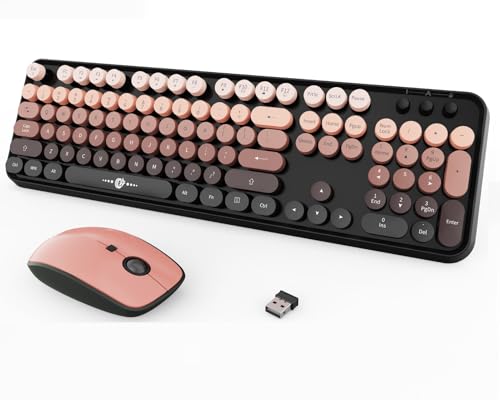
Unlike the sticker packs, this is a complete keyboard-and-mouse combo, with raised, round bubble keys and extra spacing. It is a full-size wireless keyboard with a number pad and uses a 2.4 GHz connection. The maker says its elevated keycaps are intended for long, acrylic, and press-on nails and can help reduce typing mistakes. Choose it if you want to replace your keyboard rather than modify an existing one, or need the number pad. Its limitation is the fixed black-and-pink style and full-size format; it will not suit someone seeking clear or neutral add-on caps or a compact keyboard.
Bottom line: Choose this if you want a full-size keyboard and mouse instead of stickers.
80-Piece Sparkly Raised Stickers
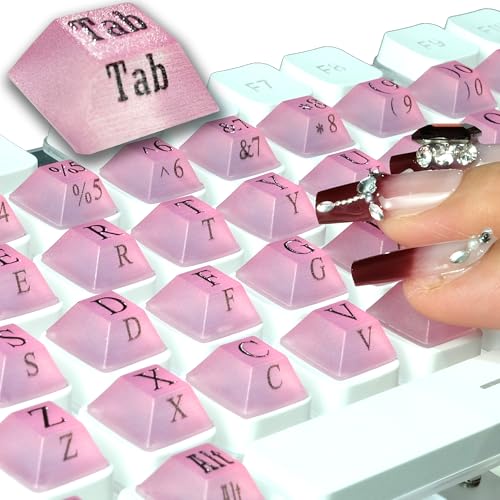
Printed characters on both the top and side make this 80-piece set distinct from packs that specify only raised labels. The maker says the tilted design increases key clearance by 0.5 inches and targets nail-art typing for work and gaming. The package includes 80 commonly used character pads, with two spares, plus instructions and accessories. It suits someone who wants colorful add-on caps with more than one label viewing angle. The set is not a complete keyboard, and its mainstream-keyboard compatibility does not establish a fit for every key shape, so verify your layout before applying the adhesive pieces.
Bottom line: Pick this if you want colorful caps with labels visible from the side.
64-Piece Clear Raised Stickers

The clear finish sets this 64-piece silicone sticker pack apart from the colored sets. Its raised cylindrical-trapezoid shape is designed around long-nail typing posture, and the maker says the soft, reusable silicone has a micro-frosted surface for fingertip grip. Choose it if you want a less colorful look while adding raised surfaces to selected keys. The 64-piece count is smaller than the 130-piece set, so it may not cover as many keys; consider which keys you need to label and confirm the key layout before applying the pieces.
Bottom line: Choose this for a clear, raised add-on rather than a full keyboard.
70-Piece Pink Raised Stickers

Heart-shaped raised letters give this 70-piece pink set a distinct look among the add-on options. The maker says the silicone surface is smooth and has no sharp corners, and that the stickers can also help shield a keyboard from dust, spills, and wear. This set suits someone who wants labeled raised keys in a pink style without replacing the keyboard. Its 70-piece count is less than the 130-piece set, and the product is described as a keyboard skin as well as stickers; check whether its shape and arrangement match the keys you plan to cover before use.
Bottom line: Pick this if pink heart-shaped raised letters suit your setup.
How to Choose a Keyboard for Long Fingernails
Choose between a complete keyboard and add-on stickers based on whether you want to replace your current hardware. A keyboard-and-mouse combo changes the whole typing surface; stickers modify only the keys they cover. Standard full-size PC keyboards commonly use 19 mm key spacing, but laptops and compact layouts can differ, so check key spacing and key shape before selecting stickers. If your nails extend far enough to strike neighboring keys, favor wider-spaced, raised keys or a set designed for your layout; the amount of clearance you need depends on nail length and typing angle. Stickers can change how keys feel and may obscure original legends, so test one piece on a less-used key before applying a full set.
Use this quick comparison to match the format to the job.
| Need | Format to consider |
|---|---|
| Replace keyboard and mouse | Full-size wireless combo |
| Modify existing keyboard | Raised sticker set |
| Cover more labeled keys | Higher-count sticker set |
Sticker Fit and Keyboard Layout
Sticker fit depends on the keyboard’s layout and the shape of its keycaps, not just the sticker count. Standard desktop keyboards usually separate key centers by about 19 mm, while laptop keys can have different shapes and spacing; compact boards may omit a number pad or function-key row. Before buying, compare the sticker arrangement with the keys you intend to cover and measure the spacing between key centers. If adjacent keys are less than 19 mm apart, confirm the sticker dimensions and clearance carefully, because added width or height may crowd nearby keys. Clean and dry the keycaps before applying adhesive pieces, and avoid placing stickers where they interfere with a key’s movement.
Raised Keys, Stickers, and Typing Feel
Raised keys create a different contact surface from ordinary flat keycaps, while stickers add height to selected existing keys. A round or concave top can give fingertips a distinct landing area, but extra height alone does not guarantee fewer errors; your nail length, hand position, and key spacing also matter. Most desktop typing uses a staggered QWERTY layout, so position markers on F and J can help fingers find the home row without looking. Add-on pieces may change key travel or tactile feel, especially if placed too close to a neighboring key. Start with a small group and check that each key presses and releases freely before covering more keys.
Care and Common Sticker Mistakes
Apply keyboard stickers only to clean, dry keycaps, and check that each key still moves freely after placement. Adhesive pieces can collect dust around their edges, while raised surfaces may need more frequent wiping than smooth keycaps; use a lightly dampened cloth and keep liquid away from the keyboard. Do not pour cleaner onto keys or apply a sticker over a moving gap, since either can affect key movement. A common mistake is assuming a universal sticker set matches every keyboard: laptop, compact, and full-size layouts can use different key shapes and arrangements. Compare the key map and sticker placement before applying the set, and keep unused pieces in case a label needs replacing.
Frequently Asked Questions
Will raised keyboard stickers fit a laptop keyboard?
Some sticker sets are intended for laptops, but fit depends on the laptop’s key shape and spacing. Check the sticker dimensions against your keys and test one piece before applying the rest.
How much spacing is typical between keyboard keys?
Many desktop keyboards have about 19 mm between key centers. Laptop and compact keyboards can differ, so measure your own keys before adding raised stickers.
Can long nails make typing on a keyboard harder?
Long nails can contact neighboring keys or the keycap edge when typing with the nail tip. Try striking keys with the finger pad and choose a layout with enough clearance for your nail length.
Do keyboard stickers change how keys feel?
Yes, raised stickers add height and a different surface to the keys they cover. Test a few pieces first and confirm each key still moves and releases freely.
How should I clean raised keyboard stickers?
Wipe raised stickers with a lightly dampened cloth and keep liquid away from the keyboard. Avoid pouring cleaner onto the keys, since moisture can enter the key gaps.