
Kindle 10th Generation Paperwhite: Model Comparison

The Kindle Paperwhite 16 GB (2024) is the closest current match for a Kindle 10th generation Paperwhite, with a 7-inch glare-free display and adjustable white-to-amber lighting.
We earn a commission if you buy through links on this page. As an Amazon Associate I earn from qualifying purchases. Products are compared on manufacturer specifications, not hands-on testing.
- Best overall: Kindle Paperwhite 16 GB (2024) – A 7-inch Paperwhite screen and adjustable warm lighting make it the closest current match.
- Best for automatic lighting: Kindle Paperwhite Signature Edition 32 GB – The Signature Edition adds an auto-adjusting front light, wireless charging, and 32 GB.
| Product | Best for | Display | Storage | Body weight | Shop |
|---|---|---|---|---|---|
| Kindle Paperwhite 16 GB (2024) | Closest current match | 7 inches | 16 GB | 0.47 lb | Check Price on Amazon |
| Kindle Paperwhite Signature Edition 32 GB | Automatic light control | 7 inches | 32 GB | 0.47 lb | Check Price on Amazon |
| Kindle Paperwhite 16 GB (6.8-inch) | Warm-light reading | 6.8 inches | 16 GB | 0.45 lb | Check Price on Amazon |
Kindle Paperwhite models and alternatives
Compare display size, storage, and weight to find the closest fit for the Kindle 10th generation Paperwhite.
Kindle Paperwhite 16 GB (2024)
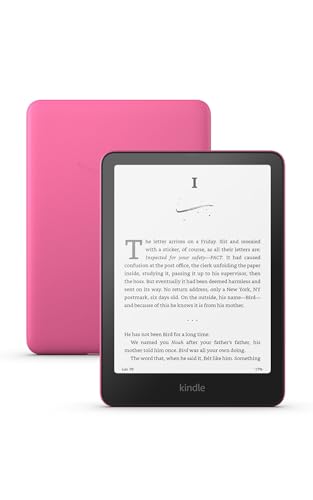
Kindle Paperwhite 16 GB (2024) is the closest match here for someone seeking a Paperwhite, with a 7-inch glare-free display and adjustable white-to-amber light. The 16 GB model weighs 0.47 pound and is waterproof, and the brand says a USB-C charge lasts up to 12 weeks. Its larger screen is useful for readers who want more display area, while its size may be less appealing if portability in a small bag is the priority. It lacks the Signature Edition’s auto-adjusting light, wireless charging, and 32 GB storage.
Bottom line: Choose this if you want the standard Paperwhite experience with a larger screen.
Kindle Paperwhite Signature Edition 32 GB
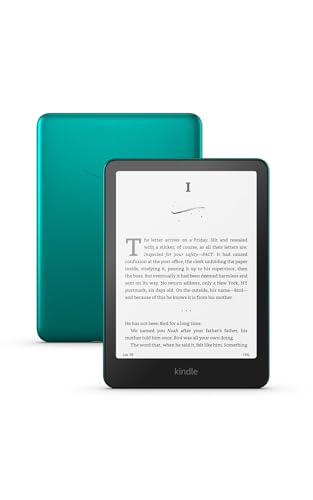
Kindle Paperwhite Signature Edition 32 GB stands apart from the standard Paperwhite with an auto-adjusting front light, wireless charging, and 32 GB storage. Its 7-inch glare-free Paperwhite display and 0.47-pound weight match Kindle Paperwhite 16 GB (2024), while the brand says USB-C charging supports up to 12 weeks of battery life. This configuration suits readers who want more built-in storage or hands-off brightness adjustment. Wireless charging requires a separate dock, so it is less compelling for someone who will use only a USB-C cable and does not need the extra storage.
Bottom line: Pick this for automatic brightness adjustment or the extra storage.
Kindle Paperwhite 16 GB (6.8-inch)
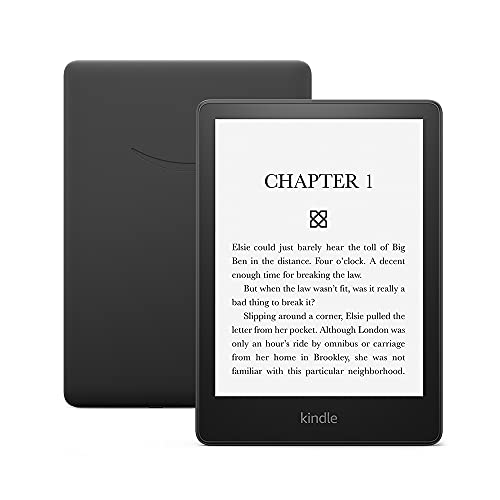
Kindle Paperwhite 16 GB (6.8-inch) has a 6.8-inch, 300-ppi glare-free display, adjustable warm light, and a flush-front design, distinguishing it from the newer 7-inch Paperwhites. It weighs 0.45 pound, stores thousands of titles, and is waterproof; the brand says its battery lasts up to 10 weeks. Choose it if you prefer the smaller screen size while retaining warm-light adjustment and water resistance. Its battery claim is shorter than the up-to-12-week claim for the newer Paperwhite models, which may matter to readers who charge infrequently.
Bottom line: Choose this if a 6.8-inch Paperwhite and warm-light adjustment fit your preferences.
Choosing a Kindle Paperwhite replacement
The 7-inch Paperwhite is the closest current match among these choices, while the 6.8-inch option keeps the screen slightly smaller. A Paperwhite uses an e-ink display designed for reflective reading rather than a typical backlit tablet screen; glare-free screens remain easier to view in bright surroundings. Screen size is measured diagonally, so a 0.2-inch difference is modest but can affect page layout and device footprint. Choose the 6-inch Kindle only if compactness matters more than matching the Paperwhite type. Compare light controls too: warm-light adjustment shifts the display toward amber, while the Signature Edition can adjust its front light automatically.
Display size, weight, and handling
Screen size and body weight are the clearest fit checks for readers replacing an older device. Here, the 6-inch Kindle weighs 0.35 pound, the 6.8-inch Paperwhite weighs 0.45 pound, and the 7-inch models weigh 0.47 pound. The lightest option is 0.12 pound below the heaviest, a practical difference for one-handed reading or carrying in a small bag. Use this need-to-choice guide before settling on a screen:
| Priority | Closest fit | Trade-off |
|---|---|---|
| Smallest and lightest | 6-inch Kindle | Not a Paperwhite |
| Paperwhite with smaller screen | 6.8-inch Paperwhite | Older feature set than the 7-inch models |
| Larger Paperwhite screen | 7-inch Paperwhite | Heavier than the 6-inch Kindle |
Measurements do not capture bezel shape or hand comfort, so consider the screen diagonal and stated weight together rather than relying on one number.
Front light and storage differences
Choose the lighting controls that match when and where you read. Adjustable brightness lets you change how much front light reaches the screen; adjustable warm light changes its color from white toward amber. The 2024 standard Paperwhite has white-to-amber adjustment, while the Signature Edition adds automatic adjustment. The smaller Kindle has adjustable brightness and dark mode, but the features do not identify warm-light control for it. Storage ranges from 16 GB on three models to 32 GB on the Signature Edition. For books alone, 16 GB is already specified to hold thousands on the standard Kindle; consider 32 GB if you particularly value more device storage.
Water resistance and charging expectations
Treat water resistance as protection against accidents, not permission to use an electronic reader carelessly around water; dry the device and charging port before connecting a cable. Battery-life claims are not a direct endurance comparison unless brightness, wireless use, and reading time are alike. The brands’ claims range from up to six weeks for the compact Kindle to up to 12 weeks for the 2024 Paperwhites. USB-C charging is identified for the Paperwhites; Signature Edition wireless charging needs a separately sold dock.
Frequently Asked Questions
How large is a 7-inch Kindle screen?
A 7-inch display measures 7 inches diagonally from corner to corner, not across its width. Screen aspect ratio determines the width and height, so diagonal size alone does not fully predict how much text fits on a page.
Does every Paperwhite here have warm light?
The 6.8-inch Paperwhite and standard 2024 Paperwhite have adjustable warm light, and the Signature Edition has an auto-adjusting front light.
Which Kindle models are waterproof for bath reading?
Keep any reader and charging connection away from water, and dry the device before charging.
How much storage is useful for Kindle books?
The 16 GB Kindle is specified to hold thousands of books, so that capacity suits a large book collection for many readers. The 32 GB Signature Edition is the option here for those who want more built-in storage.
Does wireless charging come with the Signature Edition?
The Signature Edition supports wireless charging, but its wireless charging dock is sold separately. USB-C is another charging option, and the brand says a charge lasts up to 12 weeks.